White Roses on Lime Green for a Lifetime Membership
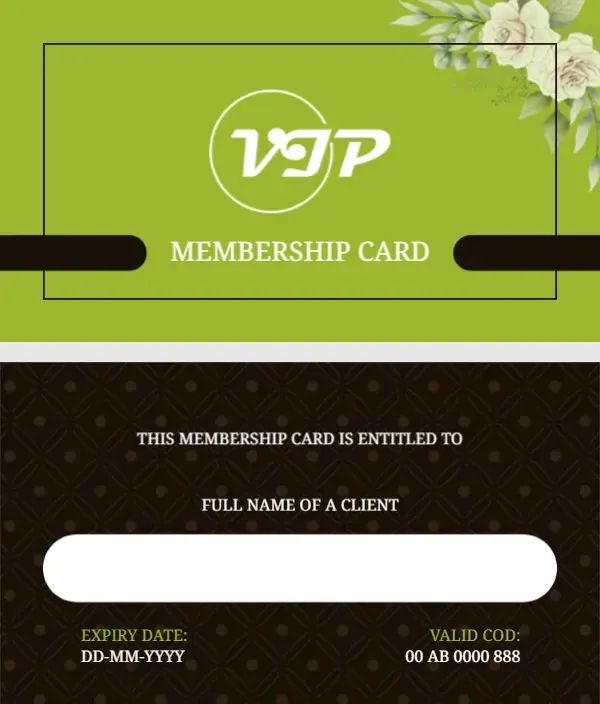
A fresh lime green front has a spray of white roses and leaves in the top right corner and a thin black frame across the middle. A white circle holds a decorative VIP in a calligraphic white script, and MEMBERSHIP CARD sits below in white serif capitals between two black bars. The back is dark brown with a subtle diamond pattern, a title line, a white name box and two small fields in green and white.
Bright Front and Dark Back
At 3.5 by 2 inches, the card matches a business card. The back reads THIS MEMBERSHIP CARD IS ENTITLED TO and FULL NAME OF A CLIENT above a rounded white box, with EXPIRY DATE and VALID COD fields at the foot.
Expiry Date on a Lifetime Card
The page is called a lifetime membership card, yet the back asks for an expiry date. For a true lifetime card, change EXPIRY DATE to MEMBER SINCE and type the join date. The second field reads VALID COD:, which is missing the final E, so retype it as VALID CODE or MEMBER NO.
Personalising the Lifetime Card
- Change Expiry Date to Member Since.
- Fix VALID COD.
- Write or type the name in the box.
- Set the member code.
- Add your business name.
What Lifetime Should Mean
Lifetime memberships are a promise. State in your terms whether it lasts for the member’s life, the business’s life or a fixed number of years, and keep that wording consistent on the card and in your records.
Adding the Business Name
Neither side names the business. Add it in white on the front under MEMBERSHIP CARD, or on the back above the title line, so a lost card can be returned.
Writing Names in the White Box
The rounded box suits a handwritten name. Use a fine permanent pen on matte card, or type the name in the editor before printing for a cleaner finish.
Printing Lime and Dark Brown
Lime green can look yellowish on some printers. Run a test card and adjust the green before printing a full batch, and check that the roses keep their soft detail.
Honouring Founding Members
Lifetime cards are often given to founding members or big supporters. Present them at an event or with a short thank you letter to make the moment special.
Recording Lifetime Members
Keep a permanent register of lifetime cards and their codes.
Step by Step Editing of the Lifetime Vip Lime Roses Design
- On the lifetime vip lime roses design, click the main headline and type your own words, keeping a similar length.
- Retype every name, date and contact line on the lifetime vip lime roses design, checking each against a trusted source.
- Search the lifetime vip lime roses design for the words Lorem and Company so that no placeholder remains.
- Click any logo or photo on the lifetime vip lime roses design, choose Replace Image and resize the new picture to fit.
- Zoom the lifetime vip lime roses design to full size and read each line aloud before you save it.
- Keep a clean master of the lifetime vip lime roses design without private details, so later versions start tidy.
Similar designs include the VIP membership card with gold ribbons. Compare it with the gold member card with a name box. You may also like the green loyalty card. Looking beyond the lifetime vip lime roses design? See all membership card templates.