White Marble and Diamond City Photos for Store Members
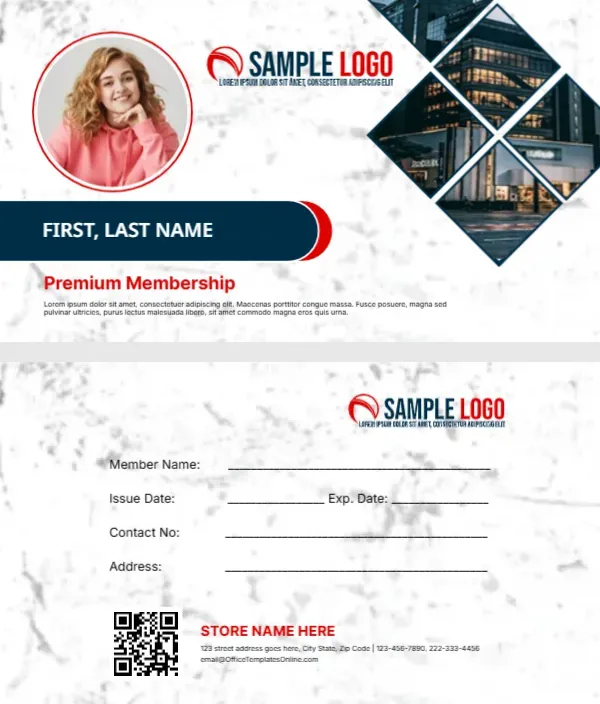
A white marble texture covers the front, with a round member photo framed in a red ring at the top left. Four diamond shaped photos of a lit city building stack in the top right corner. A red and black swoosh logo sits between them. A navy bar with a red tip holds FIRST, LAST NAME in white, and Premium Membership sits below in red with a placeholder paragraph. The back keeps the marble and lists fields, a QR code and a store block.
Marble Front and Back
The card is 3.5 x 2 inches. The back lists member name, issue and expiry dates, contact number and address, then a QR code with STORE NAME HERE, an address, phones and an email.
Name, Paragraph and Store Details
Type the member name in the navy bar and swap the photo. Replace the Lorem paragraph with a perk, such as Members save 10 percent on full price items. On the back, type your store name and change the email, which uses the template site’s address.
Personalising the Store Card
- Swap the logo.
- Add the member photo.
- Type the member name.
- Rewrite the perk line.
- Update the store block.
Photos of Your Own Shop
The diamond photos show a tall city building. Replace them with your shop front or window display so members recognise the store. Night photos of a lit shop front look striking in the diamond shapes, as the sample shows.
Points or Discounts
State the reward plainly. Points schemes need a till system, while a flat discount works with no setup. A flat discount is easier to explain at the till and needs no extra software, which suits small independent shops.
A QR Code for Online Shopping
Link the code to your online shop with a member discount code.
Printing Marble Textures
Marble prints best on smooth white card. Check that the faint grey veins do not look like smudges.
Signing Members Up at the Till
Offer cards at checkout and take the photo with a tablet if you use member photos. Ask for an email address at sign up so you can send member offers, and record consent in line with your local rules.
Keeping Store Member Records
Log each card number with the member’s contact.
Step by Step Editing of the Store Marble City Photos Design
- On the store marble city photos design, click the main headline and type your own words, keeping a similar length.
- Retype every name, date and contact line on the store marble city photos design, checking each against a trusted source.
- Search the store marble city photos design for the words Lorem and Company so that no placeholder remains.
- Click any logo or photo on the store marble city photos design, choose Replace Image and resize the new picture to fit.
- Zoom the store marble city photos design to full size and read each line aloud before you save it.
- Keep a clean master of the store marble city photos design without private details, so later versions start tidy.
Also worth a look: loyalty card with stamps. Next to try is the restaurant membership card. Have a look at the business membership card with an avatar. The rest of the series around the store marble city photos design is in membership card templates.