Lateness is rarely a single event. It is a pattern, and patterns are impossible to see from memory. One manager remembers the person who was twenty minutes late once and forgets the person who is five minutes late every Tuesday. A log fixes that. Each late arrival and early departure gets a line with the date, the person, the times, the minutes lost, and the reason. After a month, the page shows who needs support and who simply had a bad day.
An Alarm Clock With Two Gold Bells
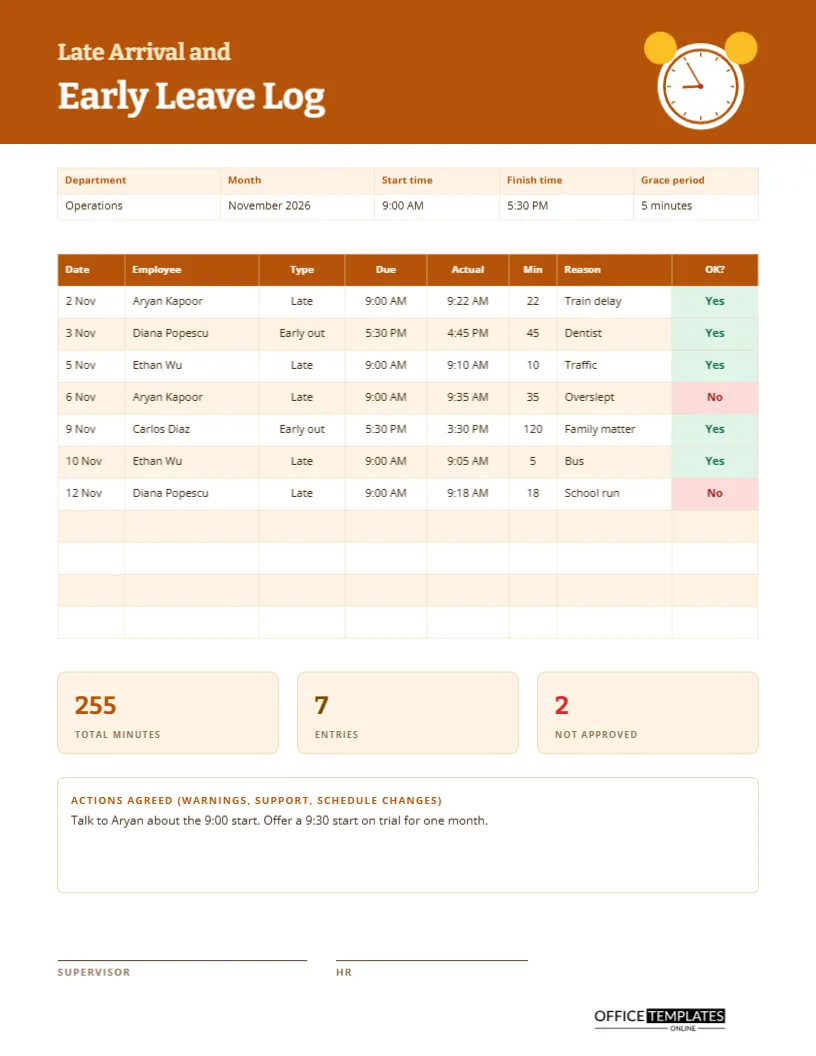
The amber header carries a white alarm clock on the right, with two gold bells on top and a clock face reading five minutes to nine. The title is set in two sizes of Bitter, a sturdy serif: Late Arrival and, in smaller cream letters, Early Leave Log in large white. Open Sans handles the rest of the page. The graphic is lighthearted, which softens a subject that can feel punitive.
Department, Month, Start and Finish, and Grace Period
A five-column strip at the top sets the rules of the log. The sample reads Operations, November 2026, start 9:00 AM, finish 5:30 PM, and a grace period of 5 minutes. Putting the working hours on the page makes the minutes easy to check, and the grace period shows that the employer expects reasonable punctuality, not perfection to the second.
Seven Entries Across November
| Date | Employee | Type | Minutes | Reason | Approved |
|---|---|---|---|---|---|
| 2 Nov | Aryan Kapoor | Late | 22 | Train delay | Yes |
| 3 Nov | Diana Popescu | Early out | 45 | Dentist | Yes |
| 5 Nov | Ethan Wu | Late | 10 | Traffic | Yes |
| 6 Nov | Aryan Kapoor | Late | 35 | Overslept | No |
| 9 Nov | Carlos Diaz | Early out | 120 | Family matter | Yes |
| 10 Nov | Ethan Wu | Late | 5 | Bus | Yes |
| 12 Nov | Diana Popescu | Late | 18 | School run | No |
The real page also shows the due time and the actual time for each entry.
Due, Actual, and Minutes
The three columns work together. Due is when the person should have arrived or left. Actual is when they did. Minutes is the gap. In the sample, Aryan was due at 9:00 and arrived at 9:22, a gap of 22 minutes. Diana was due to finish at 5:30 PM and left at 4:45 PM, a gap of 45 minutes. Writing both times makes each entry easy to verify.
Approved or Not
The last column carries a green Yes or a red No pill. An approved absence, such as a dentist visit agreed in advance, is very different from an unplanned one. Separating them stops the log from becoming a list of complaints. Over time, a manager can see that most lateness is explained and approved, which usually tells a more balanced story.
Totals That Tell the Month in Three Numbers
Three tiles summarise the month: total minutes (255), entries (7) and not approved (2). Divide minutes by entries, and you get an average of about 36 minutes, a number which looks different when one entry is a two-hour family matter. Look at the median or the list itself before concluding any single figure.
Agreed Actions
A box for actions agreed turns the log into a tool for support. The sample reads: talk to Aryan about the 9:00 start, offer a 9:30 start on trial for one month. A flexible start might solve the issue without a warning at all. Actions can also include a reminder, a schedule change, help with transport, or a note that no action is needed.
Recording an Entry Fairly
- Write the date, the person, and whether they were late or left early.
- Record the due time and the actual time.
- Work out the minutes and write them in.
- Ask for the reason and write it neutrally.
- Mark whether it was approved, then note any action.
Keeping the Tone Respectful
Write reasons in the employee’s own words and avoid judgment. Overslept is a fact; lazy is an opinion. A log used with respect builds trust and encourages honesty, and a log used to catch people out has the opposite effect. Tell staff what the log is for and let them see their own entries.
Using the Log Before a Formal Conversation
If lateness becomes a concern, the log is your evidence base. Bring the entries to the conversation, ask the employee for their view and listen. Perhaps a bus route changed, or a childcare arrangement ended. Whatever the outcome, a written record of what was said and agreed protects both sides and keeps the process fair.
Adjusting the Grace Period and Rules for Your Workplace
Grace periods differ widely, from none to fifteen minutes. Change the value in the strip and make sure everyone knows it. If flexible hours or core hours apply, rewrite the start and finish fields to describe them. The log is only as fair as the rule it records.
Early Leave for Appointments and Emergencies
Medical appointments, school emergencies, and family matters happen to everyone. Record them in the same way as lateness, mark them as approved when they were, and note how the time was made up if your policy requires it. A fair system treats a genuine emergency with understanding and keeps a simple record.
Editing the Rows and Tiles
All fields are editable, and the table is a real Table object, so you can add rows for a busy month. Retype the tiles after any change. The Yes and No labels are small coloured shapes inside the table cells, so change both the word and the colour if an entry changes.
Supervisor and HR Signatures
Two lines at the foot are for the supervisor and for HR. A supervisor signs to confirm the entries, and HR to confirm they were handled under policy. Print the page on US Letter, keep a copy in the department file, and archive it after the retention period.
Lateness Log Questions
Should every minute be logged?
Many workplaces log only lateness beyond the grace period. Choose a rule and apply it to everyone.
Can I use it for one person?
Yes. Fill in their name on every row, or delete the employee column and use the title area for the name.
Is this a disciplinary form?
No. It is a record. Use your own disciplinary process if one is needed.