Part-time staff rarely work a neat nine-to-five. Their shifts change from week to week; they may be students or carers with limits on how much they can work, and an employer may need to keep them under a weekly maximum for budget or contract reasons. A standard timesheet records hours but does not show how close someone is to the limit. This page does. A progress bar beneath the shift table shows hours used against the weekly maximum at a glance.
A Sky Blue Banner With Three Bars
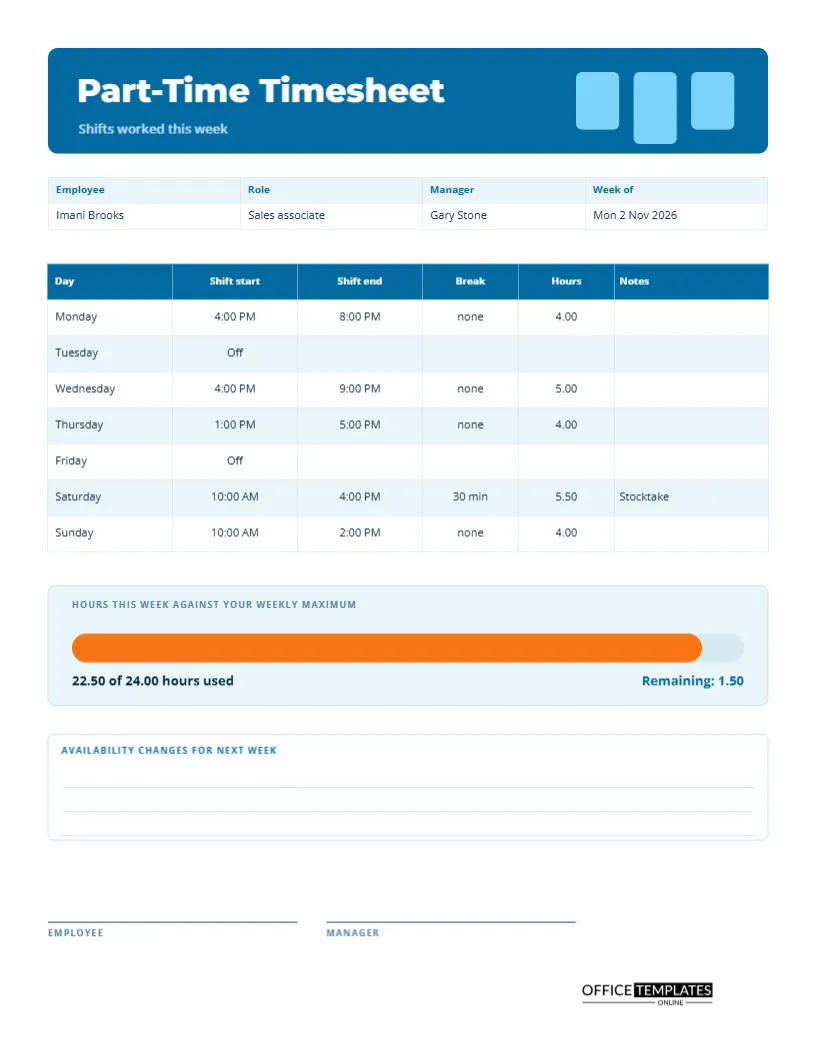
A rounded sky blue banner holds the title Part-Time Timesheet in bold Montserrat, with the line shifts worked this week beneath it. At the right, three pale blue rounded bars of different heights suggest a bar chart, a quiet hint of the progress tracker below. Open Sans carries the rest of the text. The look is clean and friendly, and it suits retail, hospitality, and education settings.
Details at the Top
A strip lists employee, role, manager, and week. The sample employee, Imani Brooks, is a sales associate working for Gary Stone, for the week of Monday 2 November 2026. Because part-time rosters change weekly, the date matters, and a sheet without it is easily misfiled.
The Shift Table
| Day | Shift start | Shift end | Hours |
|---|---|---|---|
| Monday | 4:00 PM | 8:00 PM | 4.00 |
| Wednesday | 4:00 PM | 9:00 PM | 5.00 |
| Thursday | 1:00 PM | 5:00 PM | 4.00 |
| Saturday | 10:00 AM | 4:00 PM | 5.50 |
| Sunday | 10:00 AM | 2:00 PM | 4.00 |
Tuesday and Friday are shown as Off, and Saturday carries a thirty-minute break and a note that says Stocktake.
The Weekly Maximum Bar
A tinted panel holds a long bar with an orange fill. The label says hours this week against your weekly maximum, and the text beneath reads 22.50 of 24.00 hours used, with 1.50 remaining on the right. The bar fills in proportion to the hours. If a worker goes over the cap, the fill would be redder to show a problem. Change the maximum in the text and the bar width in the editor to fit your limit.
Why Weekly Caps Exist
Employers set maximum hours for many reasons: a student visa that limits work, a benefits threshold, a budget, or a promise made to the worker. Showing hours remaining makes it easier for a manager to offer extra shifts fairly, and for the worker to say no without conflict. Both can see the number.
A Place for Availability Changes
A box at the bottom of the page asks for availability changes for next week. Part-time staff often have exams, family events or another job, and giving them a way to write it on the sheet saves a separate message. The manager can then build the next roster with the information already in hand.
Using the Sheet in Retail and Hospitality
Shops, cafes and restaurants need flexible cover, and their part-time staff are often students. This sheet makes weekly hours visible to both sides and gives the manager a short record of shift patterns. Over several weeks, the sheets show a worker’s regular availability, which helps with future rosters.
How to Complete the Sheet
- Write your name, role, manager, and the week.
- Enter the start and end of each shift you worked.
- Note any breaks and calculate the hours.
- Add the hours and compare them with your weekly maximum.
- Write any availability changes, sign, and hand in.
Handling Short Shifts and Split Shifts
If a worker is called in for a short shift or works in two parts of a day, add a second row on the same day or write two times in one cell, and total the hours. Keep the format consistent so that payroll can read it quickly. Some places guarantee a minimum paid shift, so check your own rules.
Editing the Progress Bar and Text
The bar is two rounded rectangles. Select the orange fill and drag its right edge to match the hours used. Retype the hours text and remaining hours. The table is a real Table object with Edit Table Data and Add Row, and every label is editable.
Signing and Handing In
The employee and manager sign at the foot. A signed sheet should go to payroll at the end of the week. Some managers keep a folder per person, which is a good way to see patterns and to answer a question about last month.
Printing the Part-Time Sheet
US Letter portrait. The blue banner prints well in colour, and the orange progress bar stays visible in grayscale as a mid-tone block.
Offering Extra Shifts Fairly With the Hours Remaining Figure
The remaining hours figure turns a vague request into a clear offer. If a worker has six hours left under their cap, a manager can offer a six-hour shift without risk, and a colleague with more room can take a longer one. Sharing the numbers openly makes shift offers feel fair and keeps everyone inside their limits.
Keeping Part-Time Sheets Consistent Week to Week
Part-time patterns change often, so a consistent format matters. Use the same sheet every week, file them in date order, and glance back at the last two before building the next roster. Patterns appear quickly: a worker who always asks for Saturday off, or who regularly works longer than planned. Those patterns are valuable when you plan cover.
Respecting Study and Family Limits With the Weekly Maximum
Many part-time workers balance jobs with school or care duties. A visible maximum shows that the employer takes those limits seriously. It also gives the worker a polite way to refuse extra shifts, since the number on the page speaks for itself, and it keeps both sides within any contract or visa rule.
Part-Time Timesheet Questions
Can I use it for students on a work limit?
Yes. Set the weekly maximum to the limit and track hours against it.
What if my maximum is monthly?
Retype the label to say monthly maximum and keep a running total across weeks.
Does the bar update itself?
No. Adjust it by hand after you enter your hours.