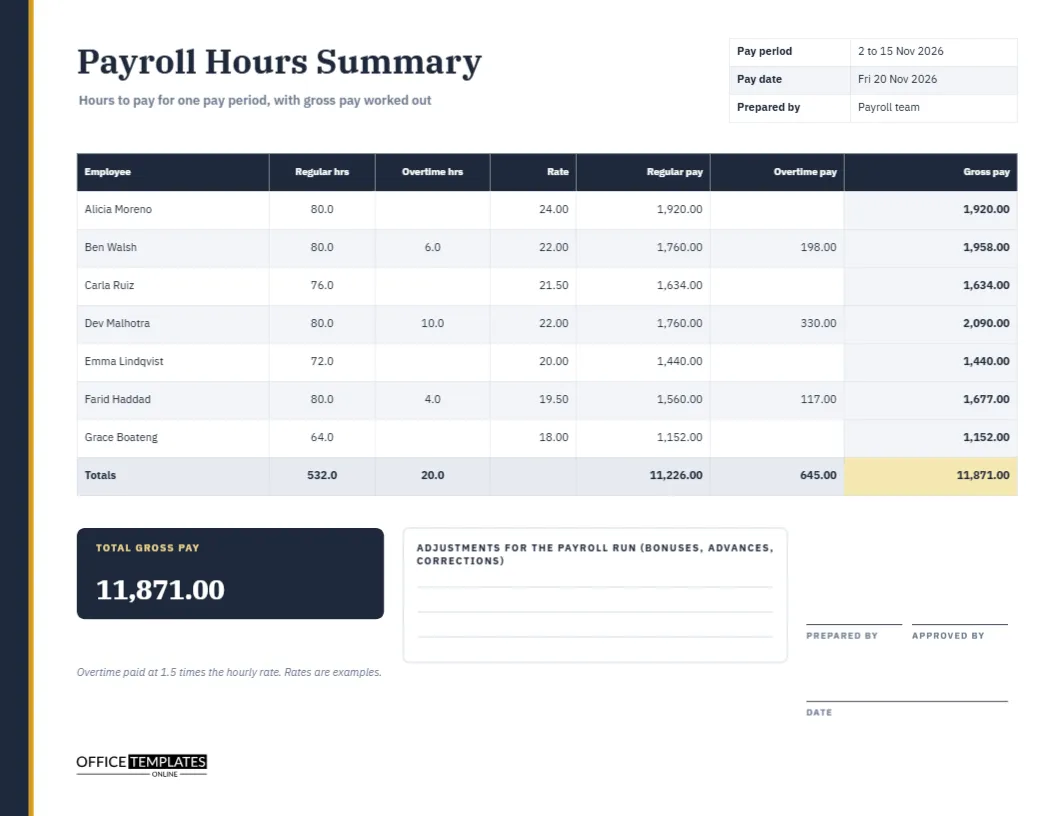
Payroll day has a rhythm. Timesheets arrive, the hours are checked, the rates are applied, and the totals are sent for payment. The middle step, where hours become pay, is where mistakes sneak in. A summary page for the pay period catches them. This landscape sheet lists every employee with regular hours, overtime hours, rate, regular pay, overtime pay, and gross pay, and ends with a totals row that payroll and finance can both sign.
A Slate Spine With a Gold Edge
A narrow slate band runs down the left edge of the page, with a thin gold line beside it, like the spine of a ledger. The title Payroll Hours Summary is set in IBM Plex Serif, with a quiet line beneath it saying hours to pay for one pay period, with gross pay worked out. The restrained look suits accountants and finance teams.
Pay Period, Pay Date and Prepared By
At the top right, a small three-row table records the pay period (2 to 15 November 2026), the pay date (Friday 20 November 2026), and who prepared the sheet. These three facts make the page self-contained. A reader who finds it in a folder next year knows exactly which payroll it belonged to and who to ask about it.
Seven Employees and Their Pay
| Employee | Regular hours | Overtime hours | Rate | Gross pay |
|---|---|---|---|---|
| Alicia Moreno | 80.0 | 0.0 | 24.00 | 1,920.00 |
| Ben Walsh | 80.0 | 6.0 | 22.00 | 1,958.00 |
| Carla Ruiz | 76.0 | 0.0 | 21.50 | 1,634.00 |
| Dev Malhotra | 80.0 | 10.0 | 22.00 | 2,090.00 |
| Emma Lindqvist | 72.0 | 0.0 | 20.00 | 1,440.00 |
| Farid Haddad | 80.0 | 4.0 | 19.50 | 1,677.00 |
| Grace Boateng | 64.0 | 0.0 | 18.00 | 1,152.00 |
The real page also shows separate regular pay and overtime pay columns.
Showing Regular Pay and Overtime Pay Apart
Gross pay is the sum of the two earlier columns. Regular pay is regular hours times the rate. Overtime pay is overtime hours times the rate times 1.5. Seeing them apart lets you check the arithmetic and also see what overtime cost this period. For Ben Walsh, regular pay is 1760.00 and overtime pay is 198.00, which together make 1958.00.
The Totals Row
A shaded row at the foot adds each column: 532.0 regular hours, 20.0 overtime hours, 11,226.00 of regular pay, 645.00 of overtime pay, and a gold gross pay cell showing the total of 11,871.00. Totals are the first thing finance checks, because they must match the amount requested from the bank. If the totals do not agree with your calculation, find the row that does not, starting with those that include overtime.
The Total Gross Pay Tile
A slate tile on the lower left repeats the total in large white serif numerals: 11,871.00. A reader scanning the page can read this figure without finding the corner of the table. It is also the number you check against the bank transfer or the payment run before releasing it.
Adjustments for the Payroll Run
A ruled box beside the tile is labelled adjustments for the payroll run. Use it for bonuses, advances, corrections to earlier periods, and anything else that changes the amount from hours alone. Writing adjustments here keeps them visible and stops them from being forgotten between the timesheet stage and the payment stage.
Working Through the Page Before Payment
- Confirm the pay period and pay date.
- Copy approved regular and overtime hours for each employee.
- Check each rate against the pay records.
- Work out regular pay, overtime pay, and gross pay.
- Add the columns and compare the total with the payment request.
- Record adjustments, sign and send for approval.
Overtime at One and a Half Times
A footnote says that overtime is paid at 1.5 times the hourly rate and that rates are examples. Your own rules may differ, with different multipliers for weekends or holidays. Edit the note and the figures to match your policy, and state any exceptions in the adjustments box so that nothing is hidden.
Checking for Common Payroll Errors
The most common errors are a wrong rate, a missing timesheet, overtime counted twice, and hours from the wrong period. A summary page makes each easier to spot. Compare the hours with the last period for each person and ask about any big change. Unusual numbers deserve a question before payment, not after.
Keeping Summaries as an Audit Trail
Store each signed summary with the timesheets it was built from. Auditors, tax authorities and employees themselves may ask how a figure was reached. A page that shows hours, rates, and gross pay on one sheet, signed by two people, is a strong answer. Keep it for as long as your records rules require.
Separating Gross Pay From Net Pay
This page stops at gross pay. Taxes, insurance, and other deductions are handled by your payroll system or accountant. The summary is a check on the first stage, not a replacement for the second. If you want to record deductions, add columns, or attach the payroll system report to the signed sheet.
Editing Names, Rates and Totals
The table is a real Table object. Retype names and rates, add rows for a bigger team, and update the totals row by hand. All numbers are typed text, so recalculate after every change. The slate and gold palette can be changed from the table panel if you prefer your company colours.
Prepared by, Approved by and Date
Three signature lines record who prepared the sheet, who approved it, and when. Two different people should sign. Print on US Letter landscape, file with the pay run, and keep a PDF.
Reviewing Hours Against Last Period
Keep the previous summary beside the new one. Compare each person’s regular and overtime hours and ask about any change larger than a few hours. Often there is a good reason, such as leave or a busy project, but sometimes it is a data entry mistake that is easier to fix before payment than after.
Payroll Summary Questions
Can I use it for monthly pay?
Yes. Change the pay period and hours to monthly figures.
Does it handle salaried staff?
Not directly. Add a row with a fixed amount, or leave salaried staff to your payroll system.
Are the figures official?
No. They are examples. Use your own rates and rules.