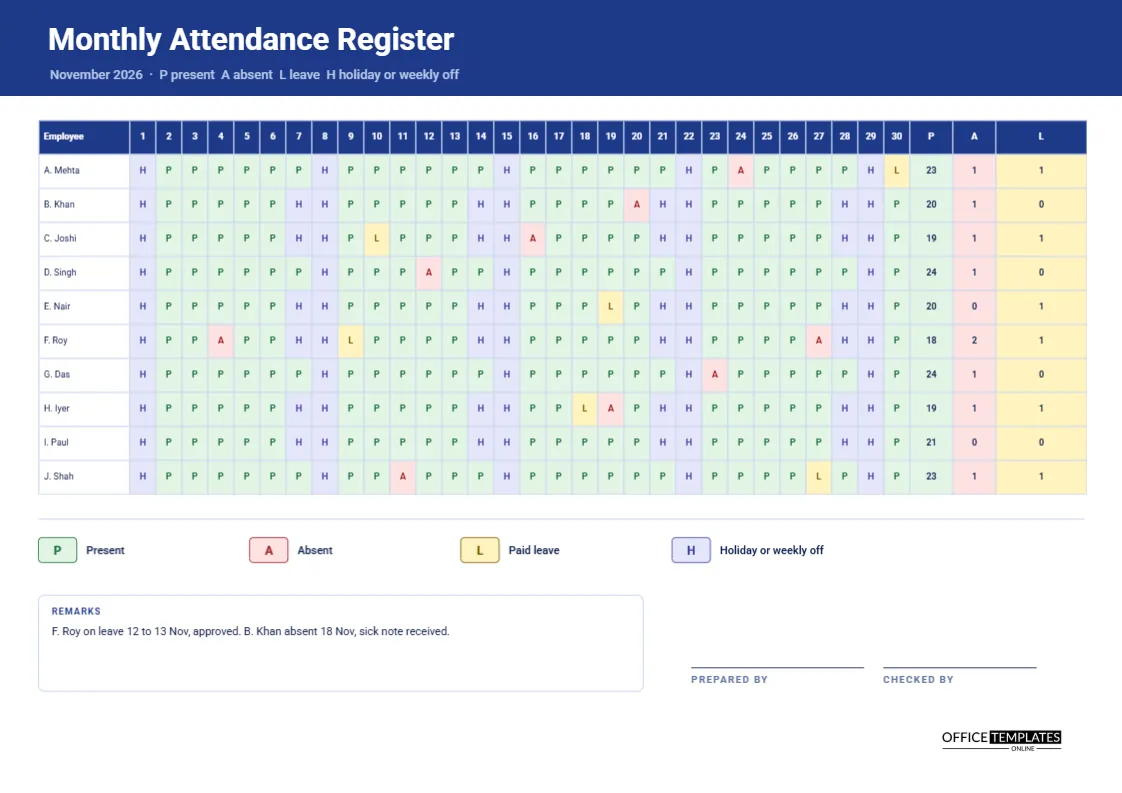
An attendance register answers a different question from a timesheet. It does not ask how many hours were worked. It asks who was there on each day. Schools use registers, factories use them, offices with fixed shifts use them, and many small employers rely on one to calculate monthly pay or check leave balances. This A4 landscape sheet is built for the whole month of November 2026, with ten employees, thirty date columns, and three totals at the end of each row.
Navy Header With Amber Totals
A deep navy band holds the title Monthly Attendance Register in Roboto. A line beneath spells out the codes: P present, A absent, L leave, and H holiday or weekly off. The totals columns on the right use green for present, red for absent, and amber for leave. The colours match the codes in the grid, so the eye connects the letters to the totals without effort.
A Grid of Thirty Days
The first column holds the employee name, and then there are thirty narrow date columns numbered 1 to 30, followed by three total columns headed P, A and L. Each cell is only about a quarter of an inch wide, so one letter fits comfortably in a size that is still readable when printed on A4 paper in landscape.
The Codes at a Glance
| Code | Meaning | Cell colour |
|---|---|---|
| P | Present for the day | Pale green |
| A | Absent without leave | Pale red |
| L | Paid leave | Pale yellow |
| H | Holiday or weekly off | Pale lavender |
You can add other codes, such as S for sick or HD for half-day, using the same pattern.
Ten Employees, One Month
The sample lists A. Mehta, B. Khan, C. Joshi, D. Singh, E. Nair, F. Roy, G. Das, H. Iyer, I. Paul and J. Shah. Initials with surnames keep the names short enough to fit the first column. Use full names if your organisation prefers, and reduce the date column width slightly to compensate. Add or delete rows to match your team size.
Totals for Present, Absent and Leave
The three columns on the right count the days in each category for the month. They give payroll the numbers it needs: days paid, days unpaid, and days of leave taken. Check by adding the three totals and the H days; the sum should equal the number of days in the month, which is thirty for November.
Remarks Under the Grid
A remarks box records exceptions. The sample notes that F. Roy was on leave on 12 and 13 November, approved, and that B. Khan was absent on 18 November with a sick note received. Every A and L in the grid should have an explanation here or in a separate file, so that anyone reading the register later understands what happened.
Marking the Register Day by Day
- Write the month and year at the top.
- Mark each person at the start of every working day.
- Use H for weekends and public holidays so they are not confused with absence.
- Correct any code if a late arrival or a leave approval changes it.
- At month end, count each code and fill the three totals.
- Add remarks, then prepare, check and sign.
Registers for Schools, Clubs and Training Courses
The layout also works outside the workplace. A school class, a sports club or a course with thirty sessions can use the same grid, replacing employees with pupils or members. Rename the codes if needed, for example, E for excused. The monthly view makes patterns of absence easy to see, which is often what a teacher or coach most wants to notice.
Spotting Patterns in Absence
A column of Hs and Ps is dull, but a pattern of As on Mondays is not. Scan the grid for repeated absences on the same weekday, for clusters around holidays and for individuals with several short absences. These patterns are the starting point for a supportive conversation, not for punishment, and the register provides the evidence.
Keeping the Register Consistent
A register is only reliable if one person owns it. Appoint a supervisor or administrator, set a fixed time each day to update it, and agree how late arrivals and half days are marked. If two people use different rules, the totals will not match payroll, and a month of data becomes arguable.
Using the Register for Leave and Payroll Checks
At month end, compare the leave days in the register with the approved leave requests. They should match exactly. Then compare the present days with the pay run. If an employee was paid for a day they were absent, or not paid for a day they worked, the register lets you find and fix it quickly.
Editing the Codes and Date Columns
For a month with 31 days, add a column and make the others slightly narrower. For a different month, retype the dates and the header line. The grid is a real Table object, so you can edit each cell, change fill colours and add rows. After any change, retype the totals, as they are text and do not update automatically.
Prepared by and Checked by
Two signature lines at the bottom right record who prepared the register and who checked it. Having a second person check it catches slips and builds confidence in the figures. File the signed page with payroll records and keep a scan.
Printing the A4 Landscape Register
A4 landscape. Print at actual size so the small letters stay readable. The pale cell colours show as light grey in black and white, while the letters themselves remain clear.
Reconciling the Register With the Daily Sign-in Sheets
If you also keep daily sign-in sheets, spot-check the register against them once a week. Pick two days at random and compare every name. Any mismatch points to a missed entry or a code written from memory, and finding it early keeps the monthly totals trustworthy.
Attendance Register Questions
How do I record half days?
Add a code such as HD with its own colour and explain it in the key.
Can I use it for shift workers?
Yes, if you only need to know who attended. Use the monthly shift roster to plan the shifts yourself.
Do the totals update by themselves?
No. Count each code and retype the totals.