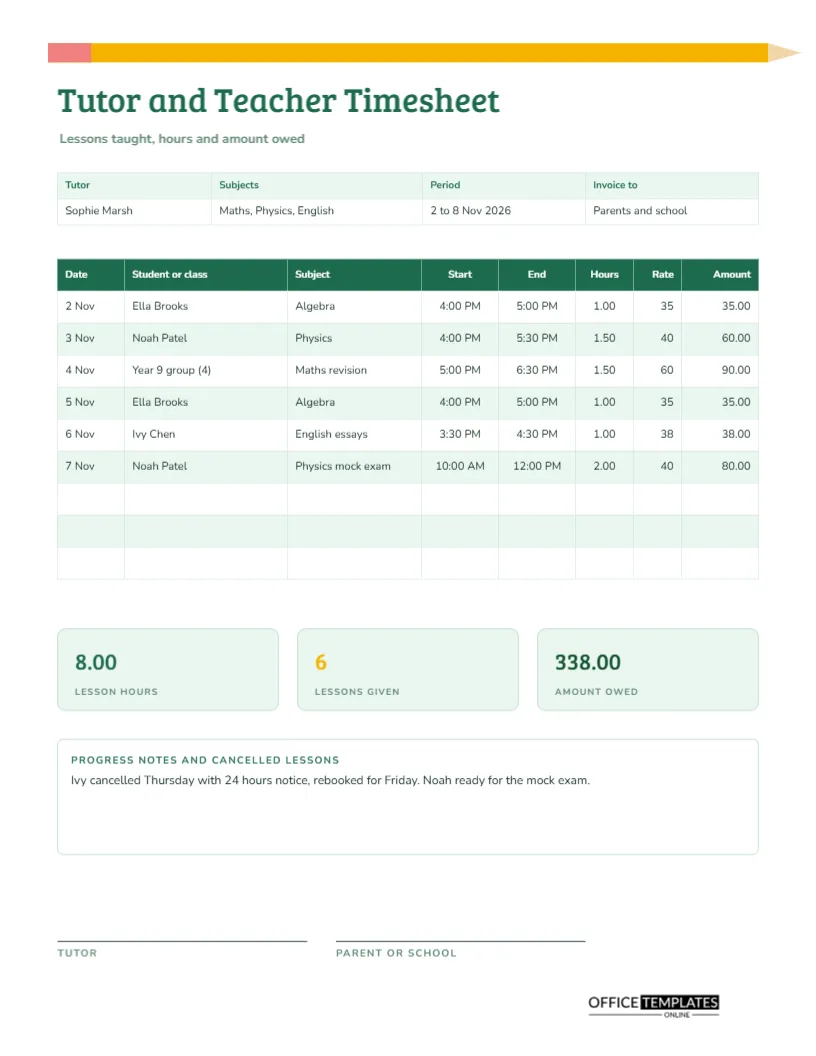
Private tutors and visiting teachers are paid by the lesson, but each lesson has its own length, student, and rate. A half-hour with a beginner is not the same as a two-hour mock exam, and a group session is priced differently from one-to-one. At the end of the week, the tutor has to turn all of this into a bill. This US Letter timesheet records each session, works out its value, and totals the week, leaving a clean basis for an invoice.
A Pencil Along the Top Edge
A long yellow pencil lies across the top of the page, with a pink eraser at one end and a pale tip at the other. It is drawn from simple shapes and sets the tone before you read a word. The title Tutor and Teacher Timesheet is set in green Bree Serif, a friendly slab serif, and a line beneath says lessons taught, hours, and amount owed.
Tutor, Subjects, Period and Invoice To
The strip lists the tutor, the subjects taught, the period, and who receives the invoice. The sample is Sophie Marsh, teaching maths, physics, and English, for 2 to 8 November 2026, invoicing parents and school. Naming the invoice recipient is helpful because tutors often bill both families and schools.
One Row for Every Lesson
| Date | Student or class | Subject | Hours | Rate | Amount |
|---|---|---|---|---|---|
| 2 Nov | Ella Brooks | Algebra | 1.00 | 35 | 35.00 |
| 3 Nov | Noah Patel | Physics | 1.50 | 40 | 60.00 |
| 4 Nov | Year 9 group (4) | Maths revision | 1.50 | 60 | 90.00 |
| 5 Nov | Ella Brooks | Algebra | 1.00 | 35 | 35.00 |
| 6 Nov | Ivy Chen | English essays | 1.00 | 38 | 38.00 |
| 7 Nov | Noah Patel | Physics mock exam | 2.00 | 40 | 80.00 |
The real page also shows start and end times for every lesson.
A Rate on Every Line
The Rate column is there because tutors rarely charge one price. Younger students may pay less, group classes more per session, and exam preparation a premium. With the rate on the line, anyone can verify the amount, and a parent who has a question about a charge can see how it was calculated without a conversation.
Lesson Hours, Lessons Given and Amount Owed Tiles
Under the table, three tiles show lesson hours (8.00), lessons given (6), and amount owed (338.00, in dark green). These are the numbers you transfer to an invoice. Lessons given is useful for tutors paid per session by a school, and lesson hours matter for tutors paid per hour by an agency.
Cancelled Lessons and Progress Notes
The notes box is headed progress notes and cancelled lessons. The sample reads: Ivy cancelled Thursday with 24 hours’ notice, rebooked for Friday, and Noah is ready for the mock exam. Short progress notes help a tutor remember where each student is, and a clear cancellation record shows whether your notice policy applied.
Filling in the Week
- Write your name, subjects, period, and who you invoice.
- After each lesson, enter the date, student, subject, and times.
- Work out the hours and write the rate.
- Multiply to get the amount.
- At the end of the week, total the tiles and sign.
Setting a Cancellation Policy
Many tutors lose income when students cancel late. Decide a policy, such as 24 hours’ notice, tell families in writing, and record exceptions on the sheet. A policy that is fair, clear, and consistently applied protects your time and rarely upsets good clients.
Group Lessons and Classes
For a group, write the group name and the number of students in the student column, as the sample does with Year 9 group (4). Use a rate for the whole group or divide it among the students. Either approach works as long as it is stated, so write the basis in the notes if it is not obvious.
Invoicing Parents, Schools and Agencies
Each of these payers may want a different layout. Parents like a simple list of lessons and a total. Schools may want purchase order numbers and dates. Agencies often have their own forms. This sheet gives you the raw data for any of them, and you can print a page for each family if you tutor several siblings.
Keeping Lesson Plans Separate
The timesheet records time, not teaching content. Keep lesson plans and student progress in a separate notebook or folder. A short link in the notes, such as see Noah file, is enough. Mixing the two makes both worse, because you end up with timesheets crowded with detail and plans that cannot be found.
Editing the Subjects and Rates
Everything is editable. Retype subjects, change rates, add rows for a busier week, and change the tile colours. The table is a real Table object, so Edit Table Data and Add Row are available. After any change, retype the tiles, because totals are text and do not update.
Signatures and Filing
The tutor signs, and the parent or school signs to confirm the hours. For a weekly invoice, the signature can wait until the end of the month. File the sheets by date and keep them for the period your tax authority requires.
Printing the Tutor Sheet
US Letter portrait. The pencil and header print well in colour, and the table is clear in black and white.
Using Weekly Sheets to Plan Your Income
Four weekly totals give you a monthly figure, and a few months give you a realistic average. Tutors often have busy exam seasons and quiet holidays, so plan your budget on the average, not the peak. The sheets also show which subjects and families bring in the most, which helps you decide where to spend your time.
Tutor Timesheet Questions
Can I use it for online lessons?
Yes. Add the platform in the subject or notes if it affects the rate.
What about travel time to a student’s home?
Add a row for travel, with its own rate if you charge for it.
Is it suitable for school staff paid by the hour?
Yes, for supply or after-school clubs. Retype the columns to fit your payroll.