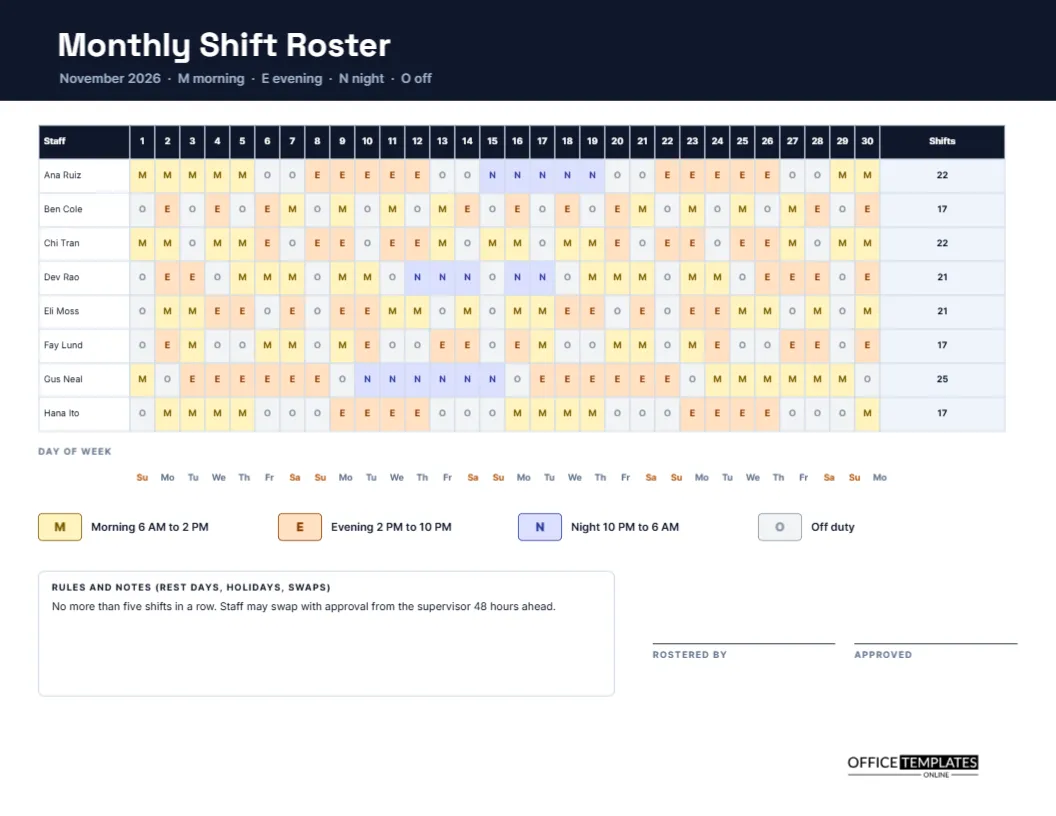
Some businesses plan by the month. A hospital ward, a care home, a call centre or a hotel needs to know weeks ahead who works nights, who covers weekends and who has rest days. A weekly schedule is too short for this. A monthly roster lays out the whole month as a grid: each person on a row, each date on a column, and a single letter in every cell. This landscape page does it for November 2026 and fits on one sheet.
Near Black Header With Sky Blue Accents
The header is near black, with the title Monthly Shift Roster in Space Grotesk, a geometric sans that feels precise and technical. A subtitle reads November 2026 and spells out the codes: M morning, E evening, N night, and O off. Inter sets the body text, designed for legibility at small sizes, which is exactly what a thirty-column grid needs.
Thirty Dates Across the Page
The grid has a staff column, thirty narrow date columns and a final column called Shifts. Each date column is about a quarter of an inch wide, so a single letter sits comfortably in each cell. Under the grid, a row of two-letter abbreviations gives the day of the week for each date, with weekends in amber to stand out.
The Four Codes
| Code | Meaning | Hours in the sample key |
|---|---|---|
| M | Morning | 6 AM to 2 PM |
| E | Evening | 2 PM to 10 PM |
| N | Night | 10 PM to 6 AM |
| O | Off duty | Rest day |
Each code has its own pale fill and a darker letter, so patterns appear as bands of colour.
Eight Staff, One Page
The sample lists eight people: Ana Ruiz, Ben Cole, Chi Tran, Dev Rao, Eli Moss, Fay Lund, Gus Neal and Hana Ito. Each has a different pattern, some rotating through the three shifts and others settled on one. The Shifts column on the right counts the shifts worked in the month, which helps compare workloads and check contracts.
Reading the Colours
Because colours are consistent, a manager can look down any date column and see how many mornings, evenings and nights are covered. Too many pale grey Os in one column means a thin day. A solid run of blue Ns for one person suggests a fatigue risk. The roster turns a spreadsheet of letters into a picture.
Rules and Notes for Rest Days, Holidays and Swaps
A notes box records the rules for the month. The sample says no more than five shifts in a row, and that staff may swap with approval from the supervisor 48 hours ahead. Replace these with your own policy. Putting rules on the roster itself reminds everyone of them every time they check their shifts.
How to Build a Monthly Roster
- Write the month, year, and staff names.
- Mark known leave, training, and public holidays first.
- Decide the minimum cover for each shift.
- Assign nights and weekends fairly, in turn.
- Fill the remaining cells, avoiding long runs and quick turnarounds.
- Count the shifts per person and check the totals.
Avoiding Quick Turnarounds
A quick turnaround happens when someone finishes a late shift and starts an early one the next day, leaving too little rest. Scan each row for an N followed by an M, or an E followed by an M. Some workplaces forbid certain combinations. A careful look at the grid before publishing prevents tired staff and awkward corrections.
Fair Distribution of Weekends and Holidays
Weekend and holiday shifts are a source of tension. Use the weekend highlight in the day row to see who has worked how many. Keep a running list from month to month, so that nobody is stuck with the worst dates year after year. Share the roster early so people can request swaps.
Using the Roster for Payroll Checks
At the end of the month, the roster is a reference for payroll. Compare the shift count with the hours submitted, check night and weekend premiums, and look for differences. Where a shift was swapped, ensure the roster was updated, or attach the swap form. A neat record answers pay questions in minutes.
Editing the Grid and the Key
All cells are editable text in a real Table object. To make a December roster, retype the month, dates, and weekday abbreviations, then change the cell letters. For a month with 31 days, add a column and narrow the others slightly. If your shifts have different times, change the key at the foot.
Printing the Wide Grid
US Letter landscape. Print at actual size, and check that the small letters remain readable on your printer. The grid works in colour or in black and white, because every cell carries a letter and not only a fill.
Sign Off on the Monthly Roster
The person who prepared the roster and the person who approved it sign at the bottom right. Keep the signed copy for your records and post a copy where staff can see it.
Planning Leave and Public Holidays on the Monthly Roster
Mark approved leave and public holidays before you assign anything else. Use the O code for leave, or add a new code if you want to separate leave from ordinary rest days. When the fixed days are in place, the remaining cells become a smaller puzzle, and it is much easier to see where extra cover is needed.
Keeping a Month-to-Month Record of Nights and Weekends
Write the count of nights and weekend shifts for each person at the end of every month, in a notebook or a spare line on the page. A running record shows who has carried the heaviest load and who is due a lighter month. It turns fairness from a feeling into a number everyone can check.
Monthly Roster Questions
Can I add a code for annual leave?
Yes. Add a fifth code such as L, give it a colour, and add it to the key.
Does it check my rules automatically?
No. It is a visual layout, so you check patterns yourself.
Can I use it for a four-week cycle?
Yes, but the three-shift rotation roster in this collection is built for repeating cycles.