When a team charges its time to projects, a plain timesheet is not enough. Finance needs to know how many hours went to which job, clients want to see what they paid for, and managers want to compare what was planned with what was spent. This landscape timesheet turns the weekly page into a grid: project and task codes run down the left side, the seven days run across the top, and every cell holds the hours spent on that code on that day.
A Teal Band With Colourful Tags
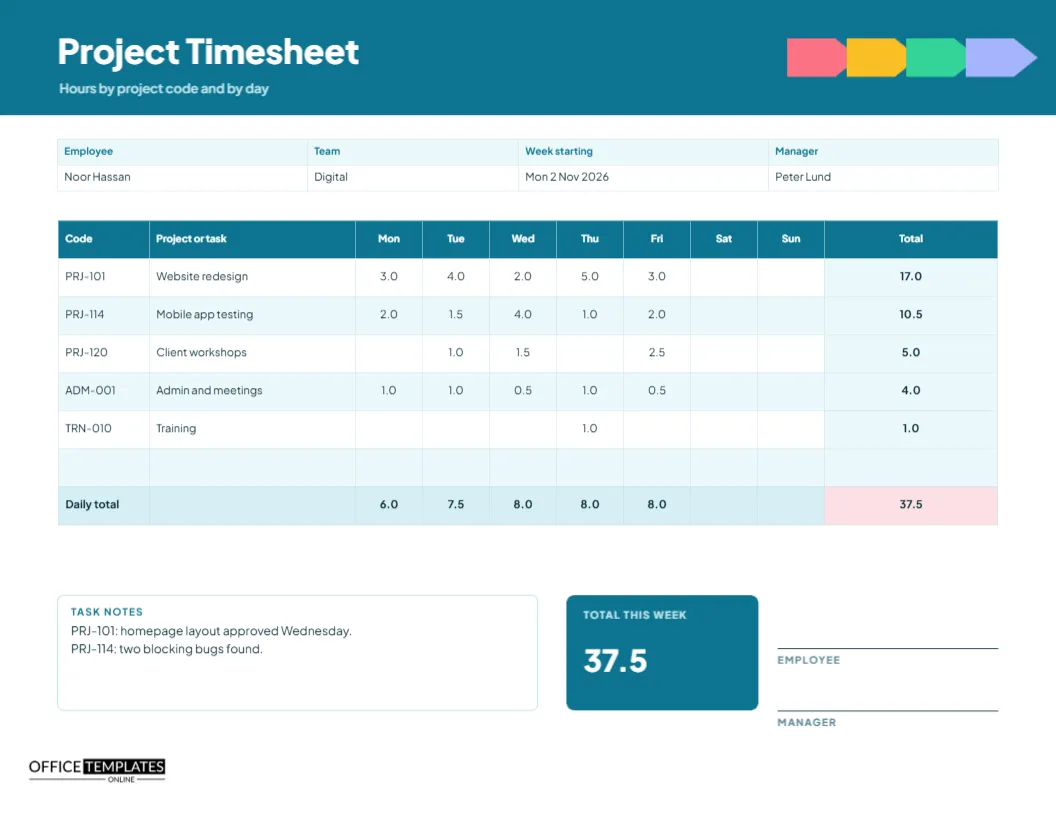
The header is a rich teal with the title Project Timesheet in heavy white type. At the right, four arrow-shaped tags in pink, amber, green, and lavender point along a line, like a row of project labels. A line beneath the title reads hours by project code and by day. The look is modern and slightly playful, which suits creative teams, agencies and IT departments.
Employee and Team Details
A four-column strip holds the employee, team, week starting date, and manager. The sample employee is Noor Hassan in the digital team, reporting to Peter Lund, for the week starting Monday 2 November 2026. Ten columns follow in the main table: code, project or task, seven days, and a total.
Reading the Grid
| Code | Project or task | Weekly total in the sample |
|---|---|---|
| PRJ-101 | Website redesign | 17.0 |
| PRJ-114 | Mobile app testing | 10.5 |
| PRJ-120 | Client workshops | 5.0 |
| ADM-001 | Admin and meetings | 4.0 |
| TRN-010 | Training | 1.0 |
Cells with no hours are left blank, which keeps the grid easy to scan.
Two Kinds of Totals
The right column adds each project across the week, and the shaded row at the bottom adds each day down the page. In the sample, the daily totals are 6.0, 7.5, 8.0, 8.0 and 8.0, with nothing on Saturday and Sunday. The corner cell, shaded pink, holds the grand total for the week, 37.5. When the daily and project totals both add up to the same figure, you know the grid is correct.
Why Codes Beat Descriptions
Free text descriptions are hard to add up. Codes are not. If everyone writes PRJ-101, finance can total the hours without interpreting anything. Codes also make reports possible: you can compare a month of PRJ-101 hours with the budget in seconds. Choose a short code system and keep a list on the wall or in a shared file. Use prefixes such as PRJ for projects, ADM for admin, and TRN for training.
Logging Non-Project Time Honestly
Admin, meetings, and training also take hours, and hiding them leads to false estimates. The sample includes an admin and meetings code and a training code, so the week adds up to a true working week. A team that records its overhead honestly can plan realistic project hours, because it knows that only about three quarters of the week goes to billable work.
Task Notes Under the Grid
A box on the lower left holds task notes. In the sample, it records that the homepage layout for PRJ-101 was approved on Wednesday and that two blocking bugs were found in PRJ-114. Short comments like these give context to the numbers and help a project manager see why a task took longer than expected.
Filling in the Grid Quickly
- Write your name, team, and the week.
- List the codes you used this week in the first column.
- At the end of each day, enter the hours against each code.
- Add across for project totals and down for daily totals.
- Check that both give the same total, then sign.
Using Quarter Hours or Tenths
The sample uses halves and tenths. Many organisations bill in quarter hours. Whatever you choose, use it everywhere, so that totals do not drift. A mix of formats such as 1.25, 1:15 and 75 minutes causes arithmetic mistakes and billing disputes.
Editing Codes, Days and Columns
Retype the codes and names in the first two columns. If your team works six days, you can delete the Sunday column. To add rows for more projects, use Edit Table Data and the Add Row button, and reduce the row height a little to keep the grid on the page. Cell colours and fonts can be changed from the table panel.
Total Tile and Signatures
A teal tile at the lower right repeats the weekly total in large numerals. Beside it are lines for the employee and the manager. The manager signs to confirm that the codes are correct as well as the hours, which is an important check when time feeds into client invoices.
Printing the Project Grid
US Letter landscape. Print at actual size so the narrow day columns stay readable. The header band uses solid colour, and in a black-and-white print the tags become grey, though the grid remains clear.
Reconciling the Timesheet With Project Budgets
Once the hours are coded, a project manager can compare them with the budget in minutes. Add the week’s hours for each code to the running total, divide by the hours planned, and note the percentage used. If a code is racing ahead of the plan, you find out in week two rather than at the end, when it is too late to change scope or ask for more money.
Choosing a Simple Code System Your Team Will Actually Use
Codes fail when they are too clever. Keep them short, give each a plain name, and print the list on the back of the sheet or pin it up. Limit the active list to what a person really touches in a week, retire old codes quickly, and agree on one place where new codes are announced, so that nobody invents their own.
Project Timesheet Questions
Can I track more than one client on a page?
Yes. Add the client name to the project column or use a code prefix for each client.
How many codes fit on one page?
Five are filled in, and there is a blank row. Add more through the table panel if you need them.
Are the totals automatic?
No. They are typed text, so recalculate them after any change.