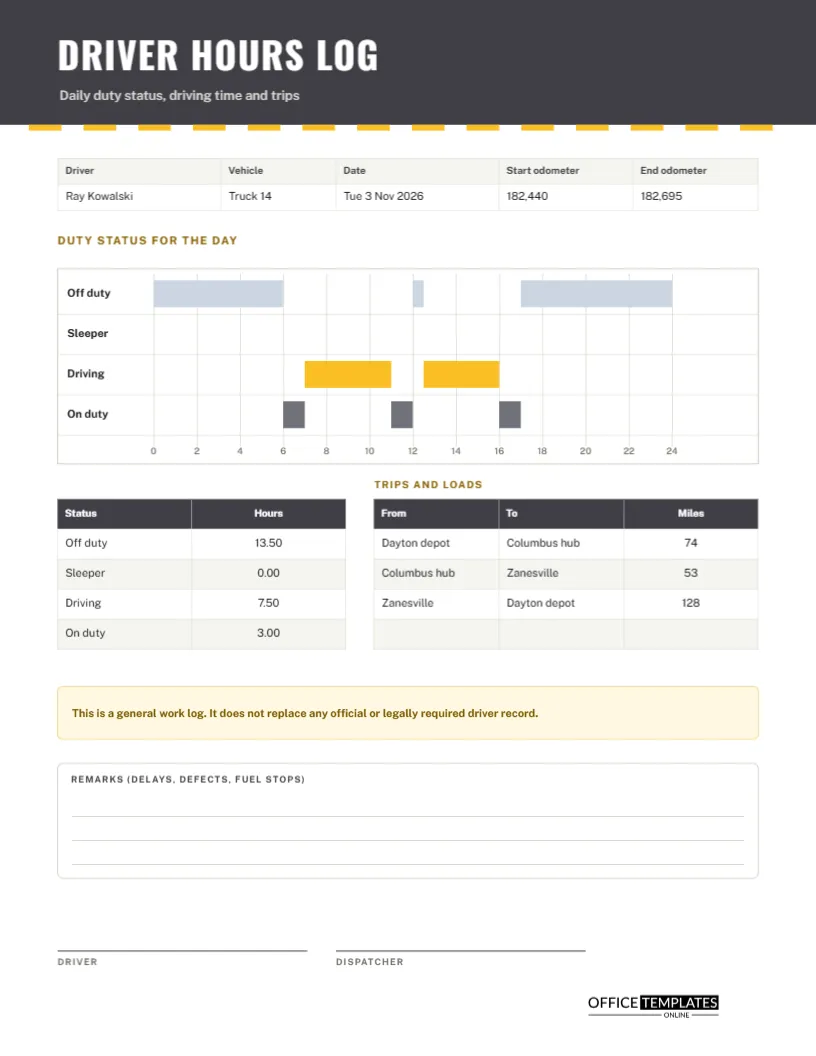
Drivers work in blocks: some hours behind the wheel, some loading and unloading, some resting. A simple start and finish time hides all of that. A duty status grid shows it in one picture, with the day laid out across a 24-hour line and each block of time drawn as a bar. This US Letter sheet is a general work log built around that picture, with odometer readings and trips beneath it. It is not an official regulatory record, and it says so on the page.
Charcoal Band and a Dashed Road Line
The header is charcoal, with a row of short amber dashes running along its bottom edge like the centre line of a road. The title DRIVER HOURS LOG is set in Oswald, a tall condensed typeface that feels like a motorway sign, with spacing between the letters. Public Sans sets the smaller text, with plain, legible forms. The page looks purposeful and a little industrial.
Driver, Vehicle, Date and Odometer
A five-column strip lists the driver, the vehicle, the date, the starting odometer, and the ending odometer. The sample is Ray Kowalski in Truck 14 on Tuesday 3 November 2026, starting at 182,440 and finishing at 182,695, which is 255 miles. Odometer readings give you an independent check on the trip table below, and they help with maintenance and mileage records.
Reading the Duty Status Grid
The grid has four rows: off duty, sleeper, driving, and on duty. Along the top, it runs 24 hours, marked every two hours. Each status is a bar placed on its row. Amber bars show driving, grey bars show on-duty time, and pale blue bars show off-duty. The picture shows at a glance how the day was split, which a list of times cannot do.
The Sample Day
| Status | Hours | When in the sample |
|---|---|---|
| Off duty | 13.50 | Midnight to 6, a half-hour break, and 5 PM to midnight |
| Sleeper | 0.00 | Not used |
| Driving | 7.50 | 7 to 11 and 12:30 to 4 |
| On duty | 3.00 | Inspection, loading and paperwork |
The four statuses add up to the full 24 hours, a useful check on any day.
The Status Totals Table
A small table to the left under the grid lists each status with its hours. Use it to confirm that the day adds to 24, and to see the driving and on-duty totals that matter for your own planning. If the total is 23.5 or 24.5, a bar is misplaced or a time is wrong, and you can fix it while it is fresh.
Trips and Loads
The table on the right lists three trips: Dayton depot to Columbus hub, 74 miles; Columbus hub to Zanesville, 53 miles; and Zanesville back to Dayton depot, 128 miles. The total is 255 miles, which matches the odometer. Add the load or delivery reference in the From or To cell if your company tracks it.
An Honest Disclaimer on the Page
A pale gold box states that the sheet is a general work log and does not replace any official or legally required driver record. This matters. Many countries and industries require drivers to keep specific records, often in an electronic device or a prescribed paper form. Use this page for your own planning, for small fleets with no such requirement, or as a supplement, never as a substitute.
Filling the Duty Status Grid Step by Step
- Write the driver, vehicle, date, and starting odometer.
- Mark each change of status on the 24-hour line.
- Draw or place a bar for each period on the correct row.
- Add up the hours for each status.
- Record trips, finish with the ending odometer, and sign.
Editing the Bars
The bars are shapes. To change one, select it and drag its edges until it matches your time, or use the position fields. Each two-hour step on the grid is about 0.45 inches wide. A quick habit is to rough out the day in pencil on a printed copy, then update the digital version later.
Remarks: Delays, Defects and Fuel Stops
A ruled box near the bottom is for remarks. Record vehicle defects, traffic delays, fuel stops, and anything unusual. A defect noted in writing on the day creates a record for the maintenance team and protects the driver if the problem causes a later issue. Keep remarks short and factual.
Using the Log for Small Fleets and Delivery Businesses
Small delivery firms, trades with vans, and local couriers often have no formal driver record, but still need to know how long drivers are on the road. A weekly stack of these sheets shows driving time and helps with scheduling, fuel claims, and customer queries about delivery times.
Dispatcher and Driver Signatures
The driver signs to confirm the day is accurate and the dispatcher signs to acknowledge it. Where the company is large, the dispatcher may sign only a batch at the end of the week. Either way, the signature shows that someone other than the driver has seen the record.
Printing and Storing Daily Driver Logs
US Letter portrait. Print one sheet per driver per day and store them in date order. Keep them for as long as your company policy requires, and make scans for safety. The amber bars print as mid-grey in black and white, and the grid remains readable.
Spotting Long Driving Blocks and Short Breaks
Look at the amber bars. A long unbroken block of driving, followed by a short break, is a sign that the schedule may be too tight. Even where no rule requires it, regular rest is safer and often faster overall, because tired drivers make slower decisions. The picture makes such patterns easy to discuss with dispatch.
Driver Hours Log Questions
Does this meet legal hours of service rules?
No. Rules differ by place and vehicle. Use the official form or device your regulator requires.
Can I use it for a taxi or rideshare driver?
Yes, as a personal record of working time. Add the platform in the remarks.
Does the grid draw itself?
No. The bars are shapes you place by hand.