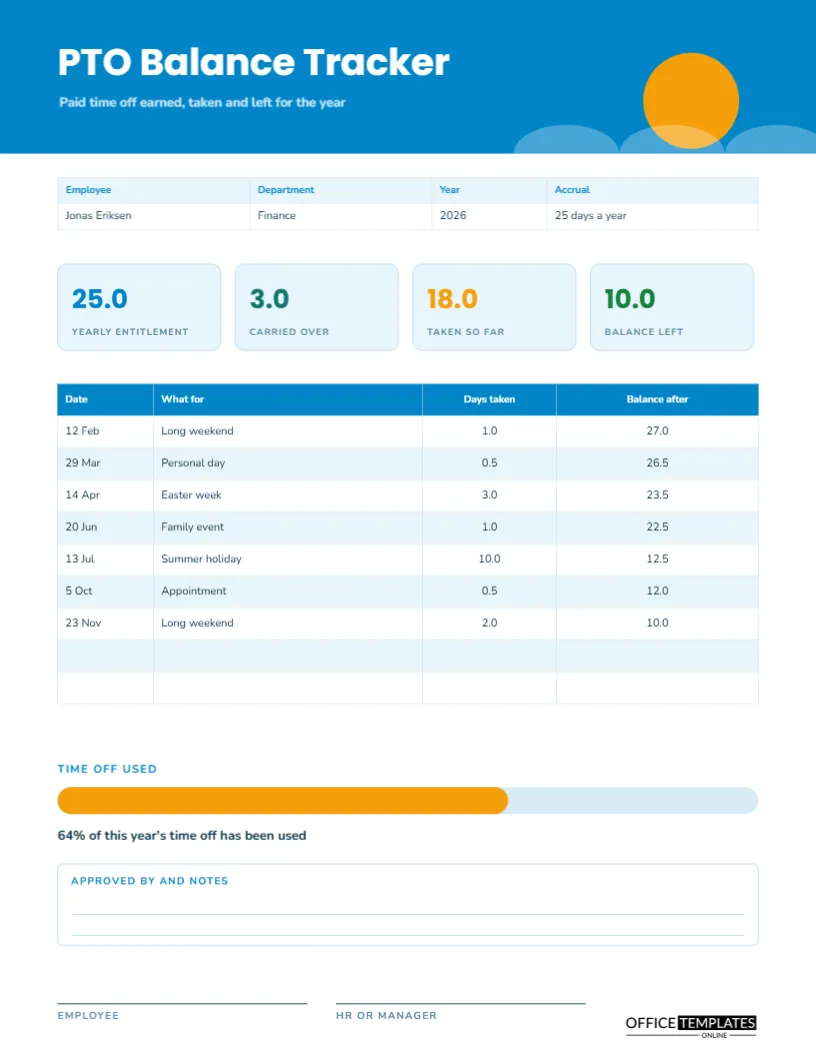
Paid time off is easy to earn and strangely hard to track. An employee wonders how many days are left. A manager cannot remember whether the long weekend in February was deducted. HR is asked in December for the balance and has to search emails. A simple tracker solves it. This page starts with the yearly entitlement and any days carried over, lists every absence with the days taken and shows the balance after each one.
A Sun Over Blue Waves
A bright blue header carries a golden sun at the right, with three pale wave shapes rising from the lower edge. The title PTO Balance Tracker is set in Poppins, a rounded geometric sans, with a line beneath it about paid time off earned, taken, and left for the year. Nunito sets the table. The picture says holiday, which makes a dull record more inviting.
Employee, Department, Year and Accrual
The strip shows the employee, the department, the year, and the accrual rule. The sample is Jonas Eriksen of Finance, for 2026, accruing 25 days a year. Accrual rules differ: some employers grant the full year on 1 January, others add days month by month. Write yours in this box so that the balance is clear.
Four Number Tiles
Four rounded tiles sit under the strip: yearly entitlement (25.0), carried over (3.0), taken so far (18.0) and balance left (10.0). They give the whole picture before a reader looks at the table. A new employee sees how many days they began with, a veteran sees what they have used, and everybody sees what remains. The balance tile is green because it is the good news.
Every Day Taken, in Order
| Date | What for | Days taken | Balance after |
|---|---|---|---|
| 12 Feb | Long weekend | 1.0 | 27.0 |
| 29 Mar | Personal day | 0.5 | 26.5 |
| 14 Apr | Easter week | 3.0 | 23.5 |
| 20 Jun | Family event | 1.0 | 22.5 |
| 13 Jul | Summer holiday | 10.0 | 12.5 |
| 5 Oct | Appointment | 0.5 | 12.0 |
| 23 Nov | Long weekend | 2.0 | 10.0 |
The starting balance is 28.0, which is the 25 days of entitlement plus 3 carried over.
The Running Balance
Each row subtracts its days from the previous balance, so the last row always shows what is left. This running method is more reliable than a single subtraction at the end, because every entry can be checked against the one before. If a number looks wrong, you can find exactly which row introduced the error.
Half Days and Part Days
The sample includes half days, written as 0.5. Some employers count in hours instead of days, particularly for shift workers. If you do, retype the column heading to Hours taken and the title labels to match. Whatever unit you choose, use it everywhere on the page, and say in the accrual box how hours convert to days.
The Time Off Used Bar
A progress bar shows the share of time off used: 64 percent of this year’s total has been used in the sample, which is 18 of 28 days. The orange fill grows from the left over a pale track. It is a motivating way to see the year, and an early warning when the bar is nearly full in spring or has hardly started in autumn.
Updating the PTO Tracker After Each Absence
- Write the employee, department, year, and accrual rule.
- Enter the yearly entitlement and the days carried over.
- After each approved absence, add a row with the date and reason.
- Subtract the days taken from the previous balance.
- Update the tiles and the progress bar.
- Have the manager initial or sign the new entry in the notes.
Carry Over, Expiry and Cash Out Rules
Many employers limit how many days can be carried into the next year, and some require unused days to be taken by a certain date. Others pay out unused days. Write your rule in the notes box so that nobody is surprised in December. The tracker shows the numbers, but the policy decides what they mean.
Helping Employees Plan Their Year
A visible balance encourages people to plan. Staff who see ten days left in October book a winter break instead of losing them. Managers who see a team with large unused balances know that rest may be needed. A tracker is a small wellbeing tool as well as a record.
Approved By and Notes
A lined box at the foot is for the approver’s notes. Use it to record who approved each absence and when, special arrangements such as a sabbatical, or corrections to earlier entries. A tracker with a clear approval trail resolves disputes quickly, because both sides can see what was agreed.
Handling Public Holidays and Different Leave Types
Public holidays, sick leave, parental leave, and unpaid leave are usually tracked separately. This page is for paid time off only. Use the absence and sick day tracker in this collection for other types, so each balance stays clean and easy to read.
Editing Rows, Tiles and the Bar
The table is a real Table object, so you can add rows for a busy year. Retype the tiles after each change and drag the right edge of the orange bar to match the percentage. Replace the sun with your own logo if you prefer a plainer page.
Employee and HR Signatures
The employee and the HR representative or manager sign at the foot of the US Letter page. A signed tracker at year-end is a tidy record of the year, and a fresh sheet begins in January with the carried over days.
Giving Staff a Copy at Year End
At the end of the year, hand every employee a copy of their completed tracker with the closing balance and any carried over days. They can check it against their own records, and any disagreement is settled in December instead of surfacing in the spring when memories have faded.
PTO Tracker Questions
Can I use it for hours instead of days?
Yes. Change the headings to hours and use your own conversion.
Does it cover unpaid leave?
No. Track unpaid leave on the absence and sick day tracker.
Do the balance and bar update automatically?
No. Retype the balance and resize the bar after each entry.