Absence is a normal part of any workplace, and tracking it is a task that deserves care. HR needs to know how many days were lost to sickness, how many were personal, and how many were unpaid. Managers need to see patterns that might need support. Employees deserve a fair record that can be checked. This A4 tracker records each absence with its date, person, type, days, note status, and return date, then totals the year by type.
A Thermometer in Raspberry and Sky Blue
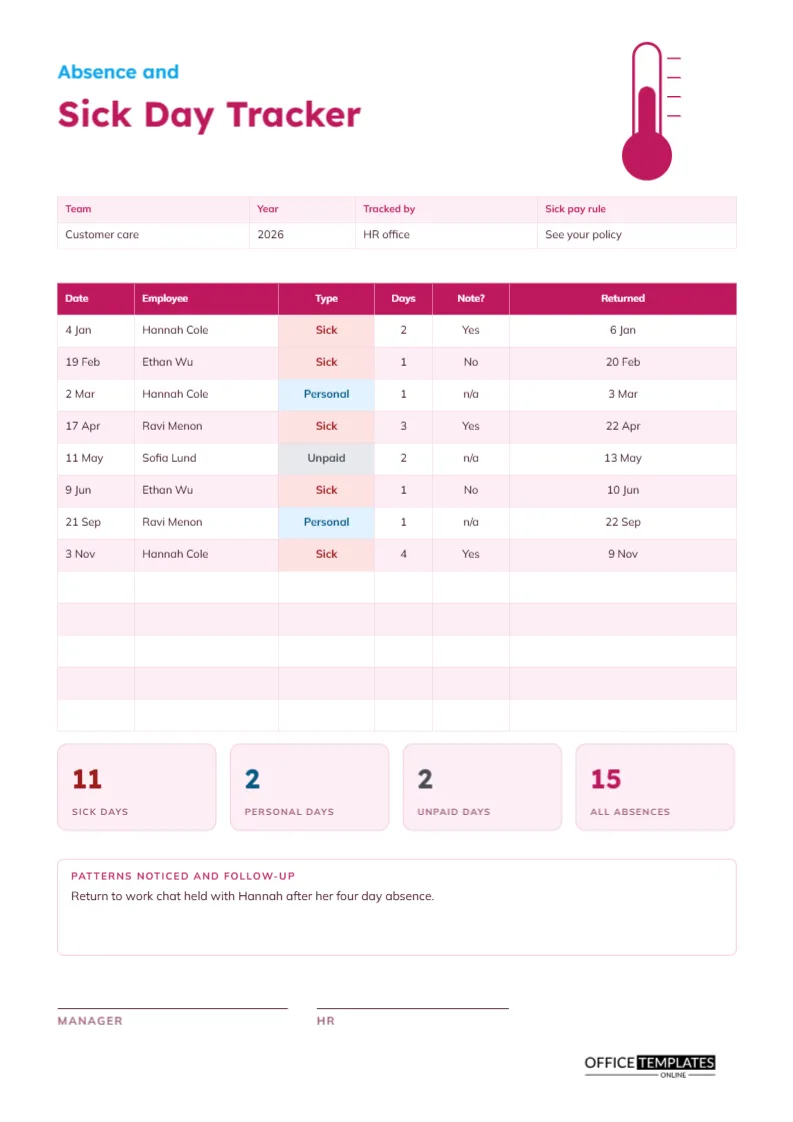
At the top right stands a white thermometer outlined in raspberry, with a raspberry bulb and a raspberry column rising inside it. The title is split in two: Absence in small sky blue Lexend, Sick Day Tracker in large raspberry. Mulish sets the table. The picture is light and clear, and it signals what the page is about before you read a line.
Team, Year, Tracked by, and Sick Pay Rule
A four-column strip holds the context: the team, the year, who tracks the data, and the sick pay rule. The sample reads Customer care, 2026, HR office, see your policy. Sick pay rules vary widely and change often, so the field refers to the local policy and does not state a rule of its own. Replace it with the document your organisation uses.
Eight Absences Across the Year
| Date | Employee | Type | Days | Note | Returned |
|---|---|---|---|---|---|
| 4 Jan | Hannah Cole | Sick | 2 | Yes | 6 Jan |
| 19 Feb | Ethan Wu | Sick | 1 | No | 20 Feb |
| 2 Mar | Hannah Cole | Personal | 1 | n/a | 3 Mar |
| 17 Apr | Ravi Menon | Sick | 3 | Yes | 22 Apr |
| 11 May | Sofia Lund | Unpaid | 2 | n/a | 13 May |
| 9 Jun | Ethan Wu | Sick | 1 | No | 10 Jun |
| 21 Sep | Ravi Menon | Personal | 1 | n/a | 22 Sep |
| 3 Nov | Hannah Cole | Sick | 4 | Yes | 9 Nov |
The page has room for thirteen rows, so five more can be added before the year is out.
Coloured Type Labels
The Type column uses small pills: pink for Sick, blue for Personal and grey for Unpaid. The colours make it easy to scan a long list and see which type dominates. If you add other types, such as Medical appointment or Compassionate, give each a colour and add a matching tile at the bottom of the page.
The Note Received Column
A column called Note records whether a doctor note or self-certification was received when one was required. The entries Yes, No, and n/a keep the answer short. A No for a short absence may be perfectly fine under your policy. The column simply makes the status visible, so a missing note on a long absence is not forgotten.
Sick, Personal, Unpaid and All Absences Tiles
At the foot of the table, four tiles total the year: sick days (11), personal days (2), unpaid days (2), and all absences (15). The sick tile is red, the personal tile blue, and the unpaid tile grey, matching the pills. HR can quote these numbers in a report, and a manager can compare them with last year’s page.
Recording Absence Entries Consistently
- Write the first day of the absence and the employee.
- Choose the type and count the working days.
- Record whether the required note was received.
- Write the return date when the person comes back.
- Update the type tile and the all absences tile.
Return to Work Conversations
A short, kind conversation after an absence shows that the employee was missed and gives them a chance to mention anything that might affect their work. The sample note records that a return-to-work chat was held with Hannah after her four-day absence. Record the fact of the conversation, not the personal details it covered.
Patterns Noticed and Follow-up
A ruled box invites you to describe patterns and actions. Look for repeated absences on Mondays or Fridays, for absences after busy periods, and for the same person appearing several times. A pattern is never proof of misconduct, but it is a good reason to ask if anything is wrong or if adjustments could help.
Respecting Privacy and Data Rules
Health information is sensitive, and the law protects it in many places. Record only what you need: the type, the days, and whether a note was received. Never write diagnoses on the tracker. Limit access to those who need it, store the page securely, and delete it when your retention period ends.
Using the Tracker to Plan Cover
A year of data shows when absences cluster. Winter often brings more sickness, Fridays before bank holidays bring personal days, and school holidays bring requests. Use the pattern to plan cover and avoid thin days. Knowing the shape of the year means fewer last-minute scrambles.
Editing the Types and Tiles
Every label is editable, and the table is a real Table object. Add types, recolour the pills and retitle the tiles. Because tiles and totals are typed text, retype them after changes. If your organisation uses half days, record them as 0.5 and change the number format in the Days column.
Manager and HR Signatures
The manager and HR sign at the foot of the page. Print on A4, check the totals at year-end and archive the signed tracker with your HR files. Start a fresh page for the next year.
Working Out the Cost of Absence
With the days by type, you can estimate what absence costs: multiply days lost by an average daily rate, and add cover costs. The figure helps managers argue for wellbeing support, flexible working or better cover plans. Even a rough number makes absence a business topic, not just a personnel one.
Supporting Staff Who Are Often Absent
If one person appears several times, the first step is care, not discipline. Ask whether they need adjustments, a change of hours, or access to support services. The tracker lets you start that conversation early, with accurate dates, which is far kinder than raising it at the end of a difficult year.
Absence Tracker Questions
Can I track one employee only?
Yes. Fill in the same name on every row, or delete the employee column.
Does it work for a school?
Yes. Replace employees with staff or pupils and adapt the types.
Is it a legal record of sickness?
It is a working record. Check whether your local rules require a particular format.