Interns and students on placements are usually told to complete a set number of hours: 120 for a work experience course, 200 for a practicum, 300 for a licence. The hours must be recorded, verified, and handed in, and a missing record can mean a missing credit. This A4 log makes the target the star of the page. A progress bar shows how far you have come, a table records each week, and every line carries a supervisor’s initials.
A Violet Header and a Cyan Progress Bar
The top of the page is a block of violet with the words Work Hours Log in large white Poppins. A line beneath reads: for interns, placements, and work experience. A pale violet panel below the details holds the progress bar, whose cyan fill grows from the left. The colours are bright enough for a student audience but still professional enough to hand to a supervisor.
Student, Organisation, Supervisor and Required Hours
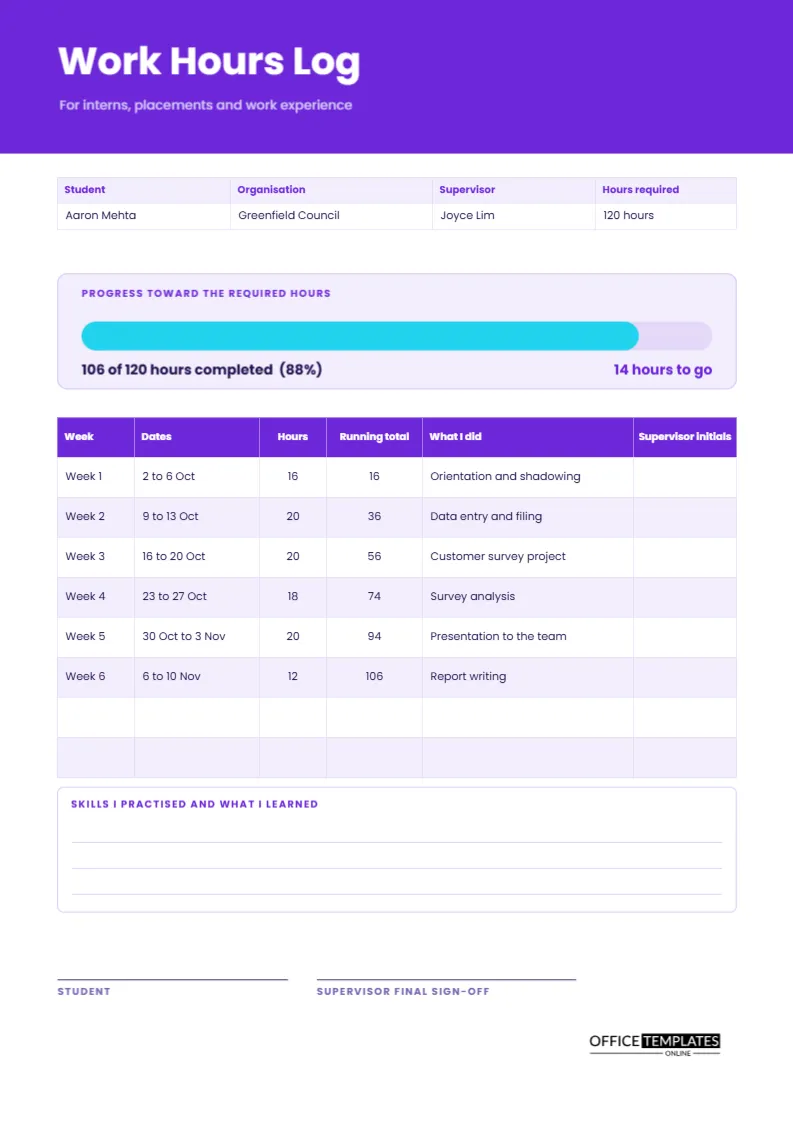
The details strip names the student, the organisation, the supervisor and the hours required. The sample belongs to Aaron Mehta, placed at Greenfield Council under Joyce Lim, with 120 hours required. Putting the target in the strip and the progress bar means the student, the supervisor, and the school are all looking at the same number.
The Progress Bar
The panel shows 106 of 120 hours completed, or 88 percent, with 14 hours to go on the right. The bar is two rounded rectangles: a pale track and a cyan fill. To update it, drag the right edge of the fill so that it matches the percentage. Seeing the bar nearly full is a quiet but strong motivator, and a nearly empty bar early in the term is a useful warning.
Weekly Entries With a Running Total
| Week | Hours | Running total | What I did |
|---|---|---|---|
| Week 1 | 16 | 16 | Orientation and shadowing |
| Week 2 | 20 | 36 | Data entry and filing |
| Week 3 | 20 | 56 | Customer survey project |
| Week 4 | 18 | 74 | Survey analysis |
| Week 5 | 20 | 94 | Presentation to the team |
| Week 6 | 12 | 106 | Report writing |
The real page also includes a dates column and a column for supervisor initials.
Why the Running Total Matters
A column that adds as you go means you never face a long sum at the end of the placement. It also reveals pace. If you must reach 120 hours in ten weeks, the running total tells you whether you are on track in week three, when there is still time to adjust, not in week nine when panic sets in.
Supervisor Initials on Every Line
The last column asks the supervisor to initial each week. Weekly initials make the record trustworthy, because an entire log signed on the final day is easy to doubt. Ask for initials on Friday afternoon, when the week is fresh, and make it part of your routine so that it never feels like a burden on the supervisor.
What I Did Describes Learning, Not Just Tasks
Schools and employers read the What I Did column to see what you learned. Write in terms of tasks and outcomes: built a spreadsheet of survey results, presented findings to six colleagues. These phrases are useful later when you write a CV or a reference request, and they remind you how much you accomplished.
Skills I Practised and What I Learned
A ruled box near the bottom asks for skills practised and what you learned. Use it every few weeks to note things like teamwork, using new software, or giving a presentation. It is also excellent preparation for an interview, because it supplies real examples for questions such as tell me about a time you solved a problem.
Completing the Log Step by Step
- Fill in your details and the required hours.
- Each week, add dates, hours, and a short description.
- Update the running total and the progress bar.
- Ask your supervisor to initial the line.
- At the end, write your reflection and collect final signatures.
If You Are Behind on Your Hours
Do not hide it. Tell your supervisor early, look at the remaining weeks and plan extra shifts or longer days. Write the plan in the notes. Supervisors are usually happy to help when a student is honest about a gap, and a log that shows a shortfall followed by a plan reads far better than one that suddenly jumps in the last week.
Using the Log for Unpaid and Paid Placements
The sheet works for both. For paid placements, the hours may also feed a payroll timesheet, so keep the two consistent. For unpaid placements, the log is your only record of effort, so keep it with extra care. Either way, make a copy of the signed final page before handing the original to your school.
Editing the Hours Target and Table
Change the required hours in the strip, update the progress text, and resize the bar. The table is a real Table object, so you can add weeks for a longer placement. Set a different number of hours, rename the weeks to months, or retype the heading to suit any programme.
Final Sign-Off and Printing
The student and supervisor sign at the foot of the A4 page. Print the final log on plain paper, sign in ink and keep a scan. The progress bar and header use colour, but black and white copies remain legible.
Asking Your Supervisor for a Reference at the End
A completed log is a strong prompt for a reference letter. Hand your supervisor a copy with the final sign-off and a note listing the projects you are proudest of. The What I Did column makes it easy for them to write specific praise, which carries far more weight with a future employer than a general statement.
Work Hours Log Questions
Can I use it for volunteer hours?
Yes, though the volunteer hours log in this collection has a verification stamp for community service.
What if my placement runs longer than six weeks?
Add rows through Edit Table Data and reduce the row height slightly.
Does the bar fill automatically?
No. Adjust it by hand when you update the hours.