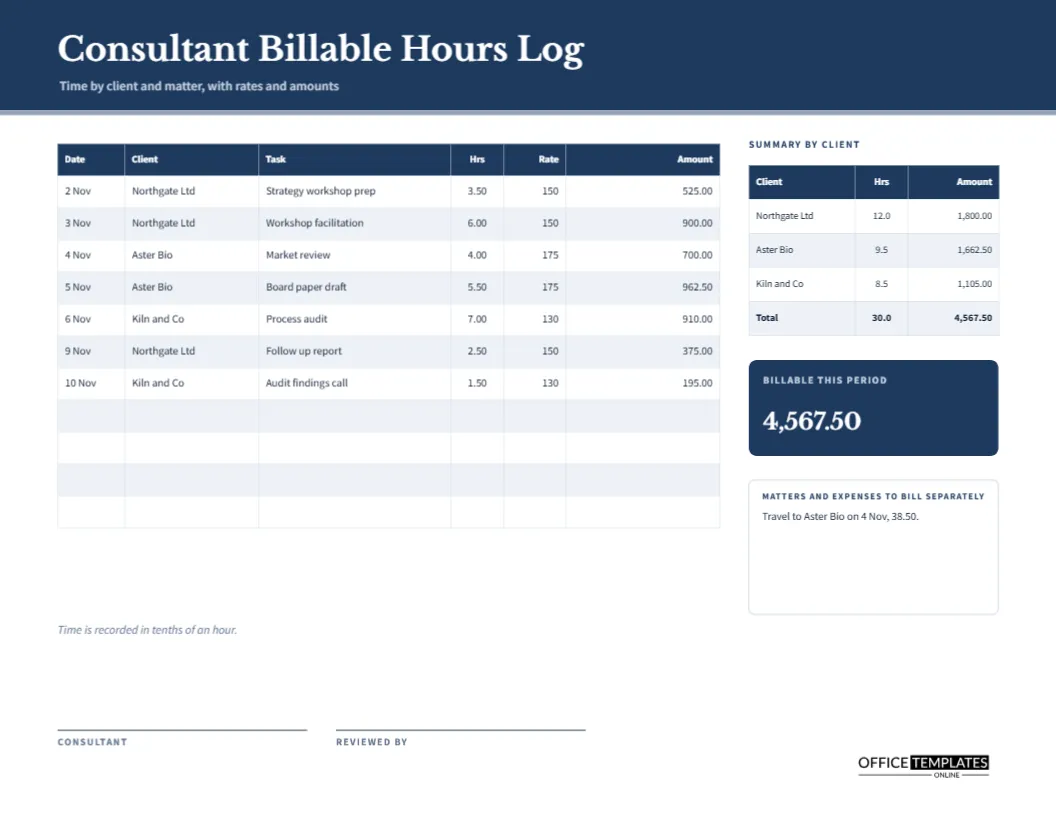
A consultant often works for several clients at different rates in the same week. One morning is spent on a board paper at 175 an hour, the afternoon on a workshop at 150, and the next day on an audit at 130. Without a tidy log, the invoices become guesswork. This landscape sheet records every entry with its own rate and amount, then rolls the entries up into a summary by client, which is exactly what you need before you open your invoicing software.
Navy Header and a Pale Rule in Libre Baskerville
The page opens with a deep navy band and a thin pale line beneath it. The title Consultant Billable Hours Log is set in Libre Baskerville, a serif with the calm authority of a professional firm. A smaller line says time by client and matter, with rates and amounts. Source Sans Pro carries every table, which keeps dense numbers crisp when printed small.
The Seven Entry Log on the Left
| Column | What it holds | Example in the sample |
|---|---|---|
| Date | Day the work was done | 3 Nov |
| Client | Who pays for the time | Northgate Ltd |
| Task | Short description | Workshop facilitation |
| Hrs | Time in tenths of an hour | 6.00 |
| Rate | Hourly rate for that client | 150 |
| Amount | Hours times rate | 900.00 |
The sample has seven entries between 2 and 10 November, across three clients, with space for four more rows.
A Rate Column on Every Row
Most simple timesheets assume one rate. A consultant rarely has that luxury. Putting the rate on every line means the amount is always correct, even when a client agrees to a special price, a junior colleague bills at a lower rate, or a rush job carries a premium. The reader can follow the arithmetic along any row without opening a rate card.
The Summary by Client
At the right sits a small table that adds up each client. Northgate Ltd shows 12.0 hours and 1800.00, Aster Bio 9.5 hours and 1662.50, and Kiln and Co 8.5 hours and 1105.00. A shaded total row gives 30.0 hours and 4567.50. This is the table you copy onto invoices. Check that the client totals add up to the total before you send anything.
Billable This Period
A navy tile under the summary repeats the total in large serif numerals: 4567.50. It acts as the headline of the sheet, the number you would quote if someone asked how the fortnight went. Because it is placed apart from the tables, it is also the figure a partner or a bookkeeper will look for first.
Expenses and Matters to Bill Separately
Below the title sits a notes box for items that should not be mixed with time, such as travel, printing and software licences. The sample records travel to Aster Bio on 4 November for 38.50. Keeping expenses in a separate box prevents them from being billed at an hourly rate by mistake, and reminds you to attach receipts to the invoice.
Recording Time in Tenths of an Hour
A footnote says that time is recorded in tenths of an hour. Six minutes equals 0.1, thirty minutes equals 0.5, and a quarter hour is 0.25, which many firms round to 0.3. Whichever rule you choose, apply it to every entry and say so on the page, so that a client who wonders why a call lasted 0.3 does not feel misled.
How to Fill In the Log Each Day
- Write the date and client as soon as you start the task.
- Record the task in a few words that a client would understand.
- At the end, enter the hours in tenths.
- Copy the client rate from your engagement letter.
- Multiply and write the amount.
- Update the summary by client at the end of the week.
Writing Task Descriptions Clients Accept
Vague descriptions such as meeting or admin lead to questions. Specific ones such as board paper draft or audit findings call lead to nods. Name the deliverable or the topic, avoid internal jargon, and keep each description under six words. A good rule: if the client read the line aloud, they should recognise the work and agree it was worth paying for.
Reviewing the Sheet Before Invoicing
The reviewer byline at the foot is for a partner, a manager or a bookkeeper. Before invoicing, they check rates against the engagement letters, look for missing days, and scan for entries that seem too long or too short. A second pair of eyes catches the errors that the person who did the work no longer sees.
Using the Log to Check Whether Rates Make Sense
Add a column of your own for the hours you actually worked in the month, billable or not, and compare it with the billed amount. Divide billed money by all hours worked to find your effective rate. If that figure falls well below your headline rates, you are giving away time somewhere, and the log shows exactly where.
Editing the Table and the Summary
Both tables are real Table objects. Select a table, choose Edit Table Data, and retype names, rates, and amounts. Use Add Row for longer periods, then trim the notes box if space gets tight. Retype the summary rows and the navy tile after any change, because totals are written by hand, not calculated.
Keeping the Logs for Your Own Records
File each completed log with the client folder and keep a copy for tax time. If a client queries an invoice months later, the log shows what you did, when, and at what rate. Many consultants also scan the page and store it with the matching invoice, so one search finds both.
Printing the Landscape Log
The page is US Letter landscape, 11 by 8.5 inches. Print at actual size so the narrow columns stay readable. The navy header uses a lot of ink, but in a draft you can change its fill to a light grey. The page also exports well as a PDF for sharing with a client.
Consultant Log Questions
Can I add a column for a matter or project number?
Yes. Add a column through Edit Table Data and narrow the task column to make room.
Does the sheet convert minutes to tenths?
No. Convert them yourself before typing the hours.
Is this the same as an invoice?
No. It is the working record that supports an invoice. The billable hours invoice summary in this collection turns similar numbers into a billing statement.