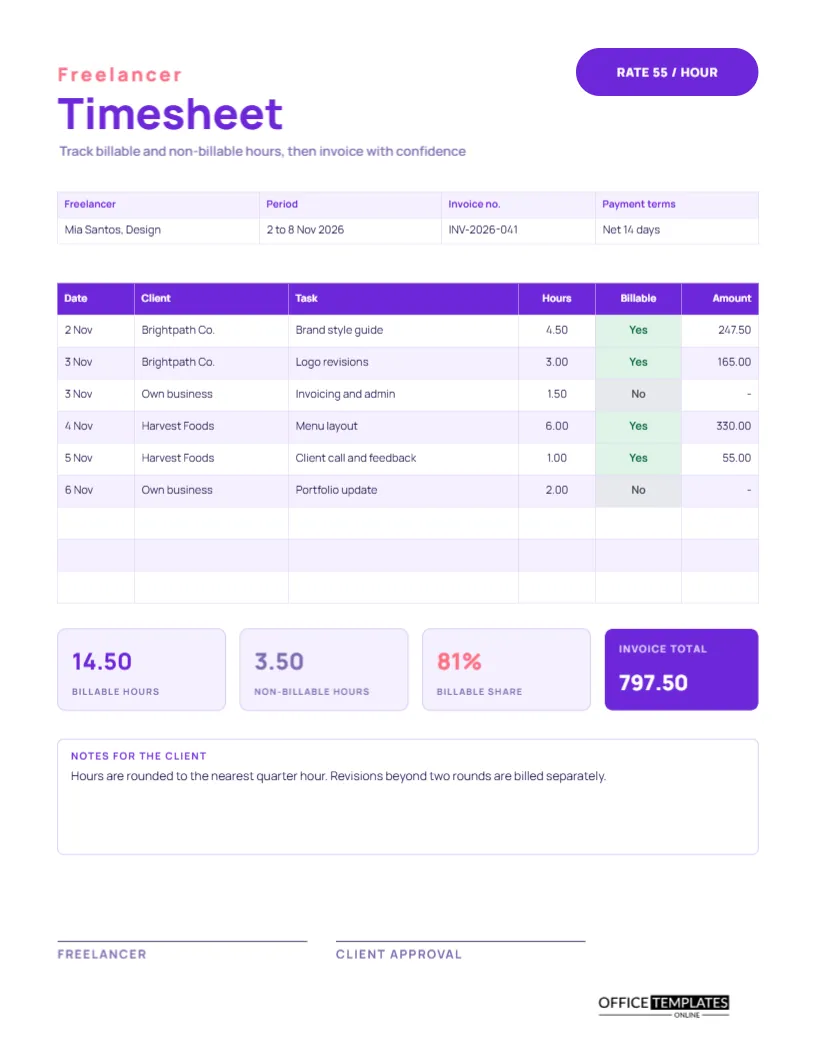
A freelancer sells time and skill, and the timesheet is the proof. It shows clients what they are paying for; it shows the freelancer where the week went, and it is the raw material for the invoice. Unlike an employee’s sheet, it has to separate hours that can be billed from hours that cannot, such as admin, marketing, and updating a portfolio. This US Letter template does exactly that, and it ends with an invoice total.
A Bold Violet Page With a Rate Pill
The page opens with the word Freelancer in spaced coral capitals, and Timesheet in large violet Manrope beneath it. A rounded violet pill at the top right reads RATE 55/HOUR. A line below the title says to track billable and non-billable hours, then invoice with confidence. The look is confident and modern, which suits designers, writers, developers, and consultants working alone.
Freelancer, Period, Invoice Number and Terms
The details strip lists the freelancer, the period, the invoice number, and the payment terms. The sample is Mia Santos, a designer, covering 2 to 8 November 2026, invoice INV-2026-041, with terms of net 14 days. Including the invoice number on the timesheet links the two documents, which makes a client query easy to resolve.
The Task Table
| Date | Client | Task | Hours | Billable |
|---|---|---|---|---|
| 2 Nov | Brightpath Co. | Brand style guide | 4.50 | Yes |
| 3 Nov | Brightpath Co. | Logo revisions | 3.00 | Yes |
| 3 Nov | Own business | Invoicing and admin | 1.50 | No |
| 4 Nov | Harvest Foods | Menu layout | 6.00 | Yes |
| 5 Nov | Harvest Foods | Client call and feedback | 1.00 | Yes |
| 6 Nov | Own business | Portfolio update | 2.00 | No |
The Billable column uses green Yes and grey No labels, and an amount column shows the value of each billable row at 55 an hour.
Four Summary Tiles
Below the table, four tiles summarise the week. Billable hours are 14.50, non-billable hours are 3.50, the billable share is 81 percent, and the invoice total is 797.50, which is 14.50 hours at 55. The last tile is solid violet, so the amount due stands out. The billable share is a useful measure: if it falls below about two-thirds, you are spending too much time on unpaid work.
Why Track Non-Billable Time
Many new freelancers ignore time that does not appear on an invoice, then wonder why their real hourly income is lower than their rate. Recording admin, invoicing, marketing, and learning shows the true cost of running a business. Over a few months, the numbers help you set rates that cover both the work and the overhead.
Working Out the Invoice From the Table
- Mark each row Yes or No for billable.
- Add the billable hours.
- Multiply by the hourly rate.
- Add any extra items, such as expenses, on the invoice itself.
- Retype the tiles to match.
Rounding and Minimum Charges
Some freelancers bill in quarter hours and round up; others charge a minimum of thirty minutes for any call. Whatever your policy, say it in the notes for the client. The sample note says hours are rounded to the nearest quarter hour and that revisions beyond two rounds are billed separately, which sets expectations clearly.
Notes for the Client
A white box with a violet title holds notes for the client. Use it for the scope you agreed on, how you round time, what counts as a revision, and anything else that might otherwise cause a dispute. Sending the timesheet with the invoice makes the invoice feel transparent and professional.
Client Approval Signature
A line for the freelancer and a line for client approval sit at the bottom. Not every client signs, but asking them to approve the hours before you invoice avoids a surprise. Even an email reply saying approved is useful evidence.
Keeping Several Clients on One Page
The client column lets you mix customers on the same sheet, which suits people who juggle several jobs in a week. For long projects with one client, consider keeping a separate sheet per project and totalling them for the invoice.
Editing Rates, Names and Rows
Retype the rate pill, the invoice number and the names. The table is a real Table object, so you can add rows through the Add Row button in Edit Table Data. Billable labels are coloured cells, so change both the word and the fill if a row changes.
Printing and Sending the Timesheet
US Letter, portrait. Most freelancers send a PDF with the invoice. Download it from the editor and attach it. The violet tile prints well in colour, and in grayscale it becomes a dark block with a white total.
Using the Timesheet to Set Better Freelance Rates
After a month of sheets, divide the money earned by every hour worked, billable or not. That is your real hourly income, and it is usually lower than the rate you quote. If it is below what you need, raise the rate, cut the non-billable share, or both. The sheet turns a vague feeling about being busy but poor into a clear number.
Sending the Timesheet to Clients Without Awkwardness
Attach the sheet to the invoice with a friendly line saying that the hours are included for transparency. Most clients appreciate it, and those who query a line can see exactly what it covers. If a client disputes an entry, discuss that row alone and keep the rest of the invoice moving, instead of letting one question delay the whole payment.
Matching Timesheet Rows to Invoice Lines
When a client is billed per task rather than per day, group the rows by task before invoicing and add the hours for each group. Write the task name, total hours, and amount on the invoice, and keep the timesheet as backup. This keeps the invoice short but lets you prove every line if asked.
Freelancer Timesheet Questions
Can I add a column for different rates?
Yes. Add a rate column and change the amount column to hours times rate.
Is this the same as an invoice?
No. It is the record behind the invoice. The contractor timesheet adds an invoice summary on the same page.
Should I include tax?
Add tax to your invoice, according to your local rules, not on the timesheet.