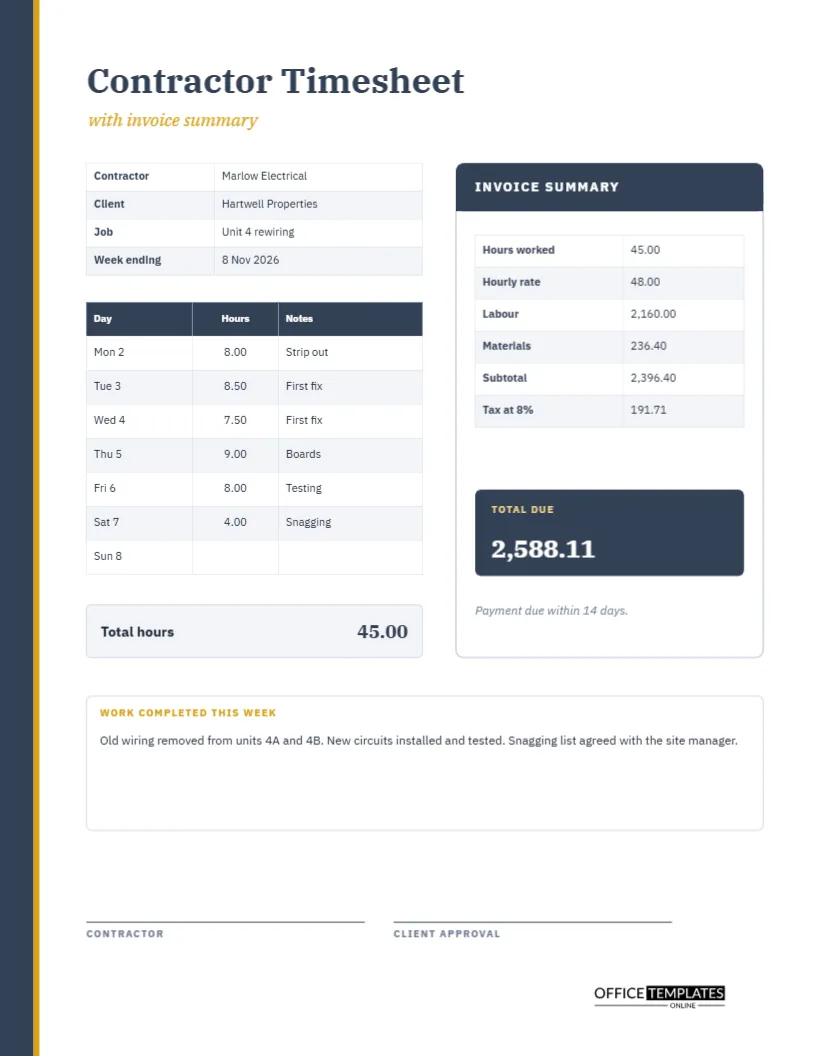
Contractors work for other people’s money, so the paperwork has to be clear. A tradesperson or independent contractor needs to show a client the hours worked, the work done, the materials used, and the amount due, preferably on one page that can be signed before the invoice goes out. This template puts the timesheet on the left and an invoice summary card on the right, so the hours turn into a total without leaving the page.
A Steel Blue Edge and a Gold Line
A slim steel blue strip runs down the left edge of the page, with a thinner gold line beside it. The title Contractor Timesheet is set in IBM Plex Serif, the words with invoice summary beneath it in gold italics. The restrained palette feels like quality stationery from a reliable firm, which is exactly the impression a contractor wants to make.
Contractor, Client, Job and Week
A four-row table on the left holds the details: contractor, client, job, and week ending. The sample is Marlow Electrical working for Hartwell Properties on a job called Unit 4 rewiring, for the week ending 8 November 2026. Naming the job matters, because a contractor may work for the same client on several jobs and each needs its own record.
The Daily Hours and Work Notes
| Day | Hours | Note |
|---|---|---|
| Mon 2 | 8.00 | Strip out |
| Tue 3 | 8.50 | First fix |
| Wed 4 | 7.50 | First fix |
| Thu 5 | 9.00 | Boards |
| Fri 6 | 8.00 | Testing |
| Sat 7 | 4.00 | Snagging |
A total hours bar below the table shows 45.00 hours for the week.
The Invoice Summary Card
At the right stands a white card with a steel blue header reading INVOICE SUMMARY. It lists hours worked, hourly rate, labour, materials, subtotal, and tax. The sample figures are 45.00 hours at 48.00, which is labour of 2160.00, plus materials of 236.40, a subtotal of 2396.40, and tax at 8 percent of 191.71. A dark total due box shows 2588.11 in white.
Checking the Sums
Forty-five hours times 48 is 2160. Adding 236.40 for materials gives 2396.40. Eight percent of that is 191.71, rounded to the nearest cent. Add them, and the total is 2588.11. The calculation is printed in the order a client reads it, which is the order that builds trust. The numbers are typed text, so redo the sums when you change a figure.
Why Materials Are Listed Separately
Clients usually want to know what part of the bill is time and what part is things. Keeping materials as a separate line also makes it easier to add a markup, to attach receipts, and to answer a query. If your contract specifies a markup, include it in the line or add another row to the card.
Payment Terms in One Line
Under the total, a small line of italic text says payment is due within fourteen days. Replace it with your own terms, such as a deposit amount, a late fee policy, or bank details. Clear terms on the page save a lot of chasing and awkward conversations later.
Work Completed This Week
A white box below the table holds a short description of what was done: old wiring removed from units 4A and 4B, new circuits installed and tested, a snagging list agreed. This narrative turns a list of hours into a story the client can follow. It also protects the contractor if a dispute arises about what was agreed.
Client Approval Before the Invoice
Two signature lines, one for the contractor and one for client approval, sit near the bottom. Getting a client to sign the week’s hours before you issue the invoice is one of the best habits in contracting. It removes doubt about the labour figure and speeds up payment.
Using the Page for Different Trades
The layout is generic. A plumber, painter, carpenter, IT consultant, or landscaper can replace the notes and the line items. If you charge a call-out fee, add it as a row on the summary card. If you have a team, add a column for each person’s hours.
Editing the Summary Card
The card rows are a table you can edit cell by cell. Change the rate, add a discount line, or rename Materials to Parts. The tax rate is written in the label, so retype it if your local rate differs. The brand mark sits on a white plate at the foot of the page.
Printing Contractor Weeks and Keeping Job Records
US Letter portrait. Print one copy for the client and keep one in the job file. Many contractors scan each signed week and attach it to the final invoice for the job. Keep records for the period your tax authority requires.
Adding a Markup or Call Out Fee to the Summary Card
Many contractors add a percentage to materials or a fixed call-out fee. Add a row to the card for each, write the percentage or amount in the label, and include it in the subtotal. Showing the markup openly is usually better received than hiding it inside a higher price, and it makes your invoice consistent from one job to the next.
Handling Variations and Extra Work Without Disputes
Jobs change as they go. When a client asks for extra work, note it on the sheet the same day, with the hours and a short description, and ask for a quick signature or written confirmation. A line that says extra socket in the hallway at the client’s request is far harder to dispute than a memory of a chat in the corridor.
Filing Signed Weekly Sheets With the Final Job Invoice
At the end of a job, staple the signed weekly sheets behind the final invoice, or merge them into one PDF. The client then has a complete picture of the hours behind the total. If a question comes up months later, you will find the answer in one folder instead of searching old messages.
Contractor Timesheet Questions
Can I use it for a fixed-price job?
Yes, to record time spent. Replace the rate with the agreed price on the card.
Where do I add a deposit already paid?
Add a row to the card called Deposit paid and subtract it from the total due.
Is the tax figure official?
No. It is an example. Use the rate and rules that apply to you.