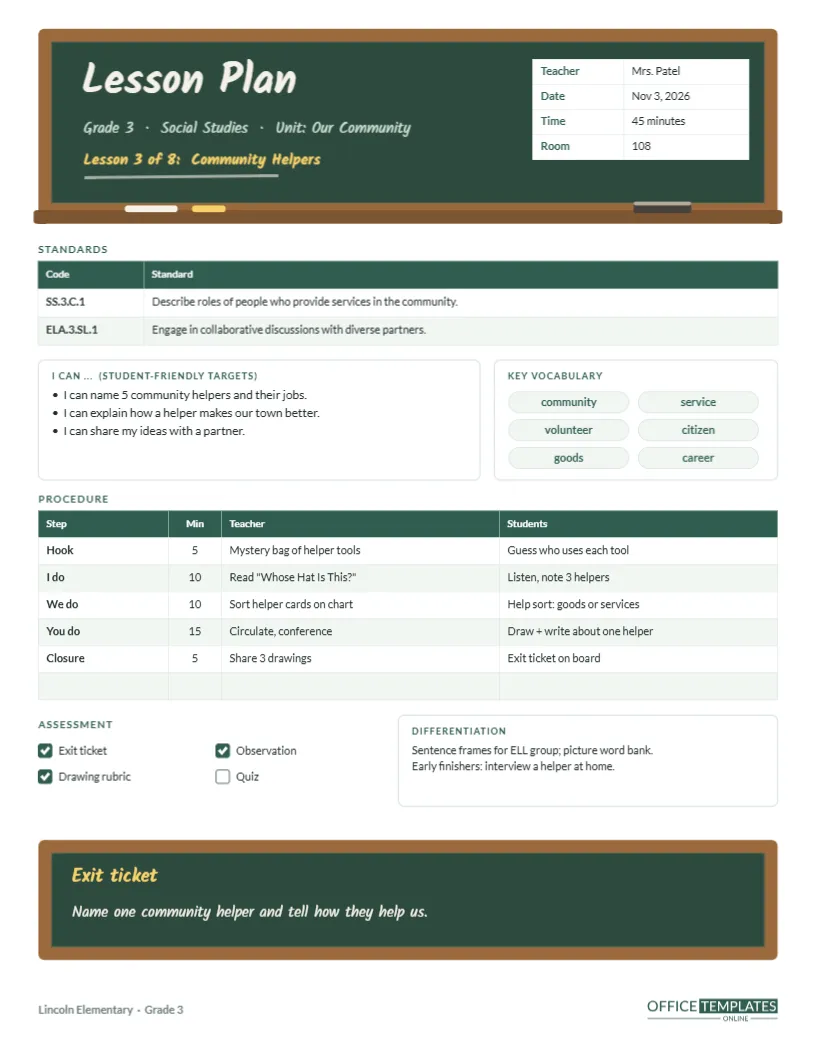
Principals, coaches, and evaluation rubrics increasingly ask the same three things of an elementary lesson plan: which standard are you teaching, how do students know what they are learning, and how will you check? This template builds those answers into the page, in a design that looks like it belongs in a classroom. The header is a framed green chalkboard with a wooden tray, and the plan closes with a smaller chalkboard holding the exit ticket.
Standards First
Below the chalkboard header, a two-column table lists standard codes and their full wording. The sample Grade 3 social studies lesson on community helpers addresses two standards:
| Code | Standard |
|---|---|
| SS.3.C.1 | Describe the roles of people who provide services in the community. |
| ELA.3.SL.1 | Engage in collaborative discussions with diverse partners. |
Replace the codes with your state or national standards. If a lesson covers three or four, open Edit Table Data and add rows.
The Chalkboard Header
A wooden frame surrounds a dark green board. On it, Lesson Plan is written in a chalky handwritten font (Kalam), followed by the grade, subject, and unit, and Lesson 3 of 8: Community Helpers in chalk yellow, with a faint chalk underline. A small white table sits on the board’s right side for the teacher, date, time, and room. Along the bottom of the frame, a chalk tray holds a white stick, a yellow stick, and a felt eraser. It is a cheerful, unmistakably elementary look.
“I Can” Statements Students Understand
The box titled I can … (student-friendly targets) rewrites the objective in the words you would post on the board. The sample targets read: I can name five community helpers and their jobs; I can explain how a helper makes our town better; I can share my ideas with a partner. Writing targets this way forces you to check that the goal is something a child could recognise achieving.
Vocabulary Chips
To the right, six rounded chips hold key vocabulary: community, service, volunteer, citizen, goods and career. They look like word cards on a word wall, and each is editable text on a shape, so swap in your own terms.
I Do, We Do, You Do
The procedure table follows the gradual release model, with a Hook and a Closure on either side. Columns record the step, minutes, what the teacher does, and what students do. The sample moves from a mystery bag of helpers’ tools (5 minutes) through a read-aloud of Whose Hat Is This?, a whole-class sort of helper cards, independent drawing and writing, and a closing share. One spare row is ready for a transition or brain break.
Assessment and Differentiation
Four tick boxes list assessment methods (exit ticket, observation, drawing rubric, quiz) so you can mark which you will use. The differentiation box beside them notes sentence frames and a picture word bank for English learners, plus an interview-a-helper extension for early finishers.
The Exit Ticket Board
A second, wider chalkboard near the bottom of the page holds the exit ticket question: Name one community helper and tell how they help us. Placing it on its own board reminds you to save the last five minutes for checking understanding, and the board itself echoes the header so the page feels finished.
Adapting It to Other Subjects
- Math: list the operation standard and put key terms like regroup in the chips.
- Science: use the hook for a quick demonstration and the exit board for a prediction.
- Reading: put the focus skill in the I can box and a text-based question on the board.
Recolouring the Boards
The chalkboards are grouped shapes. Make the board black for a blackboard look, or blue for a whiteboard-marker feel, and change the wooden frame to grey for a modern aluminium frame. The chalk lettering colours can follow your class colours.
Ready for Observations
When an administrator walks in with an evaluation form, the things they look for are all on this page: a posted target, standards alignment, a clear structure, checks for understanding, and differentiation. Print a copy for the observer and keep one on your desk.
Ink-Friendly Copies of the Board Design
Choose Download as PDF and print at actual size. The dark boards use more ink, so for daily use you may prefer to print in draft quality, or lighten the board colour to a soft green before printing.
Writing Good “I Can” Targets
Start with the standard, pick out its verb and object, and rewrite them in simple words a child can say back to you. Describe roles of people who provide services becomes: I can name community helpers and tell what they do. Keep each target short enough to fit on one line, post it on the board, and refer to it at the start and end of the lesson. When students can tell you the target in their own words, you know it is clear.
Timing the Gradual Release
A common pitfall is spending too long in the I do stage. In the sample, modelling takes ten minutes and independent work takes fifteen, so students have time to practise. If you notice the teacher column filling up with talk, move some of it into the We do row where students share the thinking.
Standards Plan FAQ
Can I fit four standards?
Yes. Add rows to the standards table; shorten the wording if space gets tight.
Is the chalk font editable?
Yes. It is Kalam, a Google Font; change it to any font in the editor list.
What size is it?
US Letter, 8.5 x 11 inches.
Can I remove the chalk tray?
Yes. Ungroup the header board and delete the tray pieces.
Can I change the number of procedure rows?
Yes. Open Edit Table Data to add or remove rows; the hook and closure rows can be renamed to suit your lesson model.
Where should the exit tickets go?
Collect them in a tray and sort into three piles: got it, almost, not yet. That sort is your plan for tomorrow.
Can I print it without the boards?
Yes. Delete both board groups, and the page becomes a plain, ink-saving standard plan.