A Hanging Sign That Offers a Simple Discount
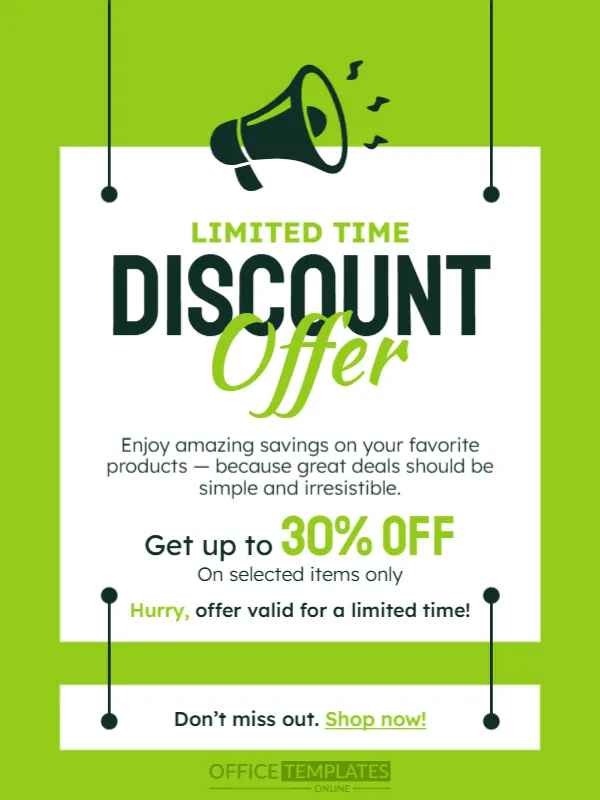
A good discount announcement is plain: how much off, on what and until when. This one hangs a white sign from two strings against a bright lime green page, with a dark green megaphone at the top and a bold DISCOUNT headline. It suits retail, food, services and e commerce brands that run a straightforward offer.
Hanging Sign on a Lime Page
The design is 600 x 800 pixels, portrait, one page. Two thin lines drop from the top edge, ending in round pins that hold a white panel, as if a sign were hanging in a shop. A second smaller panel at the foot holds the closing line. The megaphone sits above the main panel. The fonts are Staatliches, Kaushan Script and Lexend.
Headline and Offer Lines
LIMITED TIME in green is followed by DISCOUNT in dark capitals and Offer in lime script. A sentence reads Enjoy amazing savings on your favorite products, because great deals should be simple and irresistible. The offer is Get up to 30% OFF, On selected items only, and a line Hurry, offer valid for a limited time! The foot says Don’t miss out. Shop now! Replace the percentage and add the dates and the website or store name.
Clarity Checks for a Discount Notice
- Percentage and what it applies to.
- Start and end dates.
- Any code to enter.
- Exclusions, such as sale items.
- Where to shop.
Keeping the Offer Believable
A modest, specific offer, such as 30 percent off on selected items, is more believable than an extravagant claim. List two or three of the products in the caption so that customers can picture what they would buy.
Using the Link on the Last Line
The words Shop now! are underlined and highlighted in green, like a link. Add a real link in your post or story caption. In print, replace it with your web address or a QR code.
Saving the Green Discount Post
Lime green is very bright, so check the post on a phone at low brightness. Save as an image, and print a copy on 170 gsm paper for your window if needed.
Step by Step Editing of the Green Discount Offer Design
- On the green discount offer design, click the main headline and type your own words, keeping a similar length.
- Retype every name, date and contact line on the green discount offer design, checking each against a trusted source.
- Search the green discount offer design for the words Lorem and Company so that no placeholder remains.
- Click any logo or photo on the green discount offer design, choose Replace Image and resize the new picture to fit.
- Zoom the green discount offer design to full size and read each line aloud before you save it.
- Keep a clean master of the green discount offer design without private details, so later versions start tidy.
Consider the flash sale announcement. Similar designs include the seasonal sale announcement. Compare it with the giveaway announcement. Looking beyond the green discount offer design? See all announcements.