Time blocking is the habit of giving every part of the day a purpose in advance. Instead of reacting to emails and requests, you decide that nine to eleven is for the strategy paper and half past one is for the client workshop. Many people fail at it because their planner is too coarse to see the day. This US Letter log divides the day into fifteen-minute rows from 6 AM to 8 PM, so you can colour the plan in and compare it to what happened.
A Serif Title and a Clock Face
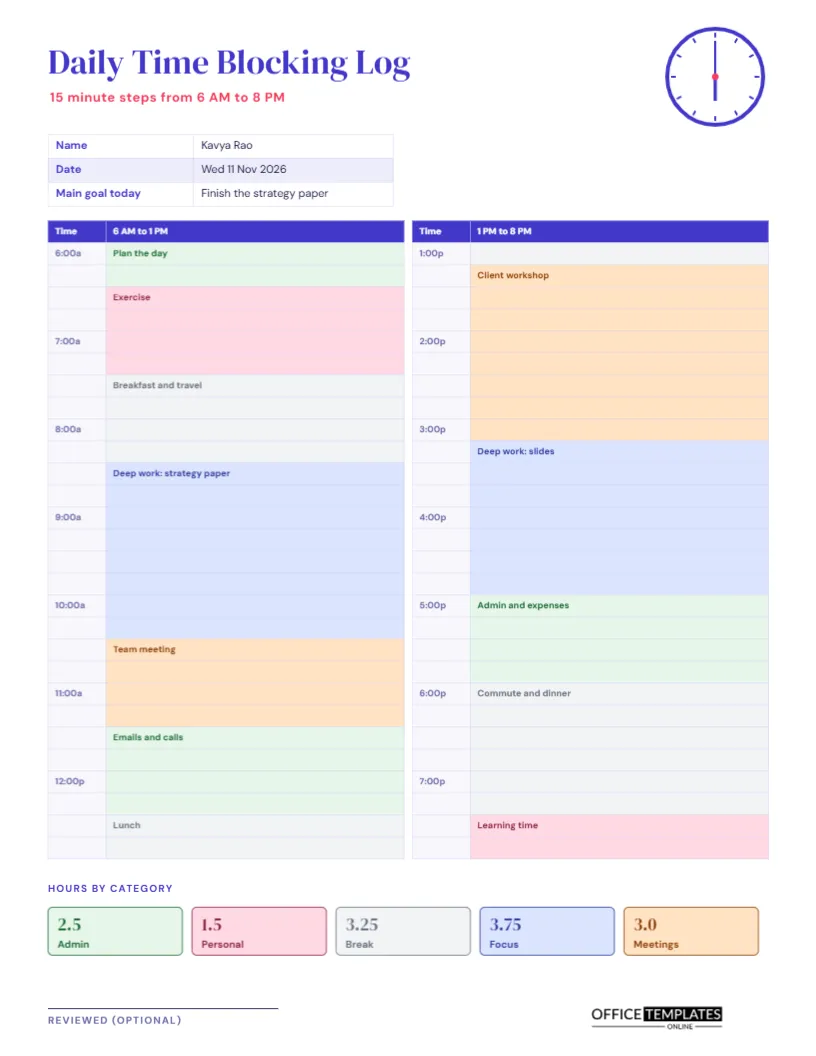
The page has no heavy banner. The title Daily Time Blocking Log is set in indigo DM Serif Display, with a rose subtitle in spaced capitals reading 15-minute steps from 6 AM to 8 PM. A small clock face at the top right shows six o’clock. DM Sans sets the rest. The airy layout leaves room for the long table that fills the page.
Name, Date and Main Goal
A small table at the top records the name, the date, and the main goal for the day. The sample is Kavya Rao on Wednesday 11 November 2026, to finish the strategy paper. Writing the main goal first is the secret of the method: every block is then judged by whether it serves the goal or not.
Two Columns of Twenty-Eight Rows
The grid is divided into two columns. The left one covers 6 AM to 1 PM and the right one 1 PM to 8 PM, each with 28 rows of fifteen minutes. A narrow time column shows the hour at the start of each hour, and a wide column beside it holds the activity. Cells are shaded as the plan is filled in, so the day becomes a map of coloured blocks.
The Five Colour Categories
| Category | Colour | Hours in the sample |
|---|---|---|
| Focus | Blue | 3.75 |
| Meetings | Orange | 3 |
| Admin | Green | 2.5 |
| Break | Grey | 3.25 |
| Personal | Pink | 1.5 |
The categories add up to 14 hours, the full length of the log.
A Sample Day Filled In
The sample day starts with planning and exercise, moves to a two-hour deep work block from 8:30 to 10:30, then a team meeting and emails. After lunch, a client workshop runs from 1:15 to 3:15, and a second deep work block follows until 5. Admin, a commute and dinner, and a short learning session fill the evening. The pattern shows a realistic mix of focus and interruptions.
Why Fifteen Minutes
An hour is too coarse for most tasks, and five minutes is too fine to maintain. Fifteen minutes balances detail with effort. It is the unit in which most meetings, calls, and quick tasks naturally fit, and it lets you plan short items such as a call or a walk without forcing them into a whole hour.
Hours by Category
A row of five tiles at the bottom totals the day by category, each in its own colour. The sample shows Focus 3.75, Meetings 3, Admin 2.5, Break 3.25 and Personal 1.5. These numbers answer a question every busy person wants answered: how much of today was for the work that matters? If focus is under three hours, the day was probably fragmented.
Planning in the Morning, Reviewing in the Evening
- Write your main goal for the day.
- Block the fixed items first: meetings, travel, and meals.
- Place deep work in your best energy hours.
- Fill the gaps with admin, calls, and breaks.
- During the day, note changes in a different colour.
- In the evening, add up the categories and note what you learned.
Protecting Focus Blocks
Focus blocks only work if they are protected. Switch off notifications, tell colleagues, book a room if you need one. Put the block in your calendar as a meeting with yourself. When someone asks for that time, offer another slot. The log shows how many blocks you actually kept, which is a useful measure of control over your day.
Leaving Buffers for the Unexpected
No plan survives contact with a real day. Leave a few fifteen-minute gaps, especially after meetings and before deadlines. Buffers absorb overruns and prevent a chain reaction of lateness. In the sample, admin and email blocks serve as soft areas that can flex when something urgent arrives.
Using the Log for Timesheets
Because every block is timed, the log can help you complete a timesheet at the end of the week. Add the hours that belong to each project, and transfer them. If you bill clients, the blocks are evidence of the time spent. For this, add the client name to the activity description.
Different Chronotypes and Shift Workers
Some people work best early, others late. The log starts at 6 AM and ends at 8 PM, but you can retype the times to start at noon or midnight. Shift workers can use it for any fourteen-hour window. The point is to match the plan to your energy, not to follow a standard day.
Editing Blocks and Colours
The grid is a real Table object, and each cell can be given a fill and text through the table panel. Select cells to colour a block, and type the activity name in the first cell of each block. Change the category names and colours in the tiles to suit your life.
Review Signature
An optional review line at the foot is for a manager or coach if you share the log. Print on US Letter at actual size so the rows stay readable. The colours print as soft tints in grayscale, and the text keeps every block distinguishable.
Comparing the Plan With What Really Happened
At the end of the day, mark where the plan and reality differed. Perhaps the workshop overran, or the deep work block was interrupted. A short note beside each difference teaches you how long things really take, and over a few weeks your plans become more realistic and your days calmer.
Time Blocking Log Questions
Can I plan a week on one page?
This page covers one day. Use the weekly work log to summarise the week.
What if my day is longer than fourteen hours?
Retype the times, or use two pages for a long shift.
Do the totals calculate automatically?
No. Add each category by hand and retype the tiles.