Most Black Friday shoppers browse on their phones. Yet many stores still use desktop banners that shrink to unreadable strips on a small screen. A dedicated mobile banner fixes that. This 1080 x 1350 pixel template is designed phone-first, with large type, a tall photo, and a full-width button that thumbs can find easily.
Mobile Banner Design Overview
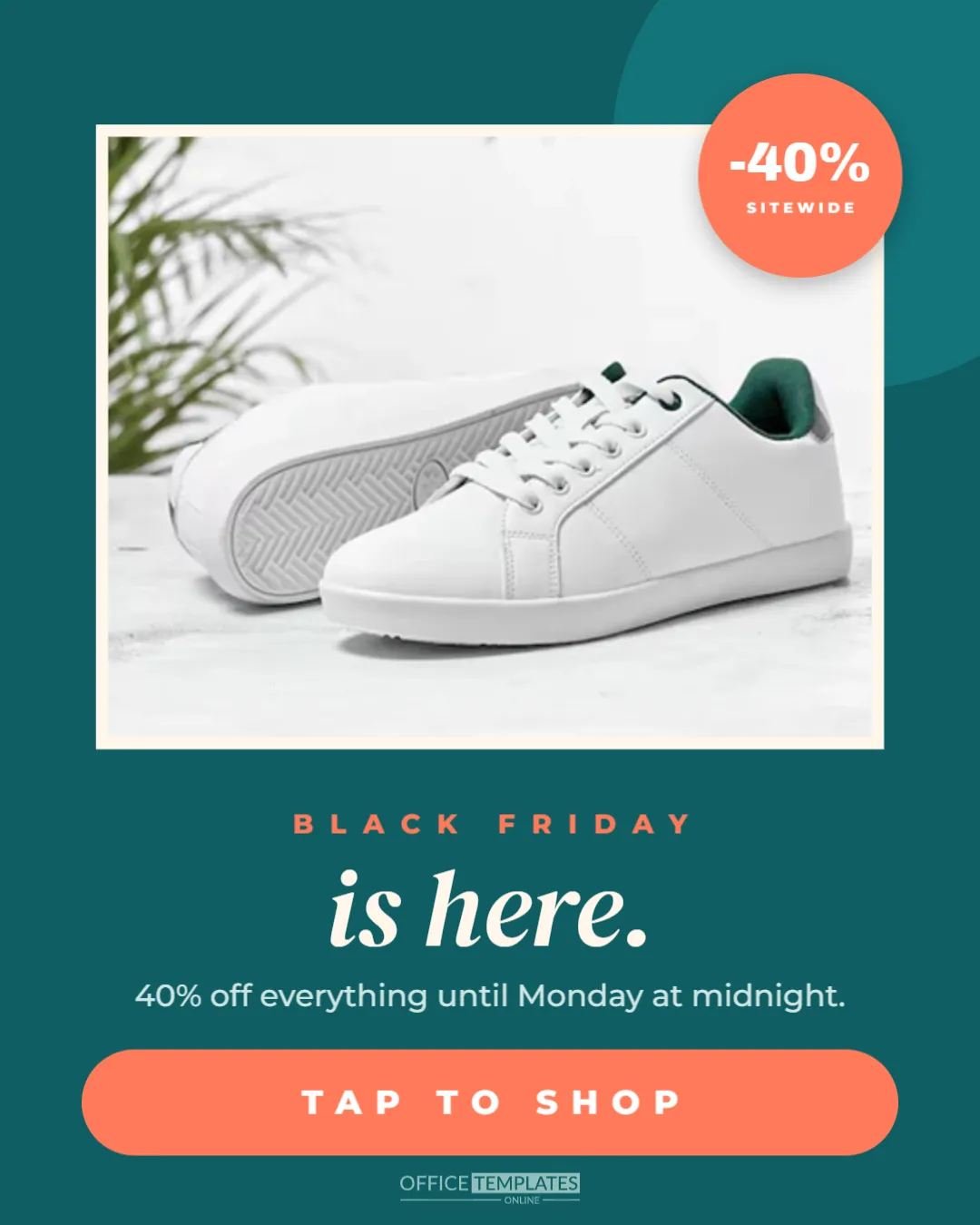
The banner is a 4:5 portrait shape, the same proportion as a portrait social post, which fills most of a phone screen without needing to scroll. The background is a deep teal, with a slightly lighter circle peeking in from the top right corner.
The top half holds a large product or lifestyle photo in a rounded card with a cream border. A coral circle overlaps the card’s top right corner with -40% in bold white letters and SITEWIDE beneath it, and a soft shadow lifts it off the photo.
Below the photo, BLACK FRIDAY is set in small-spaced coral capitals, followed by is here. In large cream DM Serif Display italic. A short line explains the offer: 40% off everything until Monday at midnight. A wide coral button with rounded ends reads TAP TO SHOP, and the brand mark sits at the bottom.
Why Your Store Needs a Mobile Banner
- Readable text: a wide desktop banner shrinks its text to a fraction of its size on a phone.
- No awkward cropping: themes often crop the sides of wide images on mobile, cutting off words.
- Thumb-friendly buttons: a wide button near the bottom is easy to tap.
- Faster decisions: one photo, one headline, and one action fit the way people scroll on phones.
Adding a Mobile Banner to Your Website
Many store themes and page builders let you upload a separate image for mobile in the hero or slideshow section. Look for a setting such as mobile image or show on mobile only. If your theme does not offer one, you can often add two sections, one shown on desktop and one on mobile, using visibility settings. Ask your theme’s support team if you are unsure.
Choosing the Mobile Banner Photo
The photo card is tall, so portrait photos work best. Choose one striking image rather than a busy collage; small details disappear on a phone. A single product with plenty of space around it, or a person using your product, is usually more effective than a group shot. Keep the top right corner simple, because the -40% badge covers it.
Editing the Offer and Headline
Click the badge to change the discount, and the offer line to match your terms. The headline is here. Works for the start of the sale; later in the weekend, change it to ends tonight. or extended. Keep the button text short and action-focused: TAP TO SHOP, SHOP NOW, or GET THE DEALS.
Mobile Banner Colour Ideas
| Background | Accent | Mood |
|---|---|---|
| Teal | Coral | Fresh and friendly |
| Black | Red | Classic Black Friday |
| Navy | Yellow | Bold and clear |
| Plum | Pink | Beauty and fashion |
| Forest green | Gold | Home and outdoor |
Speed Matters on Mobile
Shoppers on mobile data are impatient. A large banner image can slow your page, especially at peak times. Download the banner as a JPG or WebP for a smaller file, and let your platform resize it. Test your page speed on a phone using mobile data, not just Wi-Fi.
Accessible Mobile Banners
Add alt text that repeats the banner’s message, such as Black Friday is here: 40% off everything until Monday at midnight. Keep text contrast high, as the cream on teal does here, so it stays readable in bright outdoor light. Make sure the whole banner, or a real button below it, links to the sale page.
Using the Banner in Apps and Emails
The portrait format also suits app home screens, push notification images, and mobile email headers. In emails, display it at the full width of the email column; most email clients on phones show it large and clear.
Matching the Desktop Banner
Your desktop and mobile banners should feel like the same campaign. Use the same photo, colours and headline on both, adjusting only the layout. Shoppers who switch between devices, browsing on a phone and buying on a laptop, will recognise the sale instantly.
Updating the Banner Through the Sale
Plan a short series: starts at midnight before the sale, is here on Black Friday, last chance on Sunday, and Cyber Monday on Monday. Swapping the headline and badge keeps the banner fresh for returning visitors.
Testing the Mobile Banner
View your homepage on two or three different phones, including a smaller model. Check that the badge, headline, and button are fully visible without zooming, and that a tap leads to the right page. Ask a friend to try it; if they can explain the offer after a quick look, the banner works.
Thumb Zones and Button Placement
Most people hold their phone in one hand and tap with their thumb. The easiest area to reach is the lower middle of the screen, which is why the TAP TO SHOP button sits near the bottom and spans most of the width. Avoid placing important links in the top corners of a mobile design, where they are hardest to reach. If your theme adds a sticky header or cookie bar, check that it does not cover the button.
Mobile Banner Copy Length
On a phone, every extra word pushes the button further down. Keep the offer line to a single sentence of about ten words, and let the product page carry the details such as exclusions and delivery times.
Mobile Banner Questions
Can I use this size on Instagram too?
Yes. 1080 x 1350 pixels is Instagram’s portrait post size, so the banner doubles as a social post.
What if my theme needs a different size?
Change the canvas size in the editor and move elements to fit; keep the photo above the text.
Can I add a second photo?
Keep one photo for clarity on small screens. Use a carousel or slideshow if you need more.
Your customers are on their phones, so meet them there. Upload this mobile banner, set your offer, and make Black Friday easy to shop with one thumb.