On Black Friday, customers want to see the deal on the product itself. A clear sale tag showing the original price, the new price, and the savings answers their question before they ask, and saves your team a lot of time. This printable sheet gives you eight Black Friday Swing Tags, four with printed sample prices you can edit and four with blank lines to fill in by hand.
What Is on the Price Tag Sheet
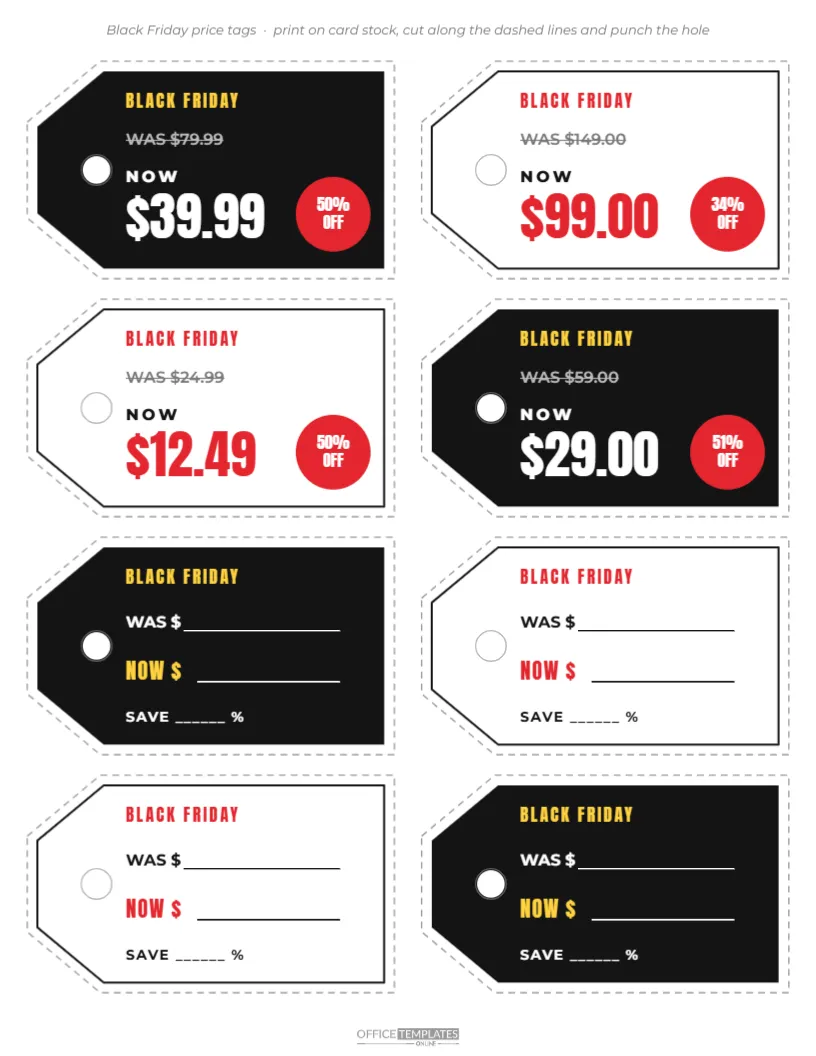
The sheet is US Letter, 8.5 x 11 inches, with a short instruction line at the top: print on card stock, cut along the dashed lines, and punch the hole. Eight tags are arranged in two columns of four. Each tag is a classic swing tag shape, pointed at one end with a round hole for string, and surrounded by a dashed cutting outline.
The tags alternate between black and white in a checkerboard pattern. Every tag has BLACK FRIDAY at the top, in yellow on black tags and red on white tags. On the first four tags, the original price is printed with a line through it after the word WAS, then NOW and the sale price in large condensed numbers, with a red disc showing the percentage off. The last four tags are write-in versions: WAS $ and NOW $ with blank lines, and SAVE ______ % below. The brand mark sits at the foot of the sheet.
Sample Prices on the Tags
| Was | Now | Saving |
|---|---|---|
| $79.99 | $39.99 | 50% |
| $149.00 | $99.00 | 34% |
| $24.99 | $12.49 | 50% |
| $59.00 | $29.00 | 51% |
Change these to your own products before printing.
Printed Tags or Write-In Tags?
Printed tags look the most professional and are best for your key deals and window displays. Write-in tags are faster when you have many products with different prices, or when prices change during the weekend. Many shops use both: printed tags for headline items and a stack of write-in tags at the till for everything else. You can also duplicate either style to fill a whole sheet.
How to Make a Full Sheet of One Style
If you want eight printed tags, select a printed tag and its outline, copy them and paste them over a write-in tag, then delete the write-in version. Repeat for each position. Alternatively, print the sheet twice: once for the printed tags and once for the write-in tags, then cut out only the ones you need.
Editing Prices and Calculating Savings
Click the WAS price and the NOW price to edit them. Then update the percentage disc. To calculate a saving, subtract the new price from the old price, divide by the old price, and multiply by 100. For example, $79.99 to $39.99 saves $40, which is 50% of $79.99. Round to the nearest whole number for the discount.
Printing and Cutting the Tags
- Print on white card stock, around 65 to 110 lb cover weight.
- Use the best quality setting so the black tags print evenly.
- Cut along the dashed outlines with scissors or a craft knife and ruler.
- Punch the hole with a standard hole punch, centred in the printed ring.
- Thread with string, elastic, tagging pins, or ribbon.
A paper trimmer makes the straight edges quick; finish the pointed ends with scissors.
Attaching Tags to Different Products
- Clothing: loop string through a buttonhole or the label.
- Bags and accessories: tie to a handle or strap.
- Homeware: tie around the neck of a vase or the handle of a mug.
- Boxed items: tape the tag to the front of the box.
- Shelves: tape the tag to the shelf edge with the point facing the product.
Black Friday Pricing Rules to Remember
Many places have rules on showing reference prices, the was price in a sale. Generally, the original price should be a genuine price at which the item was recently offered. If you are not sure of the rules where you trade, check with your local trading standards or consumer protection office. Honesty was, and now prices protect your reputation and help customers trust your deals.
Changing Tag Colours
The black and white checkerboard pattern looks bold and helps tags stand out on busy shelves. You can change the black tags to your brand colour, or make all tags one colour for a calmer display. Red, kraft brown and navy are popular for sale tags. Keep the price text high in contrast with the tag colour.
Tags for Small Businesses and Markets
Craft fairs, holiday markets and pop-up shops can use the tags for Black Friday weekend specials. Write-in tags are especially useful at markets, where you may decide prices on the spot. A neat tag on each item makes a stall look organised and professional, and saves you repeating prices all day.
Storing Leftover Tags
Keep leftover blank tags in an envelope with your sale supplies. Write-in tags can be reused for other sales by covering BLACK FRIDAY with a small sticker, or simply print a new sheet with a different headline next time.
Making Matching Shelf Signs
For a coordinated display, create a few larger signs in the same black and white style with BLACK FRIDAY and a percentage. Place them above the shelves where tagged products sit, so customers spot the sale area from across the shop and then find each price on the tags.
Tagging Stock Before the Rush
Tag sale items the evening before Black Friday, not the morning of. Work through one section at a time, checking each price against your till system as you go. Keep a list of tagged items and their sale prices at the till, so staff can confirm any price quickly if a tag goes missing.
Price Tag Questions
Can I add a barcode?
Add a small barcode image to each printed tag if your till system uses them, or keep the original product barcode visible.
Can I write on the black tags?
Use a white or silver paint marker on black tags; ordinary pens will not show.
Can I change the number of tags?
Make the tags larger and fit six per sheet, or smaller for ten. Keep the dashed outline around each one.
Clear prices sell. Print your tags, add the deals, and make every Black Friday saving obvious at a glance.