The days before Black Friday are just as important as the day itself. A countdown builds excitement, reminds followers that something is coming, and gives you a reason to post every day without repeating yourself. This Instagram Story Template uses split-flap digits, like an old airport departures board, to count down the days until your sale starts.
Countdown Story Design
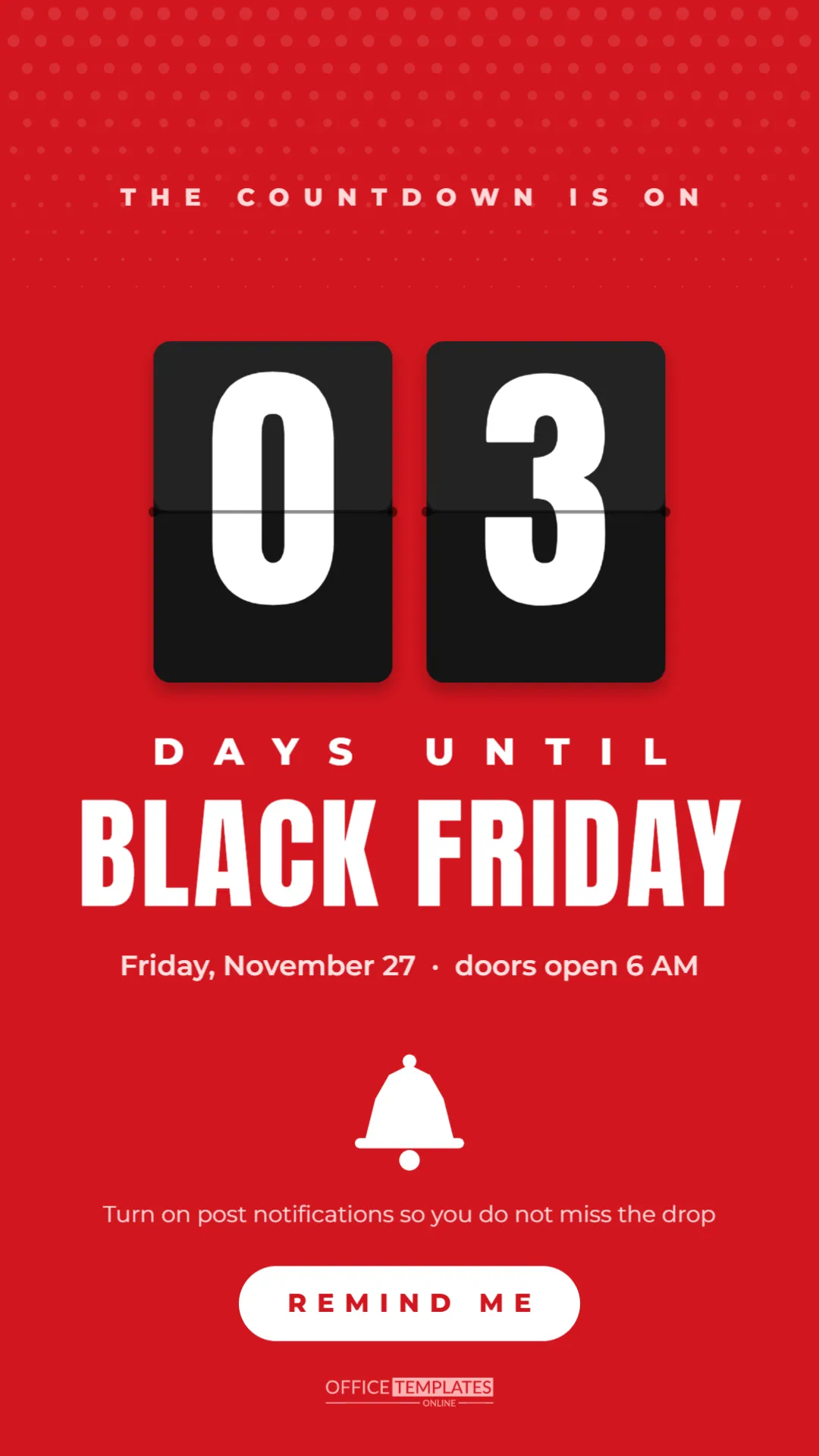
The story is 1080 x 1920 pixels with a bold red background and soft white halftone dots fading down from the top. A small pale line at the top reads THE COUNTDOWN IS ON in spaced capitals.
The centrepiece is a pair of split-flap cards, dark rounded tiles with a hinge line across the middle and tiny pins at each side, showing 0 and 3 in large white Anton digits. Below them, DAYS UNTIL is spaced widely in white, followed by BLACK FRIDAY in large Anton letters and a short line with the date and opening time.
A simple white bell icon sits under the date, followed by a gentle prompt to turn on notifications. A white pill button reads REMIND ME, and a small logo mark finishes the bottom of the story.
How to Run a Black Friday Countdown
- Pick a start date: Seven days before Black Friday works well for most shops.
- Duplicate the story: Make one copy for each day and change the digits.
- Post at the same time daily: Followers learn when to look for it.
- Add a countdown sticker: Instagram’s countdown sticker lets people set a reminder.
- Finish with a launch story: On the day, change the cards to 00, and the text to IT’S HERE.
Editing the Flip Digits
Each digit is a separate text box on its own card. Click a digit and type the new number. For a countdown longer than nine days, use both cards, such as 1 and 0 for ten days. You can also change DAYS UNTIL to HOURS UNTIL for a final-day countdown, and update the digits through the day.
Using the Instagram Countdown Sticker
Instagram’s countdown sticker counts down in real time and lets viewers tap to get a reminder when it ends. After uploading the story, add the sticker over the REMIND ME pill or just below it, set the end time to your sale’s start, and name it Black Friday sale. Each time you post a new countdown story, you can reuse the same sticker so reminders stay connected.
Countdown Content Ideas for Each Day
| Days left | Add to the story sequence |
|---|---|
| 7 | Announce the date and that a sale is coming |
| 6 | Hint at the categories on sale |
| 5 | Share a sneak peek photo, partly hidden |
| 4 | Run a poll on which deal followers want most |
| 3 | Reveal one doorbuster |
| 2 | Explain how to shop early or online |
| 1 | Post opening times and a final reminder |
Why Countdowns Build Excitement
Countdowns create anticipation. Seeing the number drop each day gives followers a small sense of an approaching event, much like a calendar before a holiday. They also give you an easy, low-effort reason to appear in stories daily, which keeps your account near the front of followers’ story trays when the sale finally starts.
Changing the Countdown Colours
Red is energetic and classic for Black Friday. Black with yellow digits gives a bold look, navy with white feels calm and premium, and a brand colour with dark cards keeps everything on brand. The halftone dots can be recoloured or removed. Keep the digit cards dark so the white numbers stay crisp.
Countdown Story Without Instagram
The same tall format works for Facebook stories, WhatsApp status updates and TikTok photo posts. On platforms without a countdown sticker, the REMIND ME pill can become FOLLOW FOR UPDATES or TURN ON NOTIFICATIONS. Posting the same countdown across platforms reaches customers wherever they spend time.
Turning the Countdown Story Into a Feed Post
If you want the countdown in your feed too, resize the canvas to 1080 x 1350 pixels and move the digits and headline closer together. A feed post on day seven and day one, with stories in between, works well without filling your grid with countdowns.
Countdown Stories for In-Store Events
Physical shops can use the countdown to build footfall for opening day. Change the date line to your opening time and address, and the bell prompt to Set your alarm; doors open at 6 AM. Show photos of the shop being prepared in the stories between countdown frames to build curiosity.
Keeping the Countdown Honest
A countdown should end when it says it will. If your sale date changes, update the remaining stories rather than letting the countdown reach zero with nothing happening. Followers who trust your timing will believe your next countdown, too.
Measuring the Countdown’s Impact
Instagram shows how many people tapped the countdown sticker to get a reminder. That number gives you a good idea of how many followers are planning to shop. Compare it with sales in the first hour of Black Friday to see how well the countdown worked.
Countdown Story Accessibility
Keep the digits large and the contrast strong, as they are here. If you add text in the Instagram app, choose a clear font and avoid placing it over the digits. Captions on any video frames in the sequence help viewers who watch without sound.
Designing the Launch Day Frame
When the countdown reaches zero, post a frame that feels like a celebration. Change the cards to 0 and 0, replace DAYS UNTIL with IT’S HERE, and swap REMIND ME for SHOP NOW with a link sticker. Followers who watched the countdown all week will be waiting for this moment.
Countdown Story Questions
Can I show hours and minutes?
Add more flip cards for HH and MM, or change the label to HOURS UNTIL for the final day.
Can I use it for Cyber Monday?
Change BLACK FRIDAY to CYBER MONDAY, and the date line, and the countdown is ready.
Can I add a product photo?
Place a small photo frame between the date and the bell, and reduce the bell or remove it.
Excitement builds one day at a time. Set your digits, post your first countdown story, and let your followers count down to Black Friday with you.