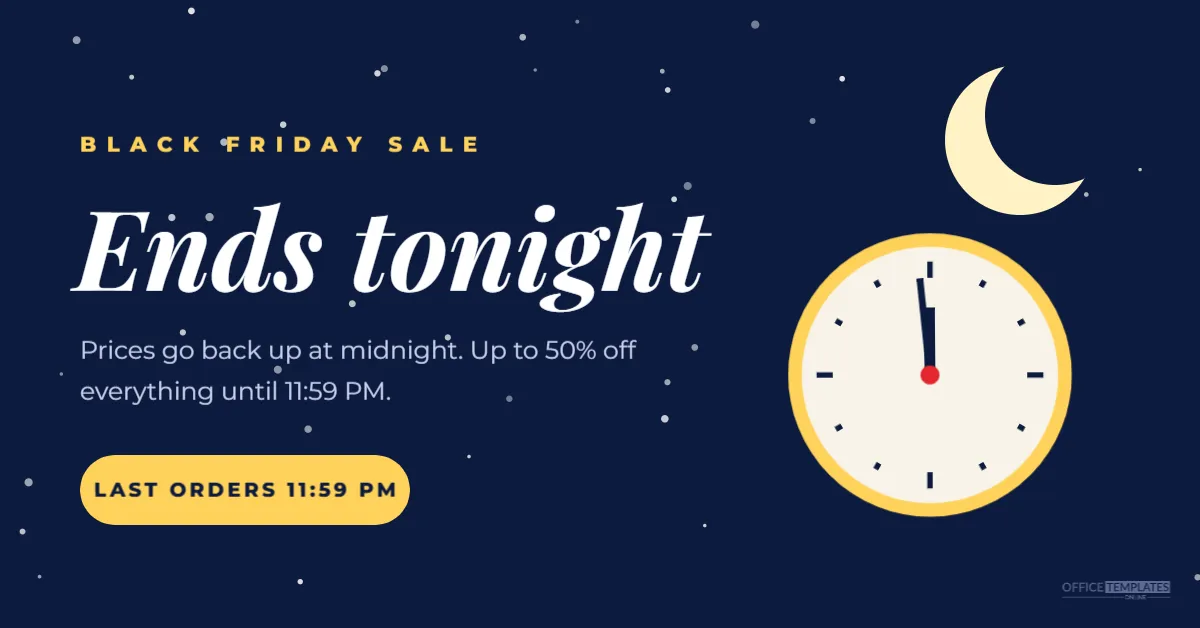
When a sale ends at midnight, the evening is your last opportunity to remind shoppers. A banner that feels like nighttime makes the message instantly understood: the day is ending, and so are the deals. This 1200 x 628 pixel banner uses a starry navy sky, a crescent moon, and a clock showing 11:59 to say it ends tonight without shouting.
Ends Tonight Banner Design
The background is a deep navy night sky scattered with small white stars of different sizes and brightness. In the top right, a soft yellow crescent moon glows. Below it sits a round clock with a cream face, a yellow rim, black hour marks, and hands set to 11:59, with a tiny red centre pin.
On the left, BLACK FRIDAY SALE appears in small yellow spaced capitals. Ends tonight is written in large white Playfair Display italic, an elegant serif that suits the calm night mood. Two lines explain: prices go back up at midnight, and up to 50% off everything until 11:59 PM. A yellow pill button reads LAST ORDERS 11:59 PM, and the logo mark sits small in the bottom right.
Where to Use the Ends, Tonight Banner
- the top of your homepage on the final evening;
- a last chance email sent in the late afternoon;
- a Facebook or LinkedIn post, since 1200 x 628 suits link previews;
- a pinned announcement on your online store or marketplace page.
Editing the Clock and Time
The clock is drawn from shapes, with the hands set to 11:59. If your sale ends at a different time, such as 9 PM, you can rotate the hands: double-click into the clock group, select the hour hand, and rotate it. Or keep 11:59 as a symbol of the last minute, and change only the text. Update the button with your real cut-off time.
A Calmer Kind of Urgency
Most “ends tonight” graphics use red alarm colours and flashing exclamation marks. This banner takes a gentler approach that still communicates the deadline clearly. It suits brands that want to avoid pressure tactics: bookshops, home brands, wellness businesses and premium retailers. The message is simple and respectful: here is the time, here is the offer.
Writing the Ends Tonight Message
| Line | Example |
|---|---|
| Kicker | BLACK FRIDAY SALE |
| Headline | Ends tonight |
| Detail | Up to 50% off everything until 11:59 PM |
| Button | LAST ORDERS 11:59 PM |
Keep the headline to two or three words so it stays large.
Time Zones and Online Sales
If you sell online to customers in different time zones, be clear about which midnight you mean. Add a time zone abbreviation to the detail line, or say midnight Pacific time. Make sure your store’s sale schedule matches; some platforms use the store’s time zone, others the server’s.
Changing the Night Sky Colours
Navy and yellow are natural night colours. For a different mood, try deep purple with pink stars, black with silver, or dark green with gold. The stars are one grouped object; you can recolour them or change their opacity. Keep the moon and clock lighter than the sky so they glow.
Using the Banner in a Final Email
Send a short email in the late afternoon with this banner at the top, a subject line such as Ends tonight: last orders at 11:59 PM, and a single button to your sale page. Resize the banner to 600 pixels wide for email and check that the text is still readable on a phone.
Turning It Into a Story
For an Instagram or Facebook story, change the canvas to 1080 x 1920 pixels, place the moon and clock at the top, and stack the text below. Add a countdown sticker set to midnight for a live timer alongside the illustrated clock.
Removing the Banner After Midnight
Schedule the banner to come down at the end of the sale, or set a reminder to remove it. A banner announcing it ends tonight that is still showing the next morning confuses customers and can lead to complaints if prices have changed.
Other Uses for the Night Banner
The night sky design suits late-night shopping events, midnight launches, New Year’s Eve countdowns and evening webinars. Change the kicker and the headline, and keep the moon and clock as a recognisable evening theme.
Banner Accessibility Tips
Add alt text such as Black Friday sale ends tonight at 11:59 PM, up to 50% off everything. Repeat the deadline in real text on your website, since some visitors cannot see images. The white and yellow text on navy has strong contrast.
Measuring the Final Evening
Look at your sales by hour on the last day. If you see a rise after the banner goes up, keep the same timing next year. If the final evening is quiet, try sending the reminder earlier, around the time your customers usually shop.
Pairing the Banner With a Gentle Email
The calm look of the banner suits a calm email. Write a short, friendly note, such as: Just a reminder: our Black Friday prices end at midnight. Thank you for shopping with us this weekend. A personal sign-off from the owner or team adds warmth. Gentle reminders are often appreciated more than aggressive countdowns, especially by loyal customers who have already bought.
Preparing the Site for the Last Rush
The final evening can bring a burst of orders. Check stock levels, hide sold-out products, and make sure discount codes still work. Keep someone available to answer customer questions until midnight, if you can, so last-minute shoppers do not abandon their carts.
Ends Tonight Banner Questions
Can I remove the clock?
Yes. The moon alone still suggests evening; move the headline to the right if you like.
Can I add a discount code?
Add a small dashed code box below the detail line.
What size is best for my website?
Check your theme’s banner size and change the canvas to match.
The night before the deals disappear is the perfect time for a gentle reminder. Set your deadline, post your banner, and let shoppers enjoy one last evening of savings.