An online shop needs more than one Black Friday graphic. Beyond the main homepage hero, you need banners for collection pages, category headers, blog posts, and promotional strips. This Wide E-Commerce Banner is designed for those spaces. It is playful, colourful, and instantly clear, with a drawn shopping bag that says shopping before anyone reads a word.
Inside the E-commerce Sale Banner
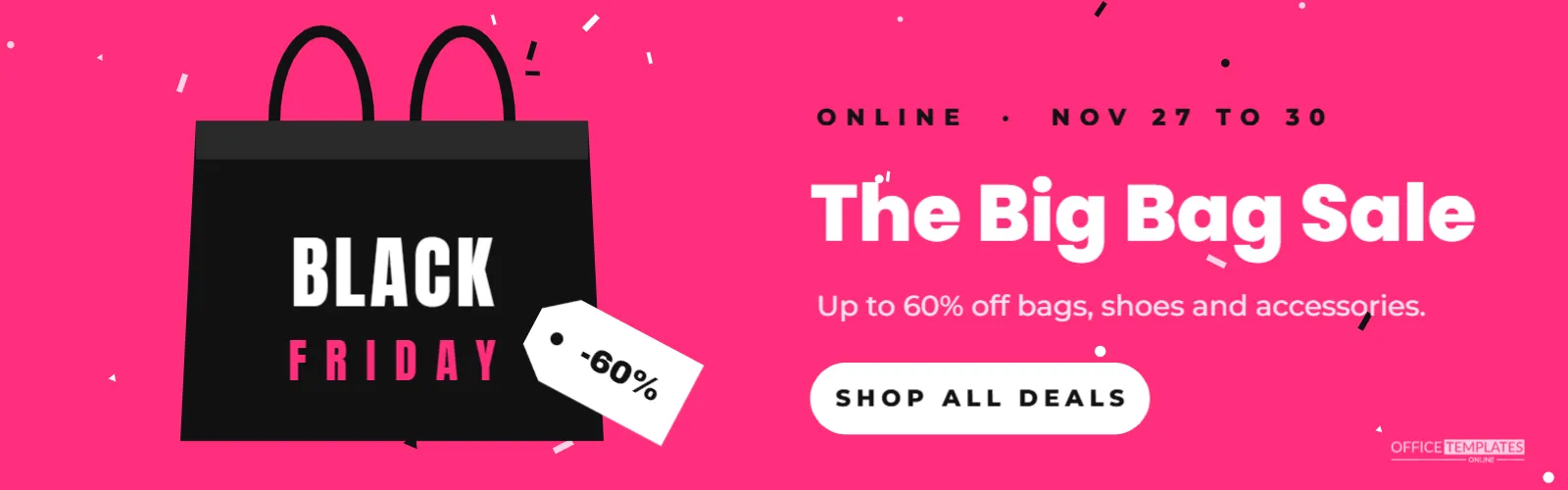
The banner is 1600 x 500 pixels, a wide strip that suits collection headers and promotional sections on most online store themes. The background is a bright hot pink with small white, pale pink, and black confetti dots scattered across it.
On the left, a black shopping bag is drawn from simple shapes: a slightly flared body, a darker folded band at the top, and two rope handles arching above. BLACK is printed across the bag in white condensed capitals, with FRIDAY in pink beneath. A white swing tag hangs off the bag at an angle with -60% written on it.
On the right, a small black line reads ONLINE · NOV 27 TO 30. The headline The Big Bag Sale is set in white Poppins ExtraBold, followed by a short offer line: Up to 60% off bags, shoes and accessories. A white rounded button reads SHOP ALL DEALS, and the brand mark sits in the bottom right corner.
Where the E-commerce Banner Fits on Your Store
- Collection page headers: above the products in your sale collection.
- Category pages: a banner for bags, shoes, or accessories during the sale.
- Homepage sections: as a second or third section under the main hero.
- Blog posts: at the top of a Black Friday gift guide.
- Marketplace storefronts: many marketplaces allow a custom banner on your shop page.
Editing the Bag and the Tag
The shopping bag is a grouped drawing, and the words on it are separate text boxes. Change BLACK and FRIDAY to your shop name or SALE if you prefer. Recolour the bag to match your packaging; a kraft brown bag with black text looks lovely for eco brands, and a white bag with gold handles feels premium. The tag’s percentage can be any figure, or a word like DEALS.
Writing a Collection Banner Headline
The Big Bag Sale is a playful headline for an accessories store, but you can match the headline to your products:
| Store type | Headline idea |
|---|---|
| Bookshop | The Big Book Sale |
| Toy shop | Toy Box Deals |
| Pet shop | Treats for Less |
| Coffee roaster | Fresh Beans, Fresh Deals |
| Fashion | The Black Friday Edit |
| Home decor | Cosy Home Sale |
Keep the headline short enough to stay on one line at this size; about 18 characters fits comfortably.
Responsive Banners on Online Stores
Wide banners shrink on phones. Most store themes either scale the image down or crop the sides. After uploading, check the page on a phone. If the text is too small, create a mobile version of the banner with a taller canvas, the bag above the text and larger type, and upload it to your theme’s mobile image setting if it has one. Keeping key text away from the far edges protects it from cropping.
Image Format and File Size
For a flat colour graphic like this, PNG gives the sharpest edges, but it can be larger than a JPG. Many store platforms convert images automatically to modern formats and sizes. Check that the uploaded banner loads quickly; a slow banner delays the whole page, and shoppers on mobile data may leave before your products appear.
Making the Banner Clickable
The SHOP ALL DEALS button is part of the image. In most themes, you can add a link to the whole banner, so a click anywhere takes shoppers to the sale collection. If your theme supports text and buttons over images, you can delete the drawn button and use a real button instead, which is better for accessibility and lets you change the link text easily.
Colour Choices for an E-commerce Banner
Hot pink stands out from the black and red that most stores use for Black Friday, which helps your banner feel fresh. If pink does not suit your brand, try electric blue with a white bag, lime green with a black bag, or orange with a navy bag. Keep confetti in the same colours as the text so the design stays coherent.
Consistent Sale Graphics Across a Store
Shoppers move between pages quickly. When the homepage hero, collection banners and product page badges share the same colours and fonts, the sale feels organised and trustworthy. Use this banner’s pink and white across your other Black Friday graphics, and repeat the bag motif on email headers and social posts for a recognisable campaign.
Alt Text for Store Banners
When you upload the banner, add alt text describing its message, such as The Big Bag Sale: up to 60% off bags, shoes and accessories, November 27 to 30. This helps visually impaired shoppers and gives search engines context. Avoid filling alt text with keywords; a natural sentence works best.
Updating the Banner After Black Friday
Change the date line to CYBER MONDAY for the following Monday, or EXTENDED if you continue the sale. After the sale ends, replace the banner promptly so returning customers do not expect prices that have changed. Saving your edited design means you can adapt it for a holiday gift sale in December.
Banner Ideas for Marketplace Sellers
Sellers on handmade and vintage marketplaces often have limited space for branding. A custom shop banner with a clear Black Friday message is one of the few ways to stand out. Check your marketplace’s recommended banner size, resize the canvas, and keep the bag and headline. Mention the discount in your shop announcement too, since banners can be hidden on some mobile apps.
Testing Your Black Friday Store Banner
Before the sale goes live, click the banner yourself on desktop and on a phone. Check that it leads to the right collection, that sale prices show, and that the headline matches what shoppers find. Small mismatches, such as a banner promising 60% off when the collection shows 30% off, lead to disappointed customers and abandoned carts.
E-commerce Banner Questions
Can I add product photos?
Yes. Replace the bag with a product photo frame, or place a photo next to it and shorten the headline.
What size should I use for my theme?
Check your theme’s recommended banner size, then change the canvas in the editor and adjust the layout.
Can I use the banner in emails?
Resize it to about 600 pixels wide and enlarge the text so it stays readable on phones.
A cheerful banner turns a plain collection page into part of the sale. Set your headline, link it to your deals, and fill your store with Black Friday colour.