Many small businesses take Black Friday orders the personal way: by message, at a market stall, over the phone, or at a pop-up. Without a proper form, orders get lost in chat threads and scraps of paper. This Order Form keeps everything in one place, with a product table that shows the regular price, the Black Friday price, and the total for each customer.
Order Form Layout
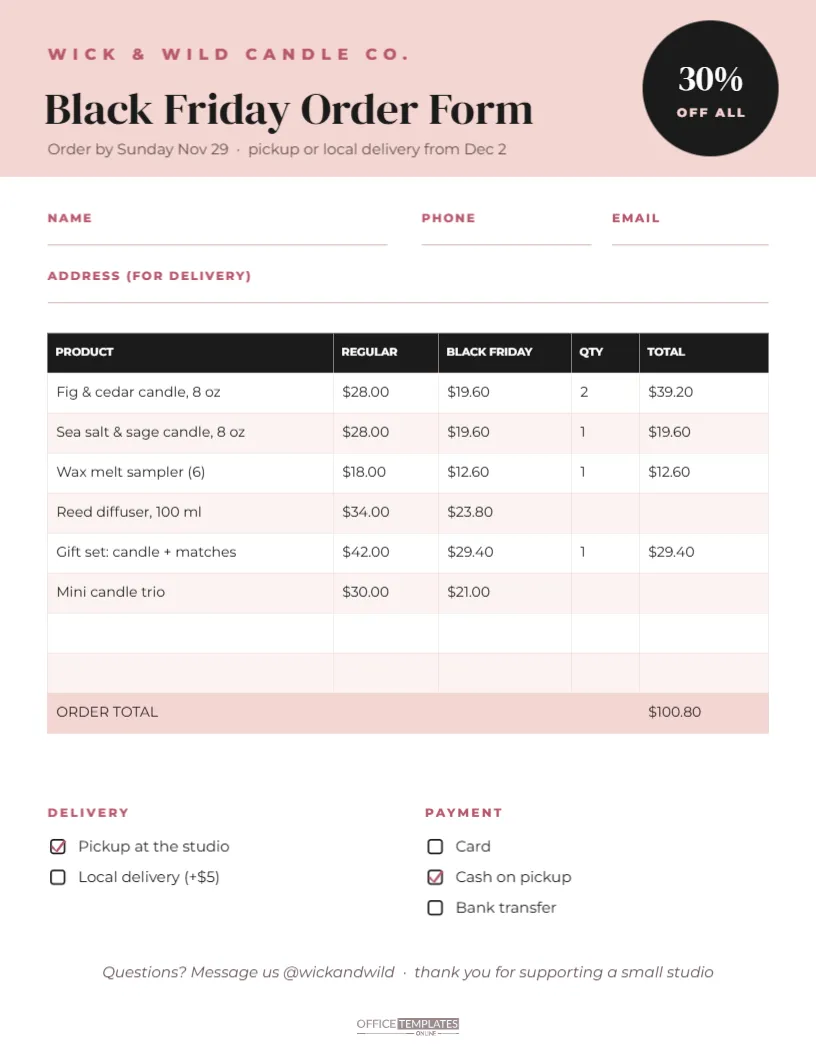
The form is US Letter, 8.5 x 11 inches. A soft blush header carries the shop name, WICK & WILD CANDLE CO., the title Black Friday Order Form in DM Serif Display, and a line with the order deadline and pickup dates. A black circle on the right announces 30% OFF ALL.
Below the header are lines for the customer’s name, phone, email, and delivery address. The main section is a real editable table with five columns: PRODUCT, REGULAR, BLACK FRIDAY, QTY, and TOTAL. Six sample products are listed, such as candles, a wax melt sampler, a reed diffuser, and gift sets, with prices calculated at 30% off and totals for the quantities ordered. Two blank rows follow, and an ORDER TOTAL row is shaded in blush.
At the bottom, tick boxes cover delivery (pickup at the studio or local delivery) and payment (card, cash on pickup or bank transfer). A short italic thank you invites questions by message, and a small logo mark finishes the page.
Sample Order in the Table
| Product | Regular | Black Friday | Qty | Total |
|---|---|---|---|---|
| Fig & cedar candle, 8 oz | $28.00 | $19.60 | 2 | $39.20 |
| Sea salt & sage candle, 8 oz | $28.00 | $19.60 | 1 | $19.60 |
| Wax melt sampler (6) | $18.00 | $12.60 | 1 | $12.60 |
| Gift set: candle + matches | $42.00 | $29.40 | 1 | $29.40 |
The sample order total is $100.80. Replace the products and prices with your own.
Editing the Product Table
Double-click the table, or choose Edit Table Data, to change products, prices, and quantities. You can add rows for more products. The totals in the sample were calculated for you; when you change prices or quantities, update the TOTAL column and the ORDER TOTAL. A calculator or spreadsheet makes this quick, or leave the QTY and TOTAL cells blank and fill them in by hand for each customer.
Who the Order Form Suits
- candle, soap and skincare makers;
- bakers taking holiday pre-orders;
- clothing and jewellery makers selling at markets;
- small shops taking phone or message orders;
- school and club fundraisers selling products.
Using the Form for Message Orders
If customers order by message, keep a printed copy of the form for each order and fill it in as you chat. Or share the form as a PDF or image so customers can fill it in themselves and send a photo back. Either way, every order has the same details, which makes packing and payment much easier.
Setting a Clear Deadline
The header includes an order deadline and pickup dates. Deadlines matter for small makers, who need time to make or pack products. Choose a deadline that gives you enough time, and tell customers when they can expect their order. A clear schedule avoids last-minute stress.
Delivery and Payment Options
Edit the tick boxes to match how you work. Some makers offer local delivery for a small fee, pickup from a studio or market, and shipping by post. For payment, list the methods you accept. If you take deposits, add a line such as Deposit paid: $____.
Changing the Form Colours
Blush and black suit candle, beauty and lifestyle brands. A bakery might prefer cream and chocolate brown, a garden business sage and cream, and a jewellery maker navy and gold. Change the header colour, the table header and the total row together.
Keeping Black Friday Orders Organised
Number each form in the top corner and keep them in a folder or clipboard. When an order is paid, tick it; when it is packed, add a second tick. A simple system like this prevents missed or duplicated orders during the busiest weekend of the year.
Order Forms and Customer Data
Order forms contain personal details such as names, phone numbers, and addresses. Store paper forms securely and shred them when you no longer need them, and keep digital copies private. Customers trust small businesses with their information, so treat it carefully.
Turning the Form Into a Price List
With the QTY and TOTAL columns cleared, the table becomes a printed Black Friday price list. Display it at a market stall or share it on social media so customers can see the deals before ordering.
Order Form Accessibility
Use clear handwriting or type when filling in forms, and keep the table text a readable size if you add more rows. When sharing the form digitally, include the deadline and contact details in your message text too.
Confirming Orders With Customers
After filling in a form, send the customer a quick confirmation: what they ordered, the total, the pickup or delivery date, and how to pay. A photo of the completed form works well in a message. Confirming avoids misunderstandings and gives customers a record of their order.
Planning Production From Orders
Add up the quantities of each product across all forms before you start making or packing. This tells you how many of each item you need and helps you order materials in time. A simple tally sheet, or the same table on a blank form, works well for this.
Printing Enough Forms
Print a stack of blank forms before the weekend and keep a clipboard at the till or stall, so no order is written on a scrap of paper.
Order Form Questions
Can I add a column for scents or colours?
Add a column in the table editor and narrow the product column slightly.
Can customers fill it in online?
Share the PDF so they can print it, or recreate the form in an online form tool using the same fields.
Can I change the discount?
Yes. Update the circle and the Black Friday price column to match your offer.
A tidy order form makes a busy weekend feel manageable. Add your products, set your deadline, and take every Black Friday order with confidence.