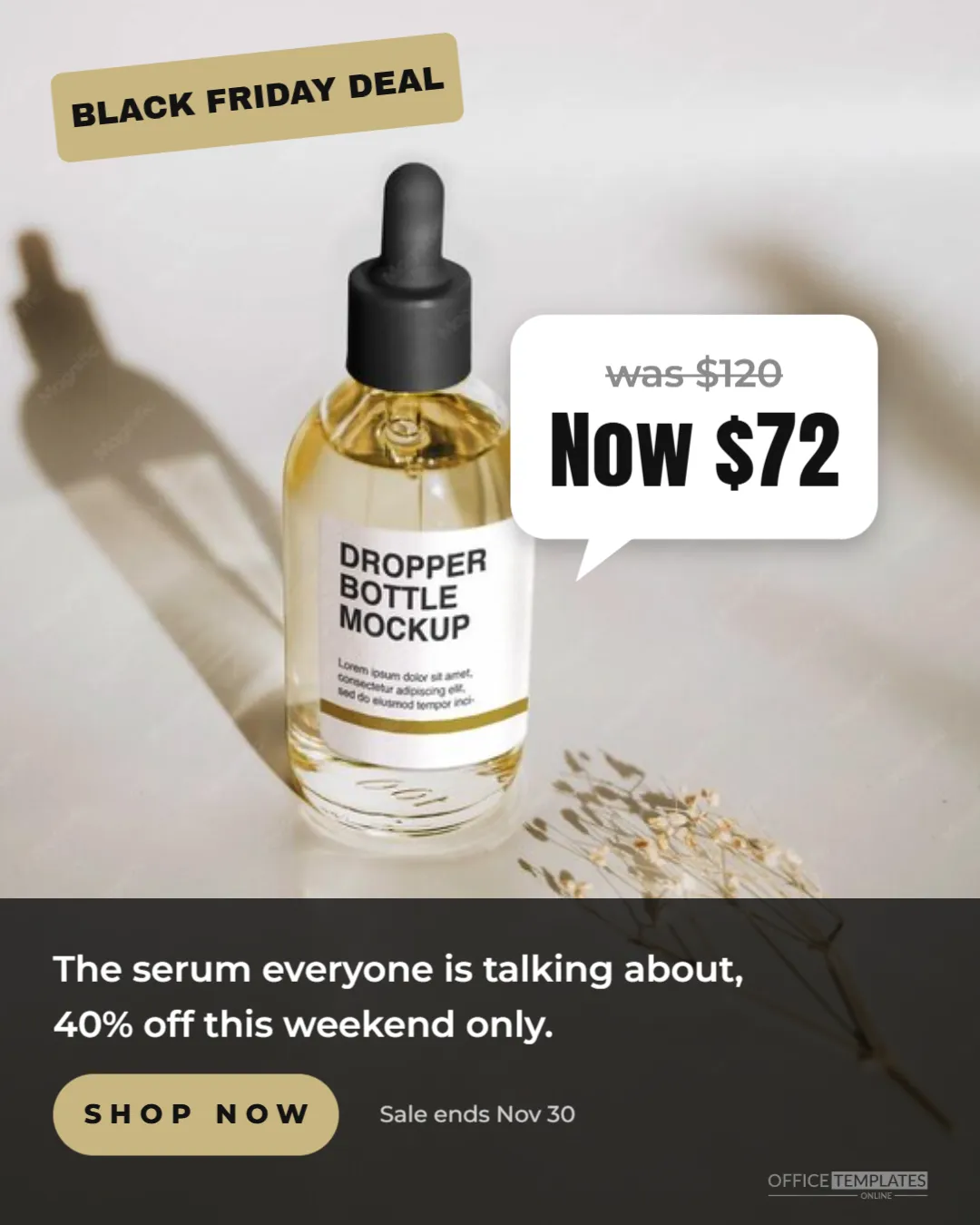
On Instagram, polished adverts can be easy to scroll past. Ads that look more like a post from a friend or creator, with a real photo, a sticker, and a casual price note, often feel more natural in the feed. This 1080 x 1350 pixel Sponsored Ad Template uses that creator style for Black Friday, with a full-bleed photo, a lime sticker, and a speech bubble showing the deal.
Creator-Style Ad Design
The ad is a 4:5 portrait shape, which takes up more of the screen in the Instagram feed than a square. A photo fills the entire background. In the top left, a bright lime sticker, tilted slightly, reads BLACK FRIDAY DEAL in heavy black letters.
On the right, a white speech bubble with rounded corners and a small tail shows the price change: was $120 in grey with a line through it, and now $72 in large black condensed numbers. The bottom of the ad has a dark translucent panel with a line of copy: The serum everyone is talking about, 40% off this weekend only, a lime SHOP NOW pill, and the note Sale ends Nov 30. The logo mark sits small in the bottom right.
Why Creator-Style Ads Perform
- Native feel: they blend with posts people already enjoy.
- Human photos: real hands, faces, and homes feel trustworthy.
- Casual language:everyone is talking about it; it sounds like a recommendation, not an advert.
- Simple maths: was and now prices make the saving obvious in a second.
Choosing a Photo for the Ad
The photo is everything in this design. Good choices include a hand holding the product, a person using it in a bathroom or kitchen, or a natural flat lay on a bed or table. Phone photos often work better than studio shots for this style. Keep space in the upper right for the speech bubble and leave the bottom area simple, since the copy panel covers it.
Working With Creators
If you work with creators or customers, their photos can make this ad even more authentic. Always get permission and agree on how the photo will be used. Platforms have rules for branded content and paid partnerships, so follow the disclosure requirements when a creator is involved.
Editing the Price Bubble
Change the was and now prices to your product’s real prices. Keep the original price genuine; many regions have rules about reference prices in sales. The bubble is grouped, so you can move it to another part of the photo without losing its shape. If you prefer a percentage, replace the prices with 40% off in the same style.
Writing the Ad Copy Line
The copy panel holds one sentence. Write it like a friend recommending the product:
| Product | Copy idea |
|---|---|
| Skincare | The serum everyone is talking about, 40% off this weekend only. |
| Kitchen | The pan our customers cook with every day, now half price. |
| Fashion | Our cosiest jumper is back in stock and 30% off. |
| Tech | The earbuds that sold out last year are now $50 off. |
Instagram Ad Formats
This portrait image suits feed ads. For Stories and Reels placements, create a vertical 1080 x 1920 pixel version with the sticker near the top and the copy panel lifted above the bottom area, where Instagram places its own buttons. Ads Manager lets you upload different images for different placements in one ad.
Colour Choices for the Sticker
Lime stands out against most photos and feels fresh. Hot pink, bright yellow, and orange also work well. Avoid red if your photo has a lot of warm tones, as it can blend in. Keep the sticker text black for maximum contrast.
Testing Creator Ads Against Polished Ads
Run this creator-style ad alongside a more polished studio ad with the same offer and audience. Compare click-through rates and sales after a few days. Many brands find that creator-style creative performs well, but results vary by product and audience, so let your own data decide.
Retargeting With the Creator Ad
Creator-style ads are especially effective for people who already know your brand, such as website visitors who did not buy. Seeing the product in a real setting, with a clear price drop, can be the reminder that turns interest into a purchase. Show the ad to recent visitors during Black Friday week.
Organic Posts From the Same Template
The design works as a normal Instagram post too. Post it to your feed or stories without paying, and use the same photo and bubble in a carousel with more product photos. Consistent creative across paid and organic posts reinforces your message.
Ad Approval Tips
Ads are reviewed before they run, and review can take longer during busy periods like Black Friday. Submit ads a few days early, avoid exaggerated claims, and make sure the landing page matches the ad’s offer. A smooth approval means your ad runs when it matters most.
Writing the Instagram Ad Caption
The caption under a sponsored post should continue the friendly tone of the image. Start with a short, relatable line, such as This is the one we get asked about most, then give the deal and deadline in plain words. Add one benefit, such as free shipping or easy returns, and finish with a clear action. Keep it short, because Instagram cuts long captions after a couple of lines, and the first line is what most people read.
Refreshing the Creative Mid-Sale
If results drop after a few days, swap in a new photo while keeping the sticker and bubble, so regular followers see something fresh.
Instagram Sponsored Ad Questions
Can I use a video instead?
Yes. Recreate the sticker and bubble as overlays in a video editor, or use the image as the video’s cover.
Can I add a discount code?
Add the code to the copy line or the ad’s caption; keep the image uncluttered.
Does the ad work for services?
Yes. Show a photo of the service in action and use the bubble for the package price.
The best ads feel like a tip from a friend. Add a real photo, show the honest price drop, and let this creator-style ad bring Black Friday shoppers to your store.