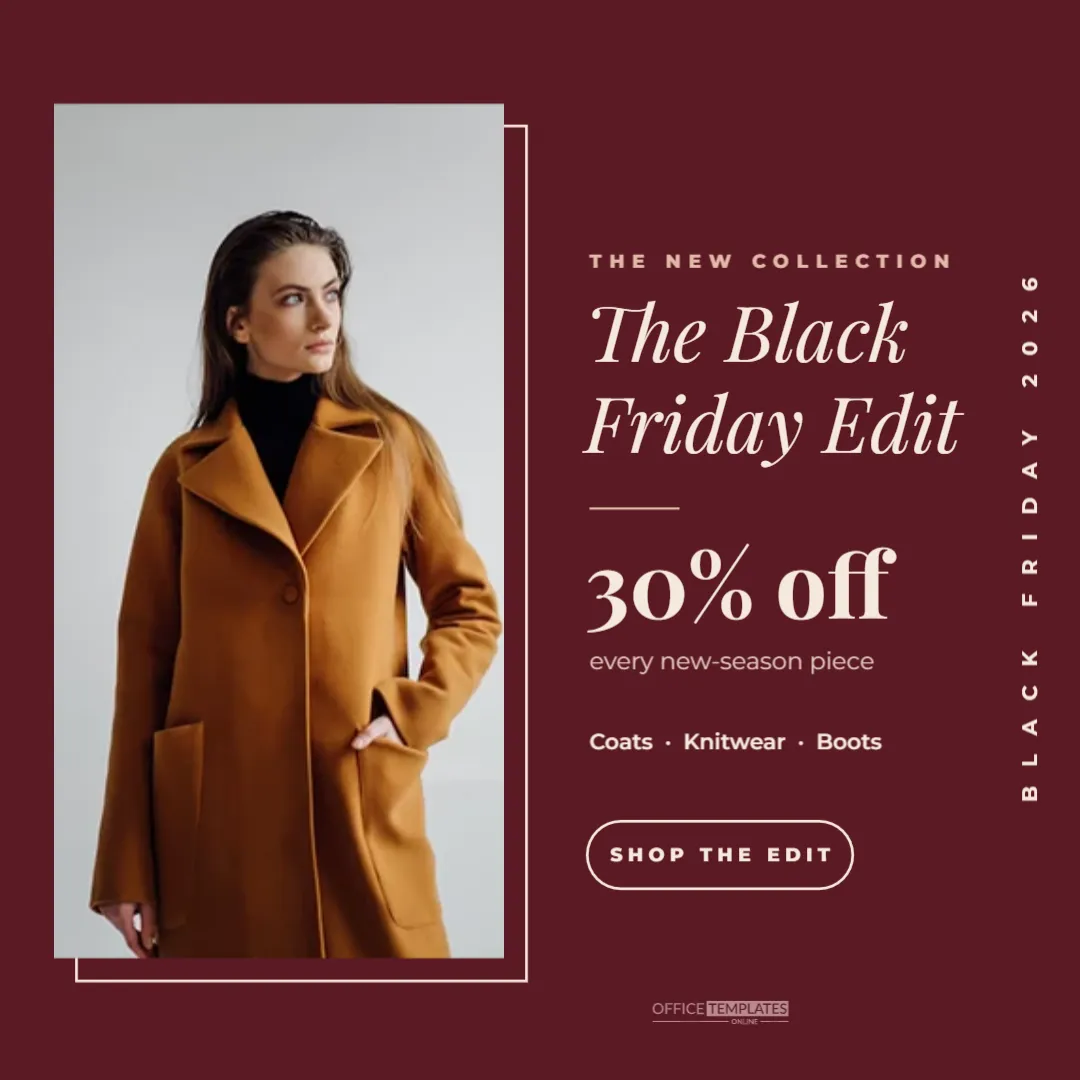
Fashion brands have a challenge on Black Friday: how to promote a discount without looking like a discount store. The answer is to treat the sale like a magazine feature. This square Instagram post presents your Black Friday offer as The Black Friday Edit, with a tall model photo, an elegant italic headline, and the warm, rich colour of a burgundy cover.
The Editorial Fashion Post Design
The post is 1080 x 1080 pixels with a deep burgundy background. On the left, a tall portrait photo area holds a model or outfit shot, with a thin cream outline frame offset slightly behind it, like a print mounted on a wall.
On the right, a small kicker reads THE NEW COLLECTION in muted pink capitals. The Black Friday Edit follows in cream Playfair Display italic over two lines, then a short rule. 30% off appears large in bold serif, with every new-season piece underneath and a line of categories: Coats · Knitwear · Boots. A rounded outlined button reads SHOP THE EDIT.
Running up the right edge, BLACK FRIDAY 2026 is set vertically in small, very widely spaced cream capitals, a detail borrowed from magazine spines and fashion lookbooks. A small logo mark sits under the button.
Why an Editorial Approach Suits Fashion
- It protects the brand: the post feels curated, not cheap.
- It leads with the clothes: the photo takes nearly half the square.
- It uses a story: “The Edit” suggests a selection made with care.
- It fits a fashion feed: it sits comfortably next to lookbook and campaign posts.
Choosing the Fashion Photo
Use a full-length or three-quarter shot of a model wearing a key piece from the sale. Portrait photos fill the tall frame best. Warm tones, such as camel coats, cream knits, or brown boots, harmonise with the burgundy background. Avoid busy backgrounds in the photo; a plain wall or studio backdrop keeps the editorial feel.
Editing the Offer and Categories
Change 30% off to your offer and update the line beneath to explain what it applies to. The category line can list three product types or name the collection. If your sale is store-wide, change every new-season piece to everything this weekend.
Fashion Sale Colour Palettes
| Background | Text | Season mood |
|---|---|---|
| Burgundy | Cream | Rich autumn |
| Chocolate brown | Sand | Cosy and warm |
| Forest green | Ivory | Winter heritage |
| Black | Champagne | Evening and party wear |
| Navy | Pale blue | Classic tailoring |
Creating a Fashion Carousel
Instagram carousels let followers swipe through several images. Use this design as the first slide, followed by three or four outfit photos with small price labels, and finish with a slide repeating the offer and Shop the edit, link in bio. Carousels often keep people on your post longer, which can help it reach more followers.
Writing a Fashion Sale Caption
Match the caption to the editorial tone. For example: The Black Friday Edit is here. 30% off every new-season piece, from our softest knitwear to the coat you have had your eye on. This weekend only. Shop via the link in our bio. Tag the products if you use Instagram Shopping, so followers can tap straight through.
Instagram Shopping Tags
If your shop is connected to Instagram Shopping, you can tag products in the photo. Tap the photo when posting and select the items shown. Followers then see prices and can open product pages without leaving Instagram. Product tags work best when the item is clearly visible in the photo.
Keeping the Feed Consistent
For a cohesive Black Friday campaign, post a few designs in the same colours and fonts: this edit post, a story announcing the sale, and a final last chance post. A consistent look makes your profile grid feel like a magazine spread rather than a series of adverts.
Fashion Discounts and Brand Value
Some fashion brands limit Black Friday discounts to certain collections or offer gifts with purchase instead of price cuts, to protect brand value. The editorial style suits all of these. Replace 30% off with A gift with every order or Free alterations if that fits your approach better.
Using the Design for Stories
To create a matching story, change the canvas to 1080 x 1920 pixels, place the photo at the top and the text below, and keep the vertical BLACK FRIDAY 2026 along the edge. Add a link sticker in Instagram to send viewers to the edit.
Accessibility for Fashion Posts
Add alt text describing the photo and offer, such as: Model wearing a camel coat and cream jumper. The Black Friday Edit: 30% off every new-season piece. It helps visually impaired followers and gives context to people with images loading slowly.
Styling the Photo Shoot for the Edit
If you are shooting new photos for the post, plan a simple set. Choose a plain wall in a warm neutral tone, use daylight from a large window, and style one complete outfit built around a sale piece. Shoot vertically so the image fills the tall frame without heavy cropping. Take a few versions with the model looking away from the camera and towards it; editorial images often feel more natural when the model is not posing directly. Keep accessories minimal so the featured items stay the focus.
Timing the Fashion Post
Fashion followers often browse in the evening and at weekends. Post the edit on Thanksgiving evening or early on Black Friday, then share it to your story with a link sticker. If you have a newsletter, send it the same morning with the same photo and headline, so the campaign feels unified across channels, and your most loyal customers see it first.
Fashion Sale Post Questions
Can I use two photos?
Yes. Split the photo area into two stacked frames, keeping the outline frame around both.
Can I use my own brand fonts?
If they are Google Fonts, yes. Elegant serifs and clean sans serifs suit the editorial layout.
Will it work for menswear?
Absolutely. Change the categories and the photo; the editorial layout is not gender specific.
Your Black Friday sale can look as good as your collection. Add your best outfit, set your offer, and publish an edit your followers will want to save.