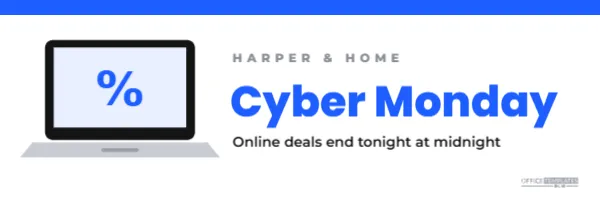
On Cyber Monday, inboxes overflow with sale emails. A clean, recognisable header helps your email stand out and tells readers in a second what it is about. This 600 x 200 pixel header uses a simple drawn laptop with a percentage sign on its screen, a bold blue title, and a clear deadline, all on a crisp white background.
Cyber Monday Header Design
The header is 600 pixels wide, the standard width for email designs, and 200 pixels tall. A blue bar runs across the very top. On the left, a laptop is drawn from simple shapes: a black screen frame, a pale blue screen showing a large blue percent sign, and a grey keyboard base with a small trackpad line.
To the right of the laptop, the store name, HARPER & HOME, appears in small grey spaced capitals. Cyber Monday is set large in bright blue Poppins ExtraBold, and a line underneath reads Online deals end tonight at midnight in dark grey. The logo mark rests quietly in the far corner, under the deadline.
Why a Light Header Works for Cyber Monday
- It contrasts with Black Friday: if your Black Friday emails were dark, a white header signals a new day.
- It suits light mode inboxes: it blends naturally into most email layouts.
- It is calm and clear: clean design suits a final-day reminder.
- It focuses on the deadline:ends tonight is the key message.
Editing the Email Header
Replace the store name with yours and update the deadline line. The laptop screen can show a different symbol or word, such as a price tag, SALE, or your logo. Change the blue to your brand colour by selecting the top bar, the title, and the percent sign together.
Cyber Monday Email Sequence
| Time | Deadline line | |
|---|---|---|
| Morning | Cyber Monday announcement | Online deals live now |
| Afternoon | Best sellers reminder | Only a few hours left |
| Evening | Last chance | Online deals end tonight at midnight |
Use the same header for all three emails and change only the deadline line, so the series feels connected.
Exporting for Sharp Email Images
Email apps on high-resolution screens can make images look soft. For crisp results, download the header at double size, 1200 x 400 pixels, and set its display width to 600 pixels in your email builder. Most builders let you set image width separately from file size.
Alt Text and Images Off
Some email apps block images by default. Add alt text such as Harper and Home Cyber Monday: online deals end tonight at midnight. Also write the offer in real text near the top of the email, so readers see it even if images do not load.
Subject Lines for Cyber Monday Emails
- Cyber Monday is here: deals end at midnight
- Last chance: our online sale ends tonight
- Cyber Monday picks, chosen for you
- Free shipping ends tonight
Pair the subject line with a short preview text that adds a detail, such as the discount or free shipping.
Dark Mode Considerations
In dark mode, some email apps invert white backgrounds. The header’s dark laptop and blue text remain visible on most inverted backgrounds, but test it. If your email platform supports separate dark mode images, consider a navy version of the header.
Using the Laptop Illustration Elsewhere
The drawn laptop is a grouped shape you can copy into other designs, such as a Cyber Monday social post, a website banner, or a printed sign at your till promoting online deals. Consistent visuals connect your channels.
Cyber Monday Email Content Ideas
Below the header, keep the email simple: a short line about the offer, a big button to the sale, and a few product highlights. Include free shipping or delivery deadlines if relevant. Shorter emails often perform better on a busy sale day.
Testing Before Sending
Send yourself a test email and check it on a phone and a computer, in light and dark mode. Click every link, confirm the discount code works, and make sure the deadline matches your store settings.
Header Accessibility Tips
Keep text large enough to read on phones, maintain strong contrast, and never put essential information only inside an image. The header supports the message; the email’s text should carry it too.
Personalising Cyber Monday Emails
Many email platforms can add the reader’s first name or show products related to their past purchases. A greeting such as Hi Maria, our online deals end tonight below the header feels more personal than a generic message. Personal touches can make a final reminder feel helpful rather than pushy.
Segmenting the Final Reminder
Consider sending the last chance email only to subscribers who have not yet bought during the sale, if your platform makes that easy. Customers who already ordered may prefer a thank-you message instead. Respecting their inbox keeps your list healthy for future campaigns.
Coordinating With the Website
Use the same laptop illustration and blue colour in a small website banner on Cyber Monday. Readers who click from the email will land on a page that looks familiar, which builds confidence that they are in the right place for the deals mentioned in the email.
Reusing the Header for Holiday Emails
After Cyber Monday, change the title to Holiday Gift Guide or Last Shipping Day and keep the laptop. The same clean header can carry your December emails, with only the words and the screen symbol changing.
Keeping the Email Short
On the final day, readers want the essentials: the offer, the deadline, and a button. Resist adding long paragraphs under the header. A short email that loads quickly and gets straight to the point often earns more clicks than a long one.
Cyber Monday Email Header Questions
Can I add my logo?
Replace the store name text with your logo image, or place the logo on the laptop screen.
Can I use it in any email platform?
Yes. Download the image and upload it as your email header.
Can I change the size?
Change the canvas height for a taller header, keeping the 600-pixel width.
A clean header and a clear deadline can be all your Cyber Monday email needs. Add your name, set the time, and send your final reminder with confidence.