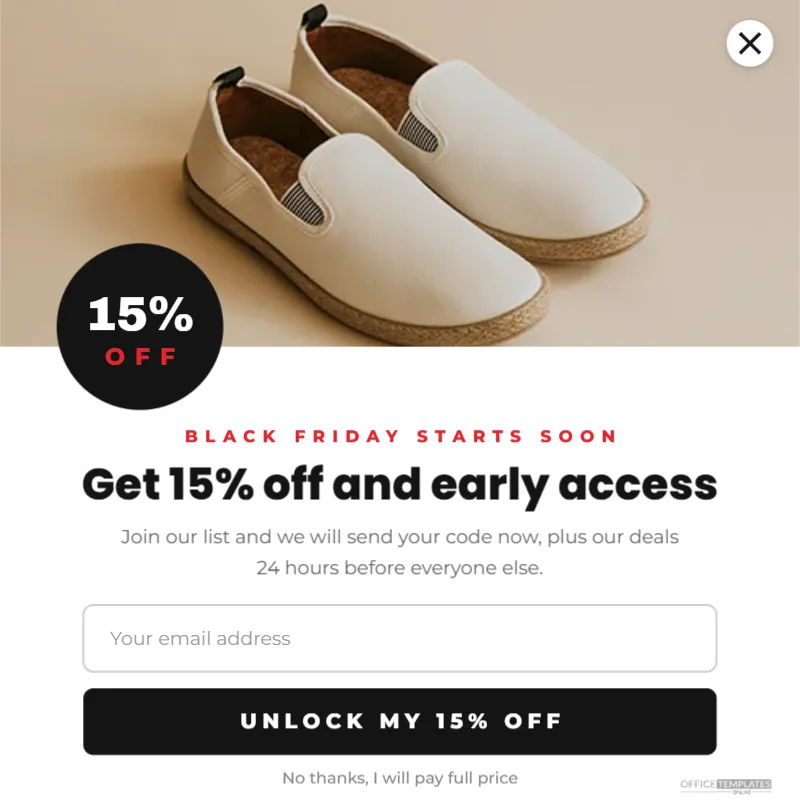
The weeks before Black Friday are the best time of the year to grow your email list. Shoppers are actively looking for deals and are happy to sign up for early access or a discount. A Website Popup is one of the most effective ways to capture those sign-ups, if it is designed well. This 800 x 800 pixel popup template gives you a clean, friendly layout with a clear offer and an easy way to say no.
The Black Friday Popup Layout
The popup is a square, 800 x 800 pixels, which suits most popup tools and scales down well on phones. The top part is a wide photo area for a product or lifestyle image, with a small white circle holding a close cross in the top right corner.
A black circular sticker overlaps the bottom left of the photo, with 15% in bold white letters and OFF in red. Below the photo, a red kicker line reads BLACK FRIDAY STARTS SOON, followed by the headline Get 15% off and early access in black Poppins ExtraBold and two lines explaining the offer: join the list for a code now, plus deals 24 hours before everyone else.
A drawn email field with placeholder text sits below, then a full-width black button reading UNLOCK MY 15% OFF. At the bottom, a small underlined line offers a polite way out: No thanks, I will pay full price.
How to Use the Popup Design
Most popup and email tools let you upload an image and place real form fields on top of it, or build a popup from blocks and add an image to it. There are two common approaches:
- Image plus form: download only the top part (photo and sticker) as an image, then build the headline, field, and button with your tool’s own elements.
- Full design as a guide: use the whole template as a visual reference and recreate it in your tool, matching fonts and colours.
Real form fields and buttons are essential: a field drawn in an image cannot be typed into. The template shows you exactly how the finished popup should look.
Writing a Popup Offer That Converts
- Lead with the benefit: a discount, early access, or a gift.
- Keep the headline under eight words.
- Explain what happens next in one or two short lines.
- Make the button describe the reward: Unlock my 15% off beats Submit.
- Offer an easy way to close, without guilt-tripping.
About the No-Thanks Link
The playful line No thanks, I will pay full price is a common technique, but use it carefully. Some audiences find it pushy. A simple No thanks or Maybe later is friendlier and works well for most brands. Whatever you choose, make sure the close cross and the no-thanks link actually close the popup, and that visitors who close it are not shown it again on every page.
Popup Timing and Frequency
| Trigger | When it shows | Good for |
|---|---|---|
| Time delay | After 10 to 20 seconds | Engaged visitors |
| Scroll depth | After half the page | Readers of content pages |
| Exit intent | When the cursor leaves the window | Visitors about to leave |
| Page specific | Only on sale or product pages | Targeted offers |
Show the popup once per visitor every few days at most. Repeated popups annoy shoppers and can hurt sales.
Popups and Search Engines
Search engines can treat intrusive popups that cover the main content on mobile, especially immediately after arriving from search, as a poor experience. Popups that are easy to dismiss, use a reasonable amount of screen space, or appear after some interaction are generally safer. Check your popup on a phone: it should be easy to close and should not block the whole page.
Privacy and Consent for Email Popups
When you collect email addresses, be clear about what people are signing up for, such as marketing emails about sales and new products. Link to your privacy policy near the field or in the confirmation email. In many places, consent must be clear and freely given, so avoid pre-ticked boxes. Your email platform usually provides compliant sign-up forms and double opt-in options.
Choosing the Popup Photo
The photo sets the mood. A best-selling product, a lifestyle image, or a festive flat lay all work. Keep the bottom left of the photo free of important details, because the 15% OFF sticker covers that area. Click the photo area and use Replace Image to add yours.
Changing the Discount Sticker
Change 15% to your offer, or replace it with FREE SHIPPING or GIFT. Recolour the circle to your brand colour; keep strong contrast with the text inside. If your offer is early access only, change the sticker to VIP or EARLY.
Measuring Popup Performance
Track how many visitors see the popup and how many sign up. A sign-up rate of a few percent is common for well-designed popups, with higher rates for strong offers. Test one change at a time, such as the headline, the offer, or the timing, and keep the version that performs best.
Following Up After the Sign-Up
Send the promised code immediately in a welcome email. Then send early access details before Black Friday and the full sale announcement on the day. Shoppers who sign up through a popup are some of your most interested customers, so make the follow-up fast and useful.
Popup Designs for the Rest of the Year
Keep a copy of the template for other campaigns: a holiday gift guide sign-up, a summer sale, or a new collection launch. Change the kicker, the sticker, and the photo, and the layout works year-round.
Website Popup Questions
Can I use the popup on Shopify, WordPress, or Wix?
Yes. Most platforms have popup apps or plugins that accept an uploaded image and a form.
Should the popup show on mobile?
Yes, but use a smaller version and make sure it is easy to close.
Can I collect phone numbers instead?
Change the field label to Your mobile number and follow the rules for text message marketing in your region.
A good popup feels like an invitation, not an interruption. Set your offer, connect your sign-up form, and start building your Black Friday list today.