Black Friday can save you money or tempt you into spending more than you planned. The difference is usually a list. Shoppers who decide who they are buying for, what they want, and how much they can spend before the sales start tend to find better deals and avoid impulse buys. This printable planner turns that plan into one simple page.
What the Shopping List Planner Includes
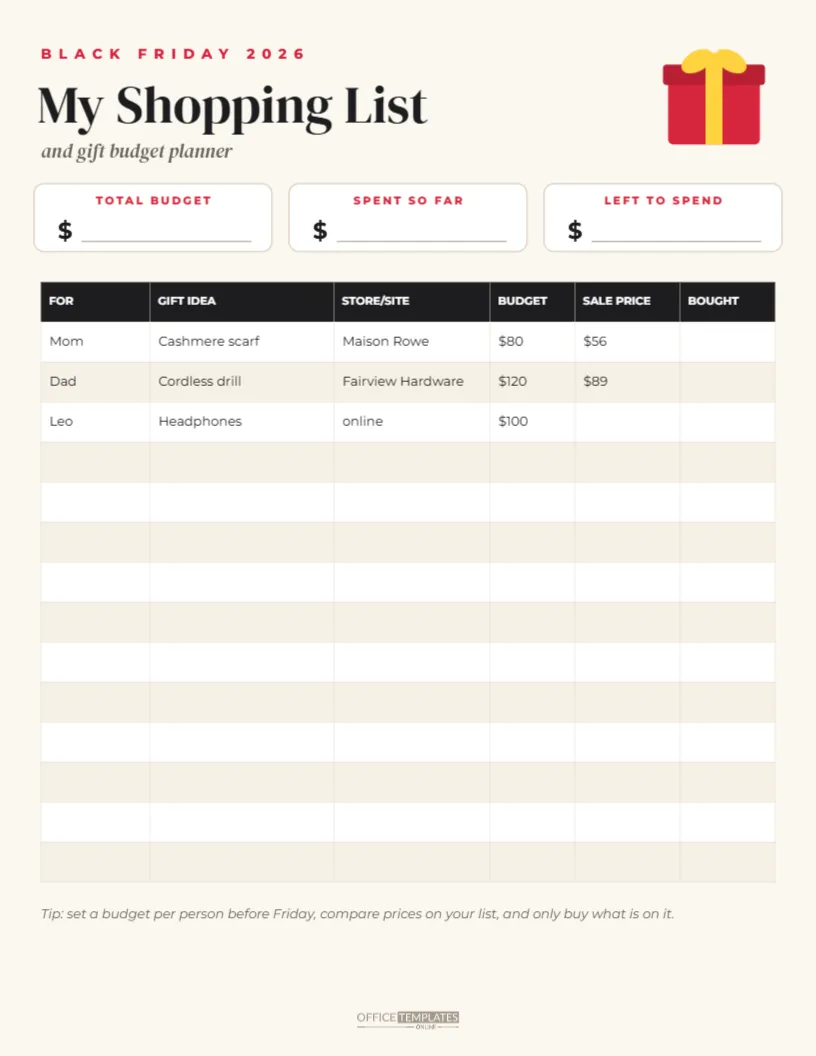
The planner is US Letter, 8.5 x 11 inches, on a warm cream background. A small red gift box with a yellow ribbon sits in the top right corner. On the left, BLACK FRIDAY 2026 appears in small red capitals, followed by My Shopping List in DM Serif Display and (and gift budget planner) in italics.
Three white boxes sit across the page for the key numbers: TOTAL BUDGET, SPENT SO FAR, and LEFT TO SPEND, each with a dollar sign and a writing line. Below is a table with six columns: FOR, GIFT IDEA, STORE/SITE, BUDGET, SALE PRICE, and BOUGHT. Three sample rows show how to fill it in, followed by eleven blank rows. A short tip line and the logo mark finish the page.
How to Use the Planner
- Set a total budget. Decide how much you can comfortably spend this season.
- List the people. Write each person in the FOR column.
- Add gift ideas. One idea per person, or a few for those you are unsure about.
- Set a budget per gift. Make sure the per-gift budgets add up to your total.
- Research stores. Note where each gift is likely to be on sale.
- Record the sale price. When you find a deal, write the price and tick BOUGHT.
- Update the boxes. Keep SPENT SO FAR and LEFT TO SPEND current.
Sample Rows
| For | Gift idea | Store | Budget | Sale price |
|---|---|---|---|---|
| Mom | Cashmere scarf | Maison Rowe | $80 | $56 |
| Dad | Cordless drill | Fairview Hardware | $120 | $89 |
| Leo | Headphones | online | $100 | still looking |
Editing and Printing the Planner
You can fill in the planner on screen before printing: double-click the table, or use Edit Table Data, to type names and ideas. Or print it blank and write by hand. Print several copies if you shop for many people, or one for each shopping trip. The cream background prints well on any home printer; choose fit to page if your printer adds margins.
Smart Black Friday Shopping Tips
- Check the regular price of items in advance, so you know a real deal when you see it.
- Sign up for store emails a week or two before for early access and codes.
- Compare online and in-store prices, and check shipping costs.
- Read return policies, especially for gifts.
- Avoid buying something just because it is discounted; stick to the list.
Budgeting Without Stress
A budget is not about spending as little as possible; it is about spending with intention. Setting limits before the sales start helps you enjoy shopping without worrying about the bill in January. If you go over budget on one gift, the LEFT TO SPEND box shows you where to adjust.
Shopping for Yourself Too
Many people use Black Friday to buy things they need, like winter coats, appliances, or electronics. Add rows for yourself and your household, and give them their own budget. Keeping personal purchases on the same list helps you see the full picture.
Family Planning Version
Families can use the planner together. Print one copy for the household, add each family member’s wishes, and decide together who buys what. This prevents duplicate gifts and helps children learn about budgeting.
Using the Planner With a Deal Tracker
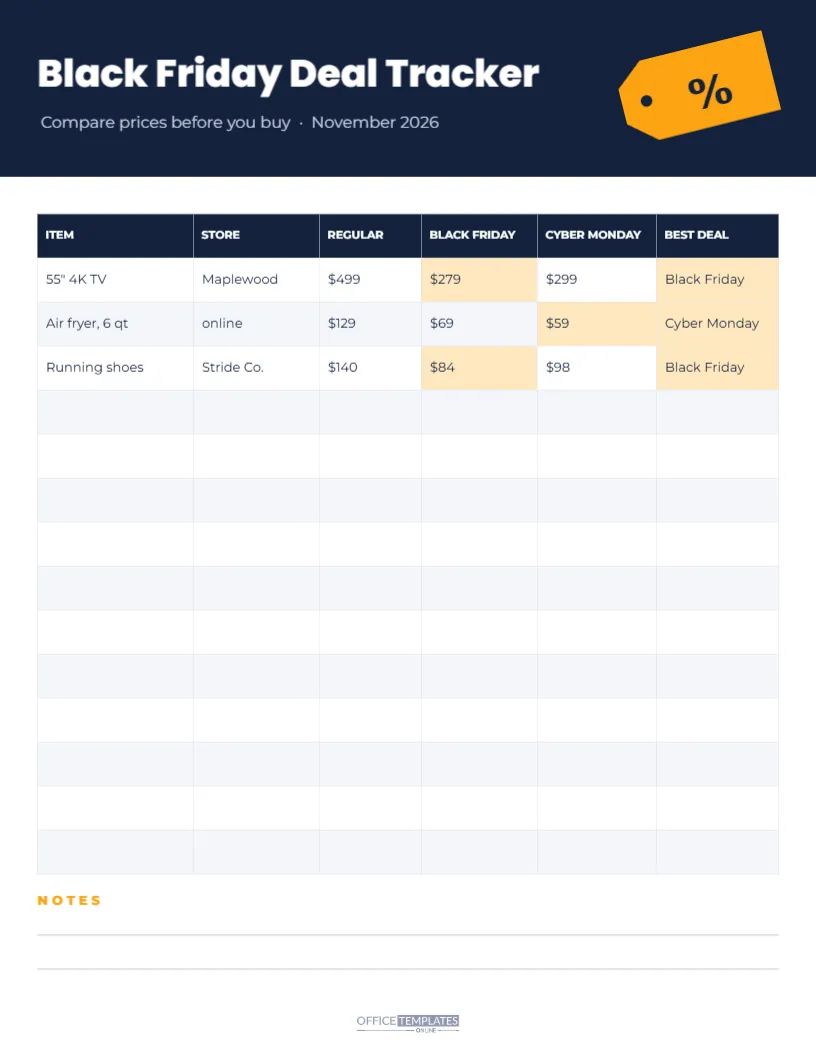
For bigger purchases, such as a TV or laptop, combine this list with a deal tracker that compares prices across stores and between Black Friday and Cyber Monday. Use the shopping list for the overview and the tracker for detailed comparisons.
Changing the Planner Colours
The cream, red and black palette feels festive and warm. You can recolour the header text, the boxes’ labels and the table header to any colour you like. Pastel colours give a softer look, while navy and gold feel more classic.
Keeping Your Gift List for Next Year
After the holidays, keep your completed list. It shows what you bought, for whom, and what you spent, which makes next year’s planning faster and helps avoid giving the same gift twice.
Gift Ideas When You Are Stuck
Some names on the list are harder than others. If you are stuck, think about the person’s hobbies, things they use every day that could be upgraded, and experiences rather than objects. Gift cards to a favourite local café, a class, or tickets can be good choices. Write two or three ideas in the GIFT IDEA column and decide when you see the deals.
Avoiding Impulse Purchases
Black Friday is designed to create urgency. Before buying anything not on your list, ask three questions: would I buy this at full price, do I have room in my budget, and will I still want it next month? If the answer to any is no, it is probably not a deal for you. The planner makes these decisions easier because your priorities are written down.
Shopping Safely Online
When shopping online, buy from sites you know or have checked, look for secure checkout pages, and be careful with deals that seem too good to be true, especially from ads or messages. Paying with a credit card or a trusted payment service can offer extra protection. Note the site in the STORE column so you can find your orders later.
Shopping List Planner Questions
Can I add more rows?
Open the table editor and add rows, or print a second copy.
Can I use it on a tablet?
Download it as a PDF and use a note-taking app to write on it.
Is it only for Black Friday?
No. Change the title to Holiday Gift List and use it all season.
A good list is the best Black Friday deal of all. Set your budget, write your list, and shop with confidence this season.