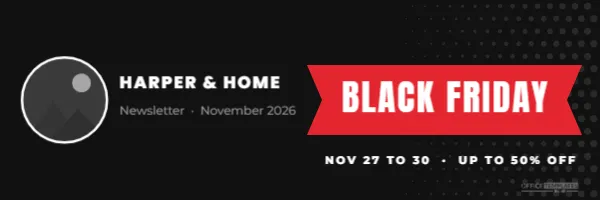
The header is the first thing subscribers see when they open your email. During Black Friday, when inboxes overflow with sale emails, a distinctive header tells readers instantly who the email is from and what it is about. This 600 x 200 pixel template is sized for email, with your logo, your name, and a bold red BLACK FRIDAY ribbon.
Email Header Design Details
The header is 600 pixels wide, the standard width for email templates, and 200 pixels tall. The background is black, with fine white halftone dots fading in from the right side. On the left, a round frame with a white border holds your logo or a shop photo. Next to it, the store name, HARPER & HOME in the sample, appears in white Poppins ExtraBold, with Newsletter · November 2026 in grey below.
The right half holds a red ribbon with notched ends, like a banner pinned across the header, with BLACK FRIDAY in white Anton capitals. A line underneath reads NOV 27 TO 30 · UP TO 50% OFF in white spaced capitals. A small logo mark finishes the lower right.
Why Email Headers Are 600 Pixels Wide
Most email designs use a content width of around 600 pixels because it displays well across desktop email programs, webmail, and phones. On phones, email apps scale the header down to the screen width, so text needs to be large enough to stay readable when shrunk. The text sizes in this header are chosen with that in mind. For extra sharpness on high-resolution screens, you can export at double size (1200 x 400 pixels) and set the display width to 600 in your email builder.
Adding Your Logo to the Header
Click the round frame and use Replace Image to upload your logo. A square logo on a white or transparent background fits best. If your logo is wide, you can delete the round frame and place the logo as an image instead, then move the store name to the right. Make sure the logo is clearly visible against the black background; a white version of your logo usually works best.
Editing the Ribbon and Dates
The ribbon text can change through the weekend: BLACK FRIDAY for the main announcement, LAST CHANCE on Sunday, and CYBER MONDAY on Monday. Update the dates line to match each email’s message, such as ENDS TONIGHT or FREE SHIPPING ALL WEEKEND. Keeping the same header design across all your sale emails builds recognition.
Black Friday Email Sequence Ideas
| When | Ribbon text | |
|---|---|---|
| Teaser | A week before | COMING SOON |
| Early access | Thursday | MEMBERS FIRST |
| Launch | Friday morning | BLACK FRIDAY |
| Reminder | Saturday | STILL ON |
| Last chance | Sunday evening | ENDS TONIGHT |
| Cyber Monday | Monday | CYBER MONDAY |
Headers and Dark Mode
Many people read email in dark mode, where some email apps invert or darken colours. A black header already looks at home in dark mode, which is one reason dark headers are popular. Check how your email appears in dark mode on a phone before sending. If your logo is dark, add a white version or a light outline so it does not disappear.
Images Turned Off
Some email programs block images until the reader allows them. When that happens, your header becomes an empty box with alt text. Add clear alt text such as Harper and Home Black Friday sale, November 27 to 30, up to 50% off. Also repeat the key message in real text near the top of the email, so readers understand the offer even without images.
File Size and Loading
Keep the header file small so emails load quickly on mobile data. A PNG is sharp for flat colours and text; a JPG can be smaller if you add a photo. Most email builders compress images automatically, but it is worth checking that the header looks crisp after upload.
Customising Colours for Your Brand
The black and red combination is classic for Black Friday. You can recolour the background to your brand’s darkest colour and the ribbon to your accent colour. Navy with gold, deep green with cream, or charcoal with pink all work. Keep the ribbon brighter than the background so it remains the focal point.
Using the Header in Other Places
The same design works as a header for printed newsletters, a website announcement strip or a blog post banner, with small size adjustments. Consistency across email, web, and print helps customers connect your Black Friday messages wherever they see them.
Email Header Accessibility Tips
Use enough contrast between text and background, keep important text large, and never rely on the header alone to carry essential information such as dates or codes. Screen readers read alt text, so write it as a sentence that makes sense on its own.
Writing the Subject Line to Match
The header and the subject line work together. If the header says BLACK FRIDAY and UP TO 50% OFF, the subject line can add urgency or detail, such as Up to 50% off starts now or Your Black Friday preview is here. Avoid repeating the same words, and keep subject lines short enough to show fully on a phone.
Testing Before You Send
Send a test email to yourself on a phone and a computer. Check that the header is sharp, the logo is visible, and the ribbon text is readable. Click through the email to confirm links work. Testing takes minutes and prevents mistakes from reaching thousands of subscribers.
Email Header Questions
Can I use it in Mailchimp, Klaviyo, or other tools?
Yes. Download the image and upload it as the header image in your email builder.
Can I make the header clickable?
Most email builders let you add a link to an image. Link it to your sale page.
Can I add a photo instead of the halftone dots?
Yes, but keep it subtle so the ribbon and text stay readable.
A strong header makes every Black Friday email instantly recognisable. Add your logo, set the ribbon text, and give your inbox presence a bold, consistent look.