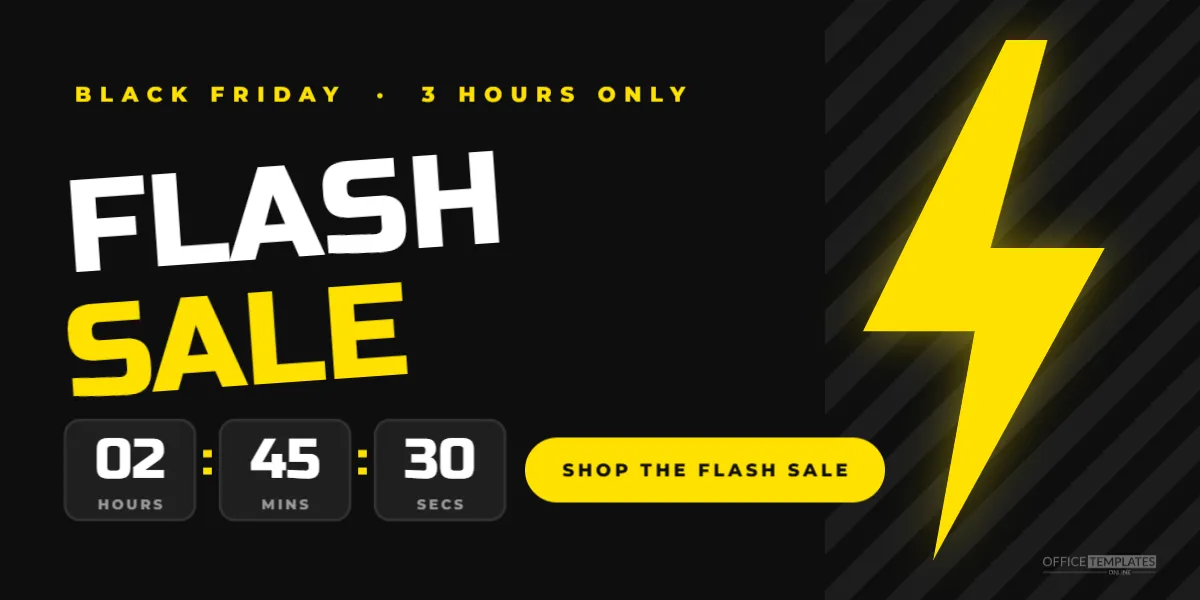
A flash sale is a short, sharp burst of deals, often just a few hours long. During Black Friday weekend, flash sales keep shoppers coming back and give your website a reason to be checked again and again. This 1200 x 600 pixel banner shouts urgency with a lightning bolt, slanted letters, and countdown boxes showing how little time is left.
Flash Sale Banner Design
The background is near-black. On the right, a band of subtle diagonal stripes adds texture, and a large bright yellow lightning bolt cuts through it with a soft yellow glow. A small yellow kicker at the top left reads BLACK FRIDAY · 3 HOURS ONLY.
FLASH is set in white and SALE in yellow, both in Russo One, a squared, sporty font, and both tilted slightly upward to suggest speed. Below the headline sit three dark rounded boxes showing 02, 45 and 30 in white, labelled HOURS, MINS and SECS, separated by yellow colons, like a digital countdown. Next to them, a yellow pill button reads SHOP THE FLASH SALE. Our logo mark is tucked into the lower right edge.
Why Flash Sales Work on Black Friday
- Urgency: a short window encourages quick decisions.
- Repeat visits: a series of flash sales gives shoppers a reason to return.
- Stock control: you can discount specific items for a limited time.
- Fresh content: each flash sale is something new to announce by email and social media.
About the Countdown Boxes
An image cannot count down by itself; the numbers in the boxes are fixed text. They work as a visual signal that time is short. For a live countdown, most email tools and website builders offer countdown timer widgets that you can place near the banner, or animated countdown images generated by email timer services. You can also edit the boxes to show the start time instead, such as 12: 00: 00 with labels NOON, TODAY, and ONLY.
Editing the Flash Sale Banner
Change the kicker to your timing: 2 HOURS ONLY,MIDNIGHT TO 3 AM, or TONIGHT 8 TO 11 PM. Edit the countdown numbers to match your sale length. The headline can stay FLASH SALE or become FLASH DEALS, LIGHTNING DEALS, or 3-HOUR SALE. Update the button text to match the action, such as SHOP NOW or SEE THE DEALS.
Planning a Black Friday Flash Sale Schedule
| Time | Flash sale idea |
|---|---|
| Thursday 9 PM | Early bird flash on best sellers |
| Friday 6 AM | Doorbuster flash online |
| Friday noon | Lunchtime flash on gifts |
| Saturday evening | Weekend flash on a single category |
| Monday 8 PM | Cyber Monday final flash |
Announce each flash sale shortly before it starts, so shoppers can be ready.
Where to Show the Flash Sale Banner
Place the banner at the top of your homepage during the flash window, in a dedicated email sent at the start, and on social media. Remove it the moment the flash sale ends, or replace it with the next one. An expired flash sale banner looks careless and frustrates customers.
Changing the Flash Sale Colours
Black and yellow is high-energy and recognisable from warning signs, which suits urgency. For a different look, try red with white, electric blue with yellow, or purple with lime. Keep the lightning bolt in the brightest colour, since it is the main visual cue. The striped band is grouped and can be recoloured or removed.
Writing Honest Urgency
Urgency only works when it is real. If you say the sale lasts three hours, end it after three hours. Fake countdowns that reset or flash sales that never end damage trust, and in some places misleading urgency claims can break consumer rules. Real, well-timed flash sales build a loyal audience that pays attention to your announcements.
Flash Sale Banner Sizes
The 1200 x 600 pixel size suits websites, blog headers, and email images when scaled down. For social media, resize the canvas to 1080 x 1080 pixels and stack the headline above the countdown. For stories, use 1080 x 1920 pixels and place the bolt behind the headline.
Flash Sales for Small Businesses
Flash sales are not only for big retailers. A small shop can run a one-hour flash sale on Instagram with a single product, a café can offer a flash discount on gift cards, and a service business can open a few discounted booking slots. The banner works for any of these with small edits to the text.
Preparing Your Website for a Flash Sale
Flash sales can send a sudden wave of visitors to your site. Check that your hosting can handle the traffic, schedule the price changes in advance if your platform allows it, and test the checkout before the sale starts. Have someone ready to fix problems quickly during the window.
Following a Flash Sale With Email
Send an email at the start of each flash sale with this banner at the top. Use a subject line that states the time limit, such as 3 hours only: Flash sale starts now. Many shoppers check email on their phones, so keep the email short with a single clear button.
Choosing Products for a Flash Sale
Pick products that people already want: best sellers, popular gifts, or items with lots of reviews. Flash sales work less well for unknown products, because shoppers do not have time to research them. Limit each flash sale to one category or a small group of items so the message stays simple. Make sure you have enough stock to cover a spike in orders, and decide in advance what happens if an item sells out before the timer ends.
Flash Sale Banner Questions
Can I make the countdown animated?
Use a countdown widget or an animated timer image from an email timer service alongside the banner.
Can I remove the countdown boxes?
Yes. Delete them and move the button under the headline.
Does it work for Cyber Monday?
Change the kicker to CYBER MONDAY, and the banner is ready.
Speed sells on Black Friday. Set your time window, add your deal, and light up your site with a flash sale that brings shoppers running.