English language teaching has its own planning conventions. Trainers on CELTA, TESOL, and similar courses expect lesson plans with clear aims, target language, staged procedures, interaction patterns, and anticipated problems with solutions. Experienced ESL and EFL teachers keep using the same structure because it works. This A4 ESL Lesson Plan Template follows those conventions on one page, with a friendly design that suits language classrooms everywhere.
Speech Bubbles Say Hello
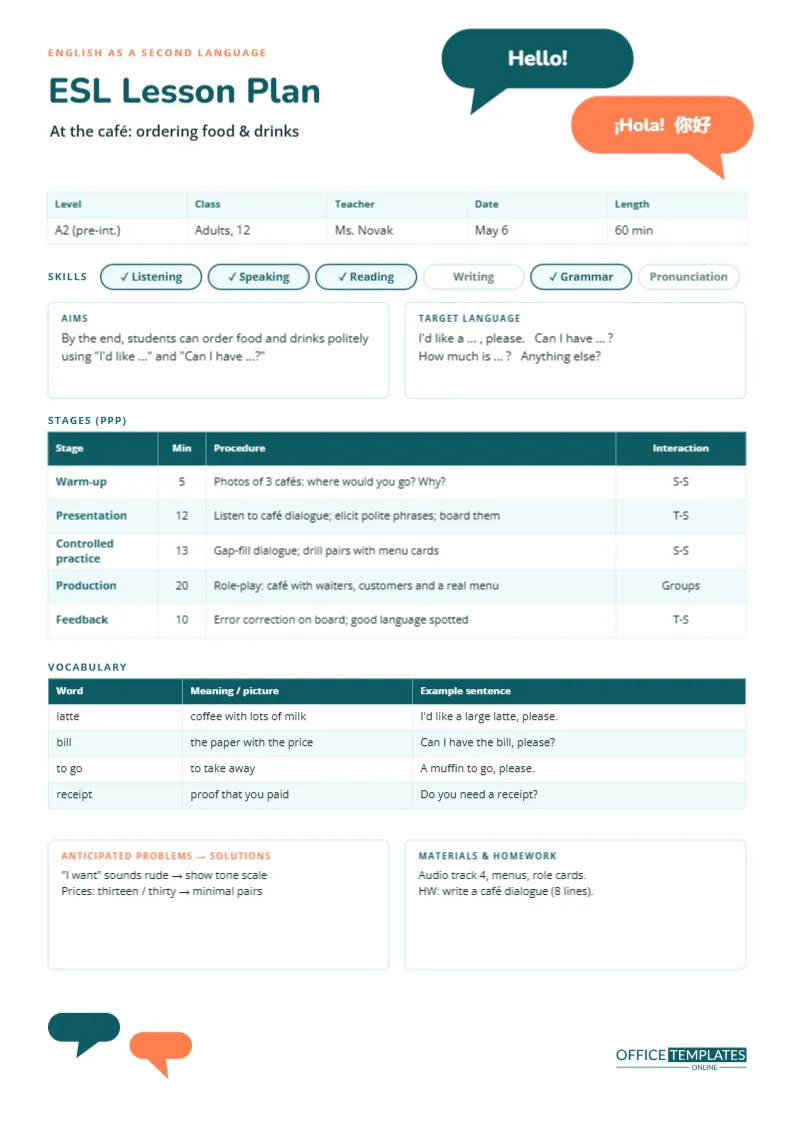
The header has two overlapping speech bubbles in the top-right corner: a teal one saying Hello! and a coral one replying ¡Hola! ??, a nod to the many languages students bring to an English class. The title, ESL Lesson Plan, is in bold teal Nunito, with the lesson topic underneath: At the café: ordering food & drinks. Two small matching bubbles sit in the bottom-left corner of the page, so the conversation continues to the end.
Class Details and Skills
A strip records the level (A2, pre-intermediate on the CEFR scale), class (12 adults), teacher, date and length (60 minutes). Below it, a row of six rounded chips shows which skills the lesson develops: listening, speaking, reading and grammar are ticked and highlighted, while writing and pronunciation are left plain.
Aims and Target Language
The aims box states the main aim in measurable terms: by the end, students can order food and drinks politely using I’d like … and Can I have …? The target language box lists the exact phrases students will learn: I’d like a …, please, Can I have …?, How much is …? and Anything else?
PPP: Presentation, Practice, Production
The stage table follows the Presentation, Practice, Production model, with a warm-up before and feedback after:
| Stage | Minutes | Procedure | Interaction |
|---|---|---|---|
| Warm-up | 5 | Photos of three cafés: where would you go? | S-S |
| Presentation | 12 | Listen to a café dialogue, elicit polite phrases | T-S |
| Controlled practice | 13 | Gap-fill dialogue, drill pairs with menus | S-S |
| Production | 20 | Café role-play with waiters and customers | Groups |
| Feedback | 10 | Error correction and good language on the board | T-S |
The interaction column (T-S for teacher to students, S-S for student to student) helps you check that students talk more than you do. Edit the stages with Edit Table Data; if you prefer Test-Teach-Test or Task-Based Learning, rename the stages accordingly.
Vocabulary With Examples
A vocabulary table lists the new words with a meaning or picture cue and an example sentence: latte, bill, to go, and receipt. Writing an example sentence for every word is good practice; it shows the word in context and gives you a model to use when you clarify meaning.
Anticipated Problems and Solutions
Trainers love this box, and for good reason. The sample predicts that I want will sound rude in English, and plans to show a tone scale; it also predicts confusion between thirteen and thirty in prices, and plans minimal-pair practice. Thinking about problems before the lesson means you are ready with a solution instead of improvising in front of the class.
Materials and Homework
The last box lists the audio track, menus and role cards, and sets homework: write an eight-line café dialogue. Short, specific homework that reuses the target language helps it stick.
Concept Checking Questions
When you present new language, check understanding with concept checking questions rather than Do you understand? For I’d like, ask: Is this polite or rude? (polite) Is it the same as I want? (similar meaning, more polite). Add your CCQs to the Presentation row so you have them ready.
Levels From Beginner to Advanced
For beginners, keep the target language to one or two phrases and use plenty of pictures. For intermediate learners, add a functional variation, such as complaining politely about an order. Advanced classes can analyse register, comparing café language in the UK, the US and Australia.
For Online and One-to-One Lessons
The same plan works online: the role-play becomes breakout rooms, and the menus become a shared screen. One-to-one teachers can replace the interaction column with notes on the student’s personal goals.
Printed on International A4 Paper
English language schools around the world, from London to Bangkok, print on A4 paper (210 x 297 mm). The template is set up in that size so it prints edge to edge without scaling. Teachers in North America can change the document size to Letter in the editor.
Printing for Observations
Download as PDF and print a copy for your observer and one for yourself. Observed lessons on teacher-training courses are judged against the plan, so a clear, staged plan with timings is a real advantage.
Error Correction Without Stopping the Flow
During the production stage, let students talk. Note errors quietly while you monitor, then use the feedback stage to write a few anonymous mistakes on the board and let the class correct them together. Include good language you heard too, so feedback feels positive. Correcting every error mid-role-play kills fluency and confidence.
Grading Your Teacher Talk
With low-level classes, keep instructions short, use gestures and demonstrate rather than explain. Check instructions with a quick question (Do you write or speak first?) before releasing students into pairs. Planning your exact instruction for each stage, in a few words, is a habit that makes lessons run noticeably smoother.
ESL Plan FAQ
Can I change the language in the bubbles?
Yes. Type greetings in your students’ languages; check the preview to be sure the characters display.
Can I add a pronunciation column?
Yes. Add a column to the vocabulary table for phonemic script or stress marks.
What size is it?
A4 portrait, 210 x 297 mm.
Can I plan a skills lesson instead of a grammar lesson?
Yes. For a reading or listening lesson, rename the stages to pre-task, gist task, detail task, and follow-up.
How do I show CEFR level?
Type it in the Level cell of the details strip, for example, A2 or B1+.
Can I note student names for the role-play?
Yes. Add the pairs or groups in the Production row, or in a short list under the vocabulary table.
Is the speech bubble art editable?
Yes. The bubbles are simple shapes; recolour or resize them freely.