See Your Whole Teaching Week at a Glance with This Colorful Lesson Planner
When you are planning several days of lessons, it helps to have the entire week visible on one page. This Weekly Lesson Plan Template gives teachers a simple way to map out lessons, activities, assignments, reminders, and other teaching plans from Monday through Saturday.
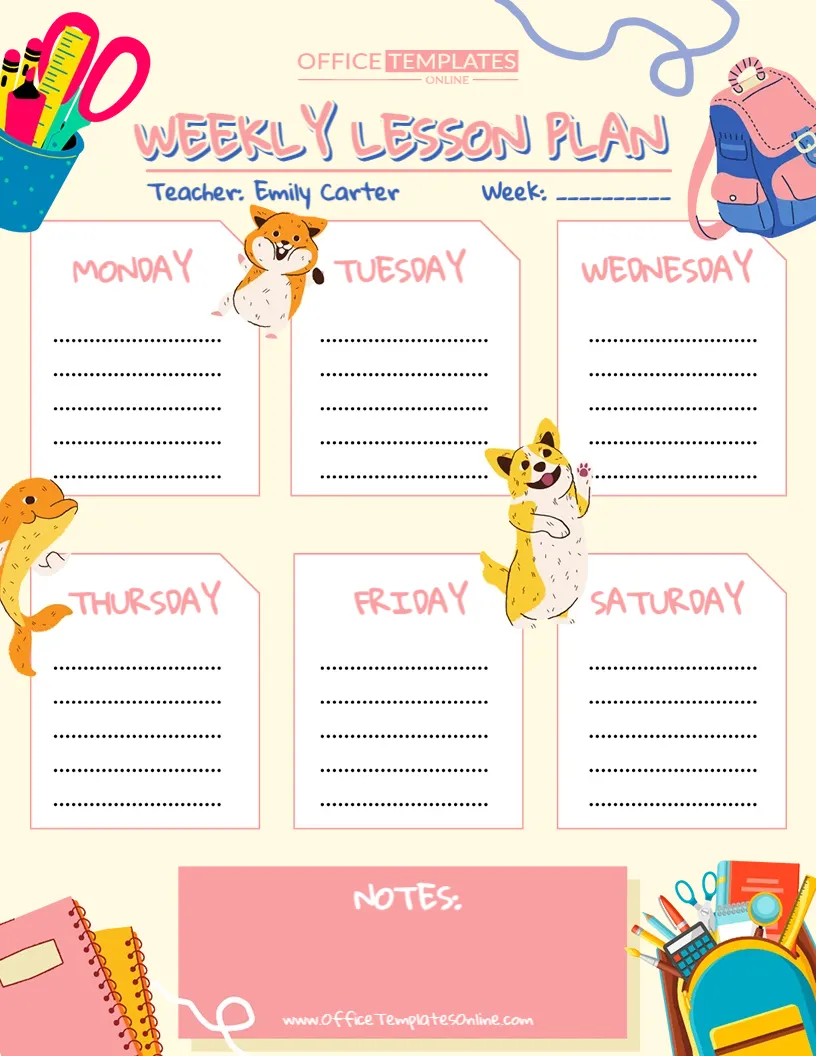
Rather than creating separate planning sheets for every day, you can use six clearly labeled daily sections to build an easy-to-follow overview of the week. A separate Notes area provides additional room for information that applies to more than one day or does not belong in a specific daily section.
The template is also easy to personalize. Open it in the online editor, customize it directly in your browser without logging in, and download your finished weekly lesson planner as a PDF, PNG, or JPG.
What’s Inside This Weekly Lesson Plan Template?
The layout has been intentionally kept straightforward so that you can decide what kind of information belongs in each daily section.
At the top, there is a field for the Teacher’s Name and another for the Week. These fields make it easy to identify a completed plan, especially if you prepare several weeks ahead or keep old lesson plans for reference.
The main part of the planner contains individual sections for:
- Monday
- Tuesday
- Wednesday
- Thursday
- Friday
- Saturday
- Notes
Each day provides multiple writing lines, giving you room to add short lesson details while still keeping the weekly layout neat and readable.
One Page for Six Days of Lesson Planning
A major advantage of a weekly lesson planner is being able to see how teaching activities connect from one day to the next. Weekly planning formats are commonly used to organize lesson topics, assignments, activities, materials, and other instructional details across several days.
This template gives you that weekly overview without forcing you to follow a complicated lesson-plan structure.
For example, Monday might introduce a new topic, Tuesday could continue with guided practice, Wednesday might include a related activity, Thursday could be used for independent work, and Friday could focus on review or assessment.
Seeing those plans side by side can make it easier to spot gaps, avoid unnecessary repetition, and understand how the week’s lessons fit together.
Saturday Is Included Too
Unlike many school-week planners that stop at Friday, this template also includes a Saturday planning section.
That extra day makes the template useful beyond a traditional Monday-to-Friday classroom schedule. Saturday can be used for weekend classes, tutoring sessions, homeschool lessons, enrichment activities, catch-up work, lesson preparation, or planning for the following week. Weekend sections can be particularly helpful for educators whose teaching or preparation continues beyond the standard school week.
If you do not teach on Saturdays, simply use that area for another purpose. It could become a weekly checklist, preparation area, homework section, or space for next week’s priorities.
What Can You Write in Each Day?
There are no fixed subject names or predefined lesson fields inside the daily boxes. This is deliberate: you can organize each day according to the way you teach.
You might enter a combination of:
Lesson topics and subjects – such as Mathematics, English, Science, Reading, History, or Art.
Classroom activities – including group work, reading sessions, discussions, presentations, experiments, or practice exercises.
Assignments and homework – note what students need to complete or take home.
Assessments and reviews – add quizzes, tests, revision sessions, or other checks for understanding.
Materials and preparation reminders – make a quick note about worksheets, books, equipment, or supplies required for a lesson.
Special classroom activities – record presentations, projects, library visits, computer sessions, or other activities that affect your teaching plan.
Because the spaces are open-ended, you are free to keep your entries very short or use the available lines for additional detail.
Use the Notes Box for Information That Applies to the Whole Week
Not every reminder belongs under a particular day. The large Notes box at the bottom of this weekly lesson planner gives you a separate place for those details.
For example, you could use it for materials that need to be prepared, weekly teaching goals, important reminders, student follow-ups, upcoming events, ideas for the next week, or changes you want to make to a lesson.
It can also work as a simple end-of-week reflection area. Teachers sometimes use weekly planning notes to record observations and adjustments that may help with future lessons.
There is no required way to use this section, so it can change from week to week depending on what you need.
A Fun Design Made for a Teaching Environment
Planning is practical work, but the planner itself does not have to look dull.
This template uses a cheerful school-inspired design with stationery illustrations, classroom supplies, backpacks, and playful animal characters. Soft colors and separate white planning areas help keep the actual writing spaces easy to find.
The result is a weekly planner that feels friendly and informal while still providing a clear structure for organizing lessons.
Customize It Online – No Account or Login Needed
You don’t have to recreate this Weekly Lesson Plan Template in another program before you can personalize it.
Simply open the template in our browser-based editor and make the changes you need online. There is no login required, which means you can start customizing without first registering for an account.
Add your teacher name, identify the week, enter lesson information, and personalize the editable content to suit your needs.
This makes the template useful when you want a ready-made starting point but still want the freedom to create your own weekly teaching plan.
From Blank Template to Weekly Plan in a Few Simple Steps
Start with the Teacher and Week fields at the top. These will help you identify the plan later.
Next, work through the daily sections from Monday onward. Add the main lessons, subjects, or activities for each day. You do not necessarily need to write complete sentences. Short, clear entries are often easier to scan during the school day.
For example, a section might contain entries such as:
Math – Multiplication Practice
English – Reading Activity
Science – Plant Experiment
Homework – Worksheet 4
Then use the Notes section for anything that applies to the overall week.
Once everything is complete, review your plan and download the final version in your preferred format.
Download Your Weekly Lesson Planner as PDF, PNG, or JPG
After customizing the template online, you can download the completed design in three convenient formats: PDF, PNG, and JPG.
Choose PDF if you want a convenient format for printing or keeping lesson plans with other teaching documents. Choose PNG or JPG when you would rather save the completed planner as an image for digital viewing or sharing.
You can therefore use the planner in the way that works best for you—keep a digital copy, print it for your desk, place it in your teaching folder, or add it to your lesson-planning records.
Useful for More Than Traditional Classroom Teachers
The flexible format means this weekly lesson plan does not have to be limited to one particular teaching environment.
It can be adapted by elementary and secondary school teachers, tutors, homeschooling parents, teaching assistants, substitute teachers, student teachers, instructors, and educators running weekend classes or enrichment programs. Weekly planners are commonly adaptable across classroom, homeschool, tutoring, and other educational settings.
Because the template does not specify subjects or grade levels, the same design can be personalized for many different teaching situations.
Make Weekly Lesson Planning Simpler
The purpose of this template is not to add another complicated form to your workload. It is to give you one clear place to see what you have planned for the week.
With dedicated spaces for Monday through Saturday, a teacher and week field, and a large area for additional notes, this editable Weekly Lesson Plan Template can help you turn scattered ideas and reminders into an organized weekly overview.
Customize it online without creating an account, add the lesson information that matters to you, and then download your finished weekly lesson plan as a PDF, PNG, or JPG. It is a simple, colorful, and flexible way to keep the teaching week easier to follow.