Turn a Busy Teaching Week into a Clear, Organized Plan
A teacher’s week can quickly fill with lessons, meetings, classroom activities, grading, preparation, reminders, and unexpected tasks. This Teacher Weekly Planner template provides one spacious page where you can organize the most important parts of the school week without squeezing everything into a complicated timetable.
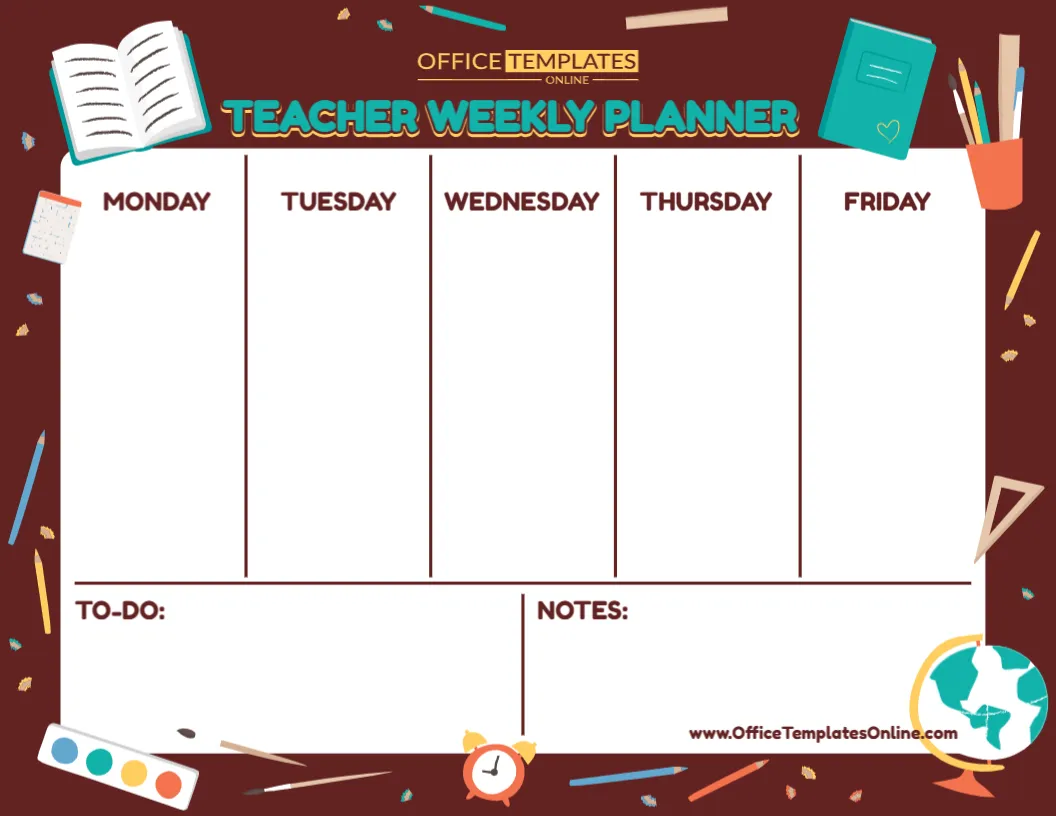
The design divides the main planning area into five large sections for Monday, Tuesday, Wednesday, Thursday, and Friday. Below the weekday planner, separate To-Do and Notes areas provide additional room for tasks, reminders, ideas, and information that does not belong to one particular day.
Unlike a pre-filled schedule, this template starts with open planning spaces. There are no fixed subjects, lesson times, or sample activities to remove. Teachers can decide exactly what belongs in each section and create a weekly plan around their own classroom routine.
The template is available through the browser-based online editor. No login is required to start customizing, and your finished Teacher Weekly Planner can be downloaded as a PDF, PNG, or JPG.
A Clean Monday-to-Friday Planning Layout
At the center of the template are five equal weekday columns:
Monday • Tuesday • Wednesday • Thursday • Friday
Each day has a large blank space underneath its heading. This gives you more freedom than a planner made from small boxes or fixed hourly slots.
You can write a few major priorities for each day or create a more detailed list of lessons and responsibilities.
For example, Monday could contain lesson preparation and a staff meeting, Tuesday could include an assessment and parent communication, while Friday might include weekly review, grading, and preparation for the following week.
Because the spaces are not restricted to specific types of information, the planner can adapt to the way you prefer to organize your work.
What Can You Plan in the Weekday Sections?
The five main columns can hold much more than lesson names.
Teachers can use them for daily priorities such as lesson topics, classroom activities, assessments, meetings, deadlines, school events, student support sessions, grading, resource preparation, or reminders.
A simple weekly plan could include entries like:
- Mathematics lesson
- Reading activity
- Science experiment
- Prepare worksheets
- Grade assignments
- Parent meeting
- Staff meeting
- Library visit
- Student presentations
- Classroom project
- Assessment
- Submit reports
- Prepare art materials
- Update student records
- Plan next week’s lessons
You can combine teaching activities and administrative responsibilities or dedicate the main columns entirely to lesson planning. The choice is yours.
Keep General Tasks in the To-Do Section
Some jobs need to be completed during the week but do not belong to a specific day.
The large To-Do area at the bottom left gives those tasks their own place.
Instead of forcing an unfinished job into Tuesday or Thursday, you can keep it in this section until you decide when to complete it.
For example, your weekly to-do list might contain reminders to make photocopies, organize classroom supplies, prepare a bulletin board, respond to emails, grade assignments, update records, or collect materials for an upcoming activity.
This separation can make the weekday columns cleaner while still keeping important work visible on the same planner.
Give Ideas and Reminders Their Own Notes Area
Beside the To-Do section is a separate Notes area.
This space is intentionally open, so it can serve different purposes from week to week.
You might record a quick teaching idea that you do not want to forget. You could write down a reminder from a staff meeting, make a note about materials needed for an upcoming project, or record something that should be carried forward to next week’s planner.
It can also be used for general classroom reminders that apply to several days rather than just one.
Having this extra space means every piece of information does not have to fit neatly into a weekday column.
No Fixed Times Means More Planning Freedom
This template does not include hourly time slots.
For some teachers, that can be an advantage.
If you already have a separate class timetable, you may not need another planner that repeats exact lesson times. Instead, you can use this weekly planner to focus on what needs to happen rather than precisely when every activity begins.
You could list your most important lesson, meeting, or responsibility for each day. Or you could arrange activities in the order you expect to complete them.
This makes the design suitable for teachers who prefer a broad weekly overview rather than a detailed hour-by-hour agenda.
Spacious Design for a Quick Weekly Overview
The template uses a large central white planning area surrounded by a dark reddish-brown school-themed border.
The weekday headings are bold and clearly separated by vertical lines. A horizontal divider separates the main Monday-to-Friday planner from the To-Do and Notes sections below.
This simple structure makes it possible to scan the page quickly.
Rather than moving between several pages, teachers can see the five school days and their general tasks together in one layout.
Classroom Illustrations Give the Planner a Teacher-Friendly Look
The border is decorated with colorful educational graphics that immediately connect the design with school and teaching.
Visible illustrations include an open book, notebook, pencils, pens, ruler, calendar, paint palette, alarm clock, globe, and stationery holder.
These graphics add personality around the outside while leaving the central planning area mostly free of decoration.
The large “Teacher Weekly Planner” title appears prominently across the top, making the purpose of the template clear at first glance.
The result combines a professional planning structure with a cheerful classroom style.
Use It for Lesson Planning Without Making It Complicated
Although this is not a detailed lesson plan form, it can work well for creating a simple weekly lesson overview.
For example, you might write the main lesson topics for each day:
Monday: Fractions, Reading Comprehension, Plant Life
Tuesday: Geometry, Creative Writing, Science Activity
Wednesday: Multiplication Review, Vocabulary, Social Studies
Thursday: Problem Solving, Guided Reading, Art Project
Friday: Weekly Assessment, Reading Review, Class Activity
More detailed lesson objectives, materials, and assessments can be kept in separate lesson plans when needed.
This gives you a quick weekly reference without trying to place every instructional detail on a single page.
Plan Meetings and School Events Alongside Lessons
Teaching weeks often include responsibilities outside normal classroom instruction.
A planning page becomes more useful when those responsibilities can sit alongside lesson reminders.
You might add a staff meeting to Monday, a parent conference to Tuesday, an assembly to Wednesday, a school event to Thursday, and a report deadline to Friday.
Because each weekday provides open space, you can mix these commitments with teaching tasks rather than maintaining separate lists.
This can give you a more complete picture of what each day actually involves.
Useful for Preparing the Week Ahead
One practical way to use the Teacher Weekly Planner is to complete it before a new school week begins.
Start with fixed events such as meetings, assessments, special classes, school activities, or deadlines. Then add your main teaching priorities.
Next, place flexible jobs in the To-Do section and save the Notes area for information that does not fit elsewhere.
By the time the week begins, you have one visual overview showing both scheduled responsibilities and general priorities.
As plans change, you can update your customized version when needed.
Customize the Planner Online in Your Browser
You do not need to install a separate design application to personalize this template.
Open it in the online editor and customize the available elements directly from your browser.
No login is required to start editing.
Add the information you want for Monday through Friday, organize your To-Do section, enter useful notes, and adjust the available content to fit your planning needs.
The overall layout has already been designed, allowing you to spend less time building a planner and more time organizing the week itself.
How to Personalize Your Teacher Weekly Planner
Creating your own version can be straightforward:
- Open the Teacher Weekly Planner template in the online editor.
- Begin with any fixed meetings, events, or deadlines for the week.
- Add lesson topics, classroom activities, and teaching responsibilities under the correct weekday.
- Put flexible or non-day-specific tasks in the To-Do section.
- Use Notes for reminders, ideas, materials, or follow-up information.
- Review Monday through Friday to make sure important commitments are included.
- Make any other available text or design changes you need.
- Download your completed planner as PDF, PNG, or JPG.
Keeping the most important information visible can help prevent the planner from becoming overcrowded.
Create a Fresh Planner for Every School Week
No two teaching weeks are exactly alike.
One week may contain assessments and parent meetings. Another could include a field trip, classroom project, assembly, or school celebration.
An editable weekly planner makes it easy to create a new version when your priorities change.
You could prepare one at the end of each Friday for the following week or organize it before classes begin on Monday.
Teachers who like keeping previous plans can also save completed versions as a simple record of earlier weekly activities and responsibilities.
Suitable for More Than Classroom Teachers
The flexible structure makes this planner useful in several educational settings.
Elementary and primary teachers can organize lessons and classroom responsibilities.
Middle and high school teachers can use the weekday sections for different classes, preparations, assessments, and meetings.
Special education teachers can organize teaching activities, support periods, meetings, and documentation tasks.
Substitute teachers can create an overview of the week’s expected activities.
Student teachers can track teaching practice, observations, assignments, and preparation.
Tutors can organize sessions and follow-up work throughout the week.
Homeschool educators can turn the five columns into a Monday-to-Friday home learning plan.
The template provides the structure without deciding what type of teaching information must go inside it.
Teacher Weekly Planner vs. Daily Planner
A weekly planner and a daily planner can serve different purposes.
A detailed daily planner is useful when you want to record many individual tasks or appointments for a particular day.
This Teacher Weekly Planner is better suited to seeing the whole Monday-to-Friday picture on one page.
That makes it a practical choice when your main goal is to compare workloads across the week, remember major activities, and keep general tasks and notes close to your weekday plans.
Teachers who need more detail can also use a weekly planner alongside separate daily or lesson-planning pages.
Download Your Finished Planner as PDF, PNG, or JPG
When you have finished organizing your week, the personalized template can be downloaded in several convenient formats.
PDF is a practical choice for printing or keeping the planner with other school documents.
PNG provides a high-quality image version for digital use.
JPG gives you a widely compatible image format that is easy to save and view on different devices.
Choose the format that best fits how you plan to use, store, print, or share your completed teacher planner.
Make Weekly Teacher Planning Simpler
A useful planner does not need dozens of complicated fields. Sometimes teachers simply need enough room to see Monday through Friday, the week’s unfinished tasks, and important notes in one place.
This editable Teacher Weekly Planner template is built around that simple idea. Five spacious weekday columns provide room for lessons and responsibilities, while separate To-Do and Notes sections keep additional information organized. The school-themed graphics add a colorful finishing touch without taking over the planning space.
Use it for weekly lesson overviews, classroom preparation, meetings, assessments, deadlines, school events, reminders, or a combination of everything you need to manage.
Customize your Teacher Weekly Planner online with no login required, organize your Monday-to-Friday plans, and download the completed design as a PDF, PNG, or JPG.


