Make Every Teaching Day Easier with This Simple Daily Lesson Planner
A busy school day can involve lessons to teach, activities to prepare, papers to check, materials to arrange, and dozens of small tasks that are easy to forget. This Daily Lesson Plan Template gives teachers a simple, attractive place to bring the most important parts of the day together.
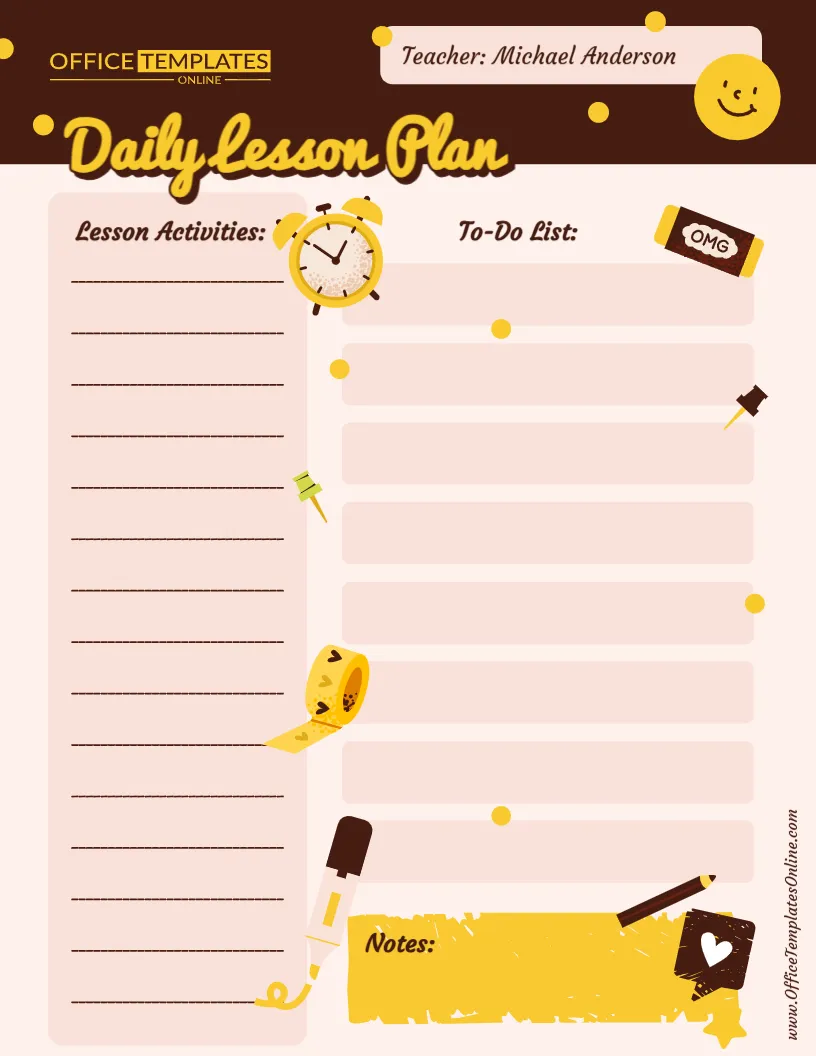
Instead of using a complicated planning form, this template focuses on three practical areas: Lesson Activities, To-Do List, and Notes. There is also a dedicated space at the top for the teacher’s name, making the finished planner easy to identify.
The template can be customized online right in your browser. No login or account is required. Once you have personalized your daily lesson plan, you can download the finished version as a PDF, PNG, or JPG for printing, saving, or using digitally.
What Makes This Daily Lesson Plan Template Useful?
Some lesson plans are designed for detailed curriculum documentation, while others are better suited to quick day-to-day organization. This template falls into the second category. It provides plenty of writing space without filling the page with unnecessary fields.
Its layout is divided into easy-to-understand sections:
- Teacher: Add the teacher’s name at the top of the page.
- Lesson Activities: Use the lined area to list lessons, classroom activities, teaching steps, subjects, or other planned activities.
- To-Do List: Eight large task boxes provide space for important jobs and reminders.
- Notes: A separate notes area at the bottom can hold additional information that does not fit naturally into the other sections.
This simple arrangement makes the planner easy to scan during a busy day.
Organize Your Lesson Activities in One Place
The Lesson Activities section takes up a large part of the left side of the template and provides multiple writing lines.
Teachers can use this area in different ways depending on their classroom routine. You might list lessons in the order they will be taught, write the main activity for each subject, note important teaching steps, or create a simple overview of the day’s classroom activities.
For example, entries could include Morning Reading, Math Practice, Science Experiment, Group Discussion, Art Activity, or Homework Review. You are not restricted to a particular subject, grade, or teaching method.
Because the section is intentionally flexible, you can decide how much or how little detail you want to include.
Turn Classroom Responsibilities into a Clear To-Do List
Teaching involves much more than delivering lessons. There are often additional jobs that need attention before, during, or after class.
The To-Do List provides eight separate spaces for these tasks. You could use them for reminders such as preparing worksheets, checking homework, arranging classroom materials, sending an important message, updating student records, grading assignments, or preparing resources for the next day.
Keeping these tasks beside your lesson activities can make the planner especially practical. At a glance, you can see what you plan to teach and what else needs to be completed.
A Notes Section for the Details You Don’t Want to Forget
Some information does not belong on an activity list or a task checklist. That is where the Notes section comes in.
Use this space for quick observations, reminders, ideas, materials you need to bring, follow-up points, or anything else worth remembering.
You might also use the notes area at the end of the day to record what worked well, what needs more attention, or what should be continued in the next lesson. A daily lesson plan can therefore become more than a schedule—it can also serve as a useful reference when planning future classes.
Designed to Be Friendly, Clear, and Easy to Use
This daily lesson planner uses a warm classroom-inspired design with playful illustrations, soft writing areas, and clearly separated sections. The decorative school-themed elements give the page personality without taking away from the areas needed for planning.
The large spaces are particularly helpful for teachers who prefer a simple daily overview rather than a highly detailed lesson planning form.
It can be used as a digital planning sheet or turned into a printable daily teacher planner after customization.
Edit Your Daily Lesson Plan Online Without Signing Up
One of the most convenient features of this template is that you can personalize it using the browser-based online editor.
There is no login required, so you can start customizing the template without first creating an account. This is useful when you need a planner quickly and do not want to install special design software.
Add or change the information you need, personalize the content for your teaching day, and prepare the planner in a way that works for you.
Download as PDF, PNG, or JPG
After editing your Daily Lesson Plan Template, you can download the finished design in PDF, PNG, or JPG format.
A PDF can be a convenient choice when you plan to print the lesson planner or save it with other teaching documents. PNG and JPG formats are useful when you want your completed plan as an image that can be viewed or stored digitally.
This flexibility means you can choose the format that best suits the way you work.
Who Is This Daily Lesson Planner For?
This template can be adapted for many educational settings. It is suitable for school teachers, tutors, substitute teachers, instructors, teaching assistants, homeschooling parents, and other educators who need an uncomplicated way to plan daily teaching activities.
It can also work across different subjects and grade levels because the template does not contain subject-specific fields.
Whether you teach several subjects throughout the day or need a quick planning page for a smaller number of lessons, you can customize the available spaces accordingly.
An Easy Way to Use the Template
Begin by replacing the sample teacher name with your own. Then use the Lesson Activities area to enter the main lessons or classroom activities you want to cover.
Next, fill the To-Do List with the jobs you need to complete. Try keeping each item short and action-focused so you can check the list quickly during the day.
Finally, use the Notes area for supporting details, reminders, or information you may need later.
For example, instead of putting a long explanation in the activity area, you could write “Science – Plant Growth Activity” there and place a reminder such as “Bring seeds and extra cups” in the notes section. This keeps the main plan clean and easy to follow.
Daily Planning Without an Overcomplicated Layout
A lesson planning tool does not always need dozens of boxes and fields to be useful. For teachers who mainly need an overview of activities, tasks, and reminders, a simpler layout may be easier to maintain throughout the day.
Daily planning resources commonly provide areas for activities and notes because these give educators a practical way to organize instruction and keep important information close at hand.
This particular template keeps that idea straightforward. There are no fixed time slots, subject names, or detailed curriculum fields to restrict how you use the available space. You can shape the planner around your own classroom routine.
Customize Your Daily Teaching Plan Today
Good organization starts with having a clear place for the information you need most. This free editable Daily Lesson Plan Template provides that space in a colorful, teacher-friendly design that is quick to understand and simple to customize.
Use it to list your lesson activities, organize your daily to-do items, and keep important notes together. Customize the template online without logging in, then download your finished daily lesson planner as a PDF, PNG, or JPG.
Whether you print a fresh copy for your teaching day or keep the completed version digitally, this template offers an easy way to keep your daily teaching plans organized and within reach.