Make Everyday Teaching Responsibilities Easier to Track with a Simple Checklist
Teaching comes with countless details to remember. Some tasks are completed every day, others appear only occasionally, and many are easy to overlook when lessons, students, meetings, and classroom responsibilities all demand attention at once.
This Teacher Checklist template offers a simple way to turn those responsibilities into clear, checkable items.
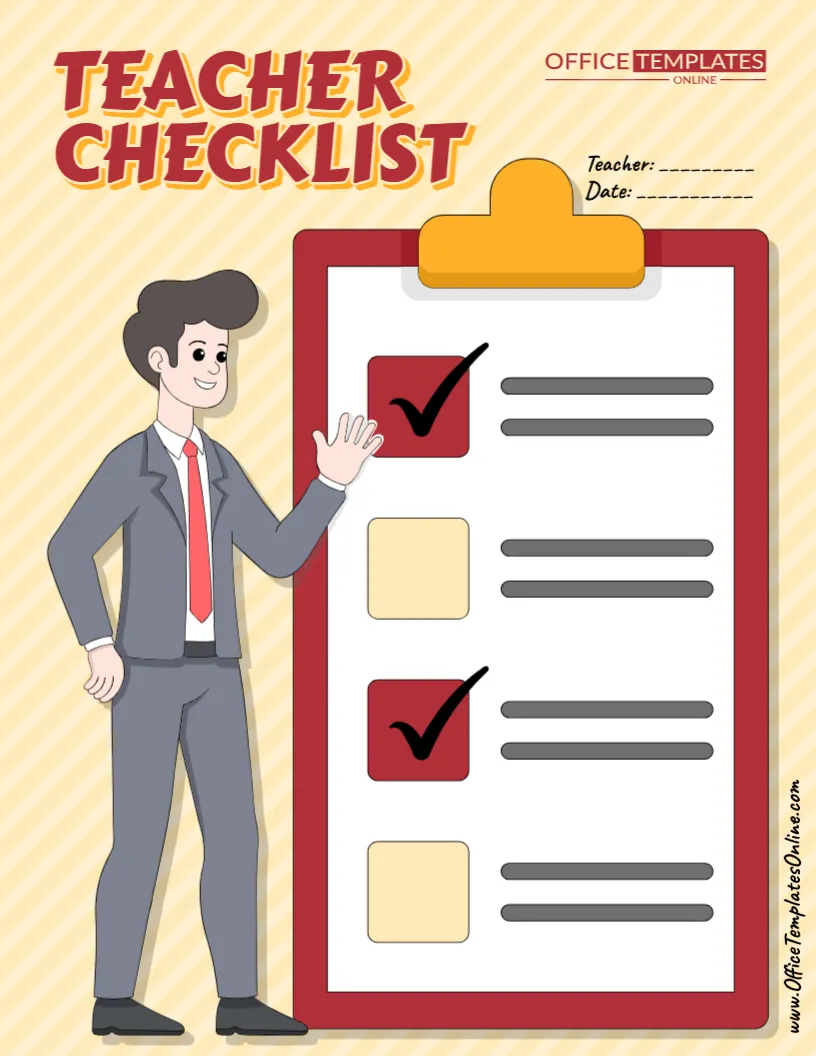
The design features a large clipboard-style checklist with four spacious task areas, including visual checkbox spaces beside each entry. At the top, separate Teacher and Date fields let you identify who the checklist belongs to and when it should be used.
Unlike the previous Teacher To-Do List format, this template is not tied to a particular week. Its date-based, open checklist layout makes it suitable for daily classroom routines, lesson preparation, observations, assessments, classroom setup, end-of-day checks, substitute preparation, and many other purposes.
The sample graphic shows how completed and unfinished items can be visually distinguished, while the actual task areas remain flexible for your own information.
Customize the available content directly through the online browser-based editor with no login required, then download your completed Teacher Checklist as a PDF, PNG, or JPG.
A Blank Checklist You Can Adapt to Different Teaching Needs
One of the biggest advantages of this design is that it does not tell you what your checklist must contain.
There are no permanent task labels such as “Grade Assignments” or “Prepare Worksheets” taking up the main planning area. Instead, the large clipboard provides open task spaces that can be personalized according to the purpose of your checklist.
That means one teacher could turn it into a morning classroom checklist, while another could use exactly the same design as a lesson preparation checklist.
You might even create several customized versions for different routines.
For example, you could prepare separate checklists for:
- Morning classroom preparation
- End-of-day classroom checks
- Lesson preparation
- Student assessment
- Classroom organization
- Substitute teacher preparation
- Field trip preparation
- Parent-teacher conferences
- New student preparation
- Back-to-school setup
- End-of-term responsibilities
- Classroom cleanup
The visual structure stays consistent while the task wording changes to fit your purpose.
Four Large Task Areas Keep the List Focused
The clipboard contains four main checklist entries.
This is intentionally different from a long, crowded task sheet.
Rather than trying to record every small responsibility you have, the design works particularly well for a short set of important actions, requirements, or checks.
For example, a morning classroom checklist could contain:
Prepare lesson materials
Check classroom equipment
Review today’s schedule
Organize student resources
An end-of-day version might instead say:
Collect student work
Update classroom records
Prepare materials for tomorrow
Check the classroom before leaving
Because there are only four prominent entries, each item can be given plenty of visual space.
Add the Teacher’s Name and Date
Near the top right of the design are dedicated fields labeled Teacher and Date.
These simple fields make the checklist more useful when you create multiple copies.
Adding the teacher’s name helps identify who is responsible for the list, while the date tells you exactly when it applies.
This can be especially helpful when a checklist is used for a particular classroom routine, observation, activity, or school day.
Instead of looking at an undated sheet later and wondering when it was used, the date provides immediate context.
Use It as a Daily Teacher Checklist
A teacher’s day often begins before students enter the classroom.
There may be materials to arrange, technology to check, worksheets to distribute, the board to update, and lesson resources to prepare.
A customized daily teacher checklist can keep the most important preparation tasks visible.
You could create a morning version containing four essential jobs and quickly review it before class begins.
The same approach works at the end of the school day.
A separate checklist could remind you to collect important work, organize materials, update necessary records, and prepare for tomorrow.
Because the date can be changed, the design works naturally for day-specific use.
Turn It into a Lesson Preparation Checklist
The template can also help you prepare for an individual lesson.
Suppose you are planning a classroom activity that requires several things to be ready beforehand. Instead of keeping those requirements in your head, turn them into four clear checks.
For example:
Review lesson objective
Prepare student materials
Check equipment or resources
Prepare assessment activity
Once those four requirements are ready, you have a quick visual confirmation that the basic preparation has been completed.
You can adapt the wording for Mathematics, Science, English, Art, Social Studies, or practically any other subject.
Create a Classroom Setup Checklist
Classroom setup can involve many different responsibilities, particularly at the beginning of a school year or term.
This Teacher Checklist template can be customized around four major setup priorities.
For example, you could use the spaces for student seating, classroom supplies, learning displays, and teaching materials.
Alternatively, create a separate checklist for each part of the classroom.
One version could focus entirely on the reading area, another on student supplies, and another on technology.
This approach can make a larger organizational project feel more manageable by dividing it into smaller sets of clearly defined checks.
Prepare for a Substitute Teacher
The open format also gives the template potential as a simple preparation checklist before a substitute takes over the class.
A teacher might create entries such as:
Leave lesson instructions
Prepare student materials
Provide attendance information
Add important classroom notes
This would not replace a detailed substitute teacher plan, but it could act as a final preparation check to make sure important materials have not been forgotten.
The Teacher and Date fields can also help identify which classroom and school day the checklist relates to when customized with the appropriate information.
Use It Before an Assessment
Tests and assessments often require preparation beyond writing the questions.
You may need to prepare copies, organize materials, review accommodations, or arrange the classroom.
A four-item checklist gives you a quick way to confirm the most important preparation steps.
For example:
Prepare assessment copies
Check student materials
Review instructions
Prepare the classroom
After the assessment, you could create another version focused on grading, recording results, providing feedback, and planning follow-up instruction.
The template is therefore flexible enough to support different stages of the same teaching process.
Helpful for Classroom Observations
Teachers, student teachers, mentors, or instructional staff may also adapt the design for simple classroom observations.
Instead of writing tasks, each entry could represent an item that needs to be checked or confirmed.
For instance, a customized version could focus on lesson preparation, classroom resources, student participation, and follow-up actions.
Because the checklist provides only a few large items, it works best for broad checks rather than a highly detailed evaluation form.
For formal evaluations, schools should of course use any required official forms or criteria.
A Strong Clipboard Design Makes the Purpose Instantly Clear
The visual centerpiece of the template is a large red clipboard.
The clipboard metaphor works naturally for a checklist because it immediately suggests tasks, checks, and completed items.
Four large square checkbox areas appear down the page, with horizontal lines beside them representing space for individual checklist entries.
Two of the example boxes display bold check marks, demonstrating the visual idea of completed items. The alternating red and light yellow checkbox areas also help separate one entry from the next.
The layout is simple enough that the checklist itself remains the main focus.
Friendly Teacher Illustration Adds Personality
On the left side of the design is a large illustrated teacher figure standing beside the clipboard.
The character points toward the checklist, helping draw attention to the main content area.
The background uses a soft cream and pale-yellow diagonal pattern, while the title combines strong red lettering with a warm yellow shadow.
The overall appearance feels educational and approachable without filling the page with too many decorative elements.
This makes the template suitable for educators who want something more visually engaging than a plain black-and-white checklist.
Teacher Checklist vs. Teacher To-Do List
Although the terms can overlap, this Teacher Checklist template can serve a slightly different purpose from a general Teacher To-Do List.
A to-do list is often used to collect jobs you need to finish over a period of time.
A checklist can be particularly useful when you have a defined set of items that should be checked, confirmed, or completed as part of a routine or process.
For example, “Grade assignments sometime this week” works naturally as a to-do item.
By comparison, a classroom closing checklist might contain the same four checks every afternoon: collect work, organize materials, update records, and prepare for tomorrow.
This template’s compact four-item structure makes it especially suitable for those focused routines.
Build Reusable Checklists for Repeated Classroom Routines
Not every customized checklist needs to be created for one-time use.
You can also prepare a standard version for something you do regularly.
For example, create a Morning Teacher Checklist with the same four essential preparation steps. Use that structure whenever you need it.
You could create another version called an End-of-Day Checklist, another for Weekly Classroom Organization, and another for Assessment Preparation.
Having separate checklists for recurring routines can give each process a clear structure without requiring you to remember every step from scratch.
Keep Checklist Wording Short and Action-Oriented
Since this template has a strong visual checklist format, concise wording will generally work best.
Instead of writing:
“Make sure all of the worksheets that students will need for today’s lesson have been printed and organized.”
You could simply use:
“Prepare student worksheets.”
Instead of:
“Check that all classroom technology is working before the students arrive.”
Use:
“Check classroom technology.”
Short phrases are easier to scan and fit more naturally beside the large checkbox areas.
Starting each item with an action word can also make the list clearer: Prepare, Check, Review, Organize, Print, Update, Collect, Confirm, Record, or Submit.
Customize the Teacher Checklist Online
The template can be personalized directly in your browser using the online editor.
You do not need to install separate design software, and no login is required to begin customizing.
Add your teacher information, enter the appropriate date, and replace the available checklist content with the tasks or checks that apply to your situation.
The visual layout has already been created for you, so you can concentrate on deciding what needs to appear on the checklist.
A Simple Way to Create Your Personalized Checklist
Start by deciding what the checklist is supposed to accomplish. A focused purpose such as Morning Classroom Preparation or Assessment Day Setup will make it easier to choose the right entries.
Next, add the teacher information and date. Then write one clear action or requirement for each of the four checklist spaces.
Review the list and ask whether completing all four items would achieve the purpose you selected. If two items overlap, combine them and use the available space for something more important.
Once everything looks correct, finalize the available design elements and prepare the checklist for download.
Create Different Versions for Different Educators
Although it is designed as a teacher resource, the basic checklist format can be adapted to different roles within an educational environment.
Classroom teachers can use it for everyday preparation and organization.
Student teachers can create checklists for observations, lesson preparation, and teaching practice.
Substitute teachers can organize the most important responsibilities for a particular day.
Teaching assistants can keep track of recurring classroom support tasks.
Tutors can prepare pre-session or post-session checklists.
Homeschool educators can use the same format for learning materials, activities, records, or daily preparation.
The open-ended task areas are what make the design adaptable.
Useful Throughout the School Year
The purpose of your Teacher Checklist can change as the academic year progresses.
During back-to-school season, it might focus on classroom setup.
During a normal teaching week, it could become a daily preparation checklist.
Before parent-teacher conferences, it might remind you to review student information, organize work samples, prepare notes, and confirm meeting details.
During assessment periods, it could focus on test preparation.
Near the end of a term, it could be adapted for reports, records, classroom materials, or closing tasks.
One design can therefore support many different teacher routines.
Download Your Checklist as PDF, PNG, or JPG
Once your personalized checklist is ready, download it in the format that best fits how you plan to use it.
PDF is a practical option for printing and keeping the checklist with other teacher documents.
PNG provides a high-quality image format suitable for digital use.
JPG provides a widely compatible image file that is convenient to save and view on different devices.
The ability to choose between PDF and image formats makes the finished checklist useful for both print and digital workflows.
Four Clear Checks Can Make a Complicated Task Feel More Manageable
A good checklist does not need to contain dozens of entries. For many classroom routines, the most useful checklist is the one that keeps a small number of essential actions visible and easy to follow.
This editable Teacher Checklist template does exactly that. Its large clipboard design provides four focused checklist areas, while dedicated Teacher and Date fields add useful context. The illustrated teacher, bold heading, and warm school-friendly design make the page visually engaging without taking attention away from its purpose.
Turn it into a daily teacher checklist, classroom setup list, lesson preparation checklist, assessment checklist, substitute preparation list, end-of-day routine, or another teacher resource that fits your needs.
Customize the Teacher Checklist online with no login required, add your own teacher details and checklist items, and download the finished template as a PDF, PNG, or JPG.


