Turn a Long List of Teaching Tasks into a Simple Weekly Checklist
Teachers often have many small but important jobs competing for attention: planning lessons, grading assignments, preparing worksheets, checking student work, updating records, and getting classroom materials ready. This Teacher To-Do List template gives those responsibilities one clear place to live.
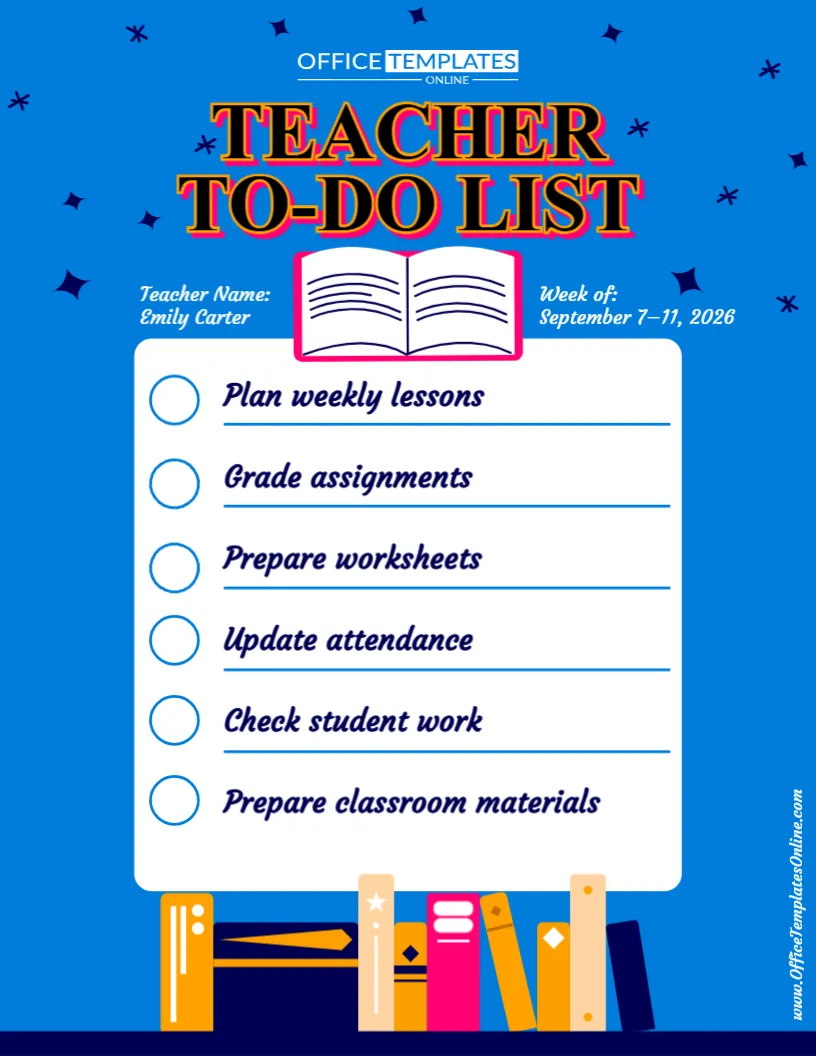
Designed as a straightforward weekly checklist, the template includes fields for the teacher’s name and week, followed by six large task rows with easy-to-see check circles. The sample version demonstrates common teaching responsibilities, but the task text can be replaced with the jobs that matter most in your own classroom.
Instead of using scattered notes or trying to remember everything, you can create one focused list for the week and mark items as they are completed.
The template can be customized directly in the online browser-based editor with no login required. Once your list is ready, download the completed design as a PDF, PNG, or JPG.
A Focused Checklist Without Unnecessary Sections
This design keeps things intentionally simple.
Rather than dividing the page into calendars, hourly schedules, notes boxes, and multiple planning areas, most of the space is dedicated to one purpose: your teacher task list.
There are six clearly separated task entries, and every item has a large circle beside it that acts as a visual checkbox.
This makes the template particularly useful when you already have a lesson planner or classroom schedule and simply need somewhere to keep track of the jobs that still need to be completed.
Start Each Week with Your Most Important Tasks
At the top of the template, there are two useful pieces of information:
Teacher Name: Identify who the checklist belongs to.
Week of: Add the date or date range for the week you are planning.
The sample design uses Emily Carter and September 7–11, 2026, but these are example details that can be replaced.
Adding a week or date range can be especially useful if you create a fresh to-do list regularly. Saved or printed lists are then easier to identify later.
Replace the Sample Tasks with Your Own Priorities
The sample Teacher To-Do List contains six realistic classroom responsibilities:
- Plan weekly lessons
- Grade assignments
- Prepare worksheets
- Update attendance
- Check student work
- Prepare classroom materials
These examples demonstrate how the checklist can be used, but they do not have to remain in your customized version.
Replace them with whatever needs your attention during the current day or week.
For example, one week may be focused heavily on assessment and grading. Another could involve preparing for a school event, organizing classroom materials, or completing reports.
The editable format allows your checklist to change as your workload changes.
Use the Six Spaces for Your Highest Priorities
A teacher’s complete task list can sometimes become very long. This template offers six prominent spaces, which makes it well suited to highlighting the jobs you most want to keep visible.
You might choose six must-do tasks for the week rather than trying to place every minor responsibility on the page.
For example, your list could include preparing Friday’s assessment, grading student projects, contacting families, completing report information, organizing science materials, and planning next week’s lessons.
A shorter, focused checklist can also be easier to scan during a busy school day than a page filled with dozens of small entries.
Check Off Tasks as You Complete Them
Each task row begins with a large empty circle.
These circles give the template its clear checklist appearance and provide a simple visual way to track progress.
If you print the completed design, you can mark each circle after finishing the corresponding task. You could also use the list as a visual reference and track completed responsibilities according to your preferred workflow.
The structure makes it easy to distinguish finished tasks from work that still needs attention.
Teacher-oriented to-do lists commonly use checkable task areas because they provide a straightforward way to keep school responsibilities together and track what remains to be done.
Useful for Lesson Preparation
Lesson planning often creates several related tasks.
You may need to decide what will be taught, prepare materials, make copies, organize classroom resources, and check that everything is ready before students arrive.
Instead of keeping each preparation job in a different place, you can add the most important ones to this checklist.
For example:
Plan science lesson
Prepare experiment materials
Print activity sheets
Review presentation
Set up classroom equipment
Check student resources
This can turn a broad responsibility such as “prepare for science” into several clear actions.
Keep Grading and Student Work Visible
Assignments and assessments can quickly create another set of teacher responsibilities.
The sample template already includes Grade assignments and Check student work, showing how the checklist can support this part of the teaching workload.
You could make these tasks more specific when needed.
Instead of simply writing “Grade assignments,” you might enter Grade mathematics quizzes or Review reading journals.
Specific wording can make it easier to see exactly what needs to be completed when you return to the list.
Use It for Classroom Administration Too
Not every teacher task is directly related to lessons.
There are also records, communication, meetings, supplies, classroom organization, and other administrative responsibilities to manage.
Your customized Teacher To-Do List might therefore contain tasks such as update attendance, reply to parent emails, submit reports, prepare meeting notes, order supplies, update student records, or organize classroom files.
The template does not categorize tasks for you, so teaching and administrative responsibilities can appear together in whatever order makes the most sense for your week.
A Bright Design That Is Easy to Recognize
The template uses a strong blue background with dark navy, pink, orange, and white details.
A large “Teacher To-Do List” heading appears prominently near the top, so the purpose of the page is immediately clear.
An open-book illustration separates the title from the main checklist, while a row of colorful books appears along the bottom. Small star-like decorations add visual interest around the blue background.
The central task area remains white, helping the dark task text and blue check circles stand out clearly.
This balance gives the template a lively school-themed appearance without making the actual checklist difficult to read.
Edit the Teacher To-Do List Online
You do not need to create a checklist from scratch or install separate design software.
Open the template in the online editor and personalize the available content directly in your browser.
No login is required to start editing.
You can replace the sample teacher name, update the week, and rewrite each task to match your own responsibilities.
Because the checklist structure and visual design are already prepared, you can spend your time deciding what needs to be done instead of designing the page itself.
How to Customize Your Teacher Checklist
Creating a personalized version is simple:
- Open the Teacher To-Do List template in the online editor.
- Replace the sample teacher name with your own name.
- Change the Week of field to the correct date or date range.
- Review the six sample tasks and decide which ones you want to keep.
- Replace the remaining entries with your own classroom or teaching responsibilities.
- Put your most important tasks in prominent positions.
- Check the wording and dates for accuracy.
- Download your completed checklist as PDF, PNG, or JPG.
If you have more tasks than available spaces, consider using the template for your highest-priority jobs rather than trying to fit every small reminder onto the page.
Create a Fresh To-Do List for Each Week
The design works particularly well as a recurring weekly teacher checklist.
At the end of one week, you can review what has been completed and identify anything that still needs attention.
Then create a new version for the following week, change the date range, remove completed items, and add new priorities.
This approach also means your checklist can change during particularly busy parts of the school year.
At the beginning of the year, tasks might focus on classroom setup and student materials. During assessment periods, grading and record updates may become more important. Near the end of a term, reports and classroom organization could take priority.
Use It During Back-to-School Preparation
The template can also become a useful back-to-school teacher checklist.
Instead of the sample weekly tasks, you could add jobs such as preparing student folders, organizing desks, labeling supplies, creating classroom displays, checking teaching materials, and preparing welcome activities.
A separate version could be created for the first week of classes with reminders about student information, classroom routines, parent communication, and initial assessments.
Because the task wording is customizable, the same basic design can support different stages of the school year.
Helpful During Report and Assessment Weeks
Some weeks naturally come with more administrative work than others.
During an assessment period, for example, you might create a checklist focused on preparing tests, checking completed work, grading assessments, recording results, identifying follow-up needs, and returning work to students.
During report preparation, the list might focus on reviewing grades, updating records, writing comments, checking missing work, completing reports, and preparing for parent meetings.
This is where a dedicated teacher checklist can be particularly practical: it provides a separate place for tasks that may not fit neatly inside a regular lesson plan.
Suitable for Different Educators
Although the design is labeled Teacher To-Do List, its open task format makes it suitable for different educational roles.
Classroom teachers can track lesson preparation and administrative work.
Substitute teachers can create a checklist of responsibilities for the school day.
Student teachers can organize assignments, observations, teaching preparation, and university requirements.
Homeschool educators can use it for lesson preparation, resource gathering, record keeping, and learning activities.
Tutors can track session preparation, student follow-ups, materials, and scheduling tasks.
Teaching assistants can organize classroom support responsibilities and reminders.
The content can change without changing the basic checklist structure.
Teacher To-Do List vs. Teacher Planner
A teacher planner and a to-do list can work together, but they serve slightly different purposes.
A teacher planner is generally useful for organizing when lessons, meetings, activities, and events will happen.
A Teacher To-Do List focuses more directly on the actions that still need to be completed.
For example, your planner might show that a science activity takes place on Thursday. Your to-do list could remind you to prepare the experiment materials before Thursday arrives.
Using the checklist alongside a weekly or monthly planner can therefore provide a simple way to separate scheduled events from actionable tasks.
Download as PDF, PNG, or JPG
After you have personalized the checklist, download the finished version in the format that works best for you.
PDF is a convenient choice when you want a document for printing or storing with other planning materials.
PNG provides a high-quality image version for digital use.
JPG gives you a widely supported image format that can be saved and viewed on many devices.
Having multiple download options makes it easier to use your personalized checklist in the way that fits your workflow.
Give Every Important Teacher Task a Clear Place to Go
The value of this editable Teacher To-Do List template is its simplicity. There are no complicated schedules to complete and no unnecessary planning sections competing for space. Instead, you get a clear weekly heading, teacher identification, and six prominent checklist items for the responsibilities that need your attention.
Use it for lesson preparation, grading, worksheets, attendance, student work, classroom materials, meetings, parent communication, reports, or any other teaching tasks on your list.
Customize the Teacher To-Do List online with no login required, replace the sample tasks with your own priorities, and download your completed checklist as a PDF, PNG, or JPG.