Make a Friendly First Introduction Before the School Year Begins
The beginning of a new school year comes with plenty of questions for students and parents. Who is the teacher? What grade or subject do they teach? Where is their classroom? How can families contact them? And, perhaps most importantly, what can students expect when they walk into class?
This Meet the Teacher Template helps answer those questions in one colorful, welcoming design.
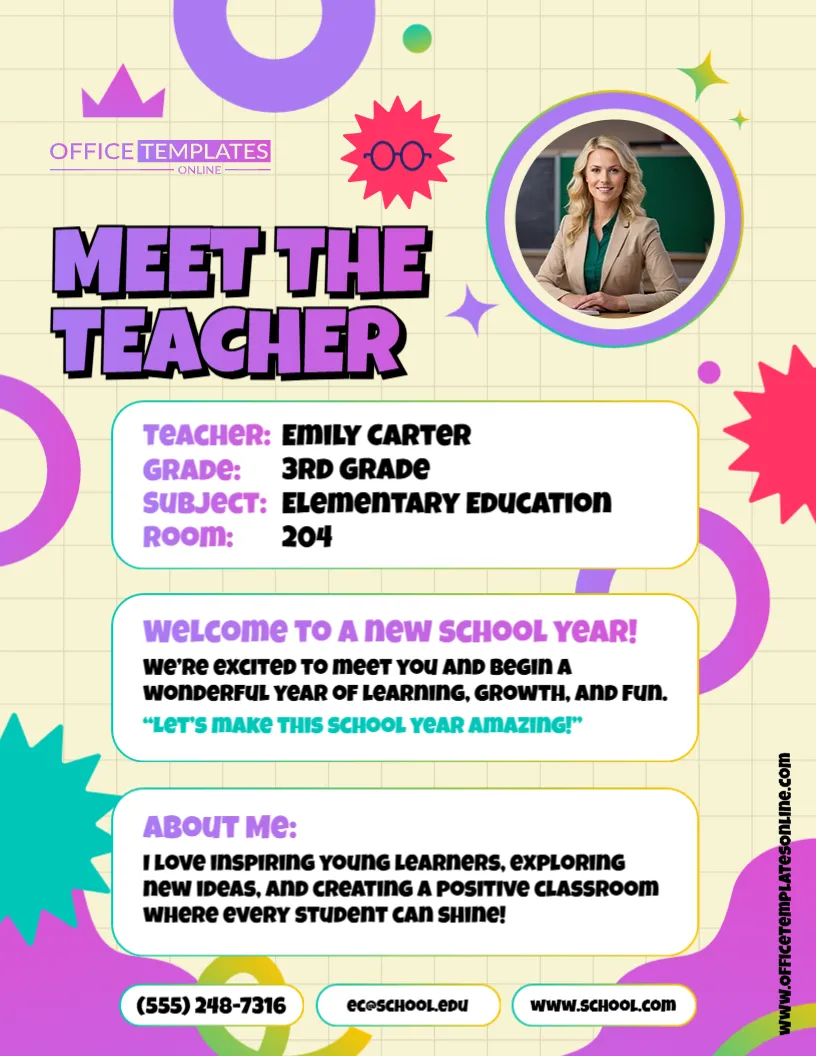
It provides dedicated spaces for a teacher photo, name, grade, subject, room number, welcome message, short “About Me” introduction, phone number, email address, and website. Instead of sending several pieces of information separately, teachers can introduce themselves and share key classroom details in one easy-to-read page.
The template is customizable through an online browser-based editor, with no login required. Replace the sample information with your own details, personalize the content and design, and download the finished introduction as a PDF, PNG, or JPG.
What Information Is Included in This Meet the Teacher Template?
A useful teacher introduction should provide enough information to help families feel informed without overwhelming them. This layout organizes the content into clearly separated sections, making important details easy to find.
The sample design includes areas for:
- Teacher name
- Teacher photograph
- Grade
- Subject
- Room number
- Welcome message
- About Me section
- Phone number
- Email address
- School or classroom website
All of the sample information is there to demonstrate how the completed template can look. Replace it with details that apply to you, your classroom, and your school.
Introduce Yourself With a Photo
The circular photo area near the top gives students and families an immediate visual introduction to their new teacher.
Replace the sample photograph with your own teacher photo. A clear, friendly headshot works particularly well because the photo area is designed as a portrait rather than a large photo collage.
Adding a photograph can also make the introduction feel more personal. Students who have not met their teacher yet can put a face to the name before the first day of class or a Meet the Teacher event.
Help Students Know What to Expect
The welcome section gives you room to set a positive tone for the new academic year.
The sample wording welcomes students to a year of learning, growth, and fun, but you can replace it with a message that better represents your own classroom.
For example, you could briefly mention what students can look forward to, encourage them before their first day, or share a simple classroom motto.
Keeping this section warm and concise helps make the page inviting while leaving enough space for the practical information families need.
Tell Families a Little About Yourself
The “About Me” section is where this template becomes more than a contact sheet.
Use this space for a short introduction that helps students and parents learn a little about the person behind the teacher’s name. You might briefly mention your approach to teaching, what you enjoy about education, or what you hope students will experience in your classroom.
You could also adapt the section to include information such as:
- Years of teaching experience
- Educational background
- Favorite subjects
- Teaching philosophy
- Classroom goals
- Hobbies or interests
- A fun fact about yourself
- What you enjoy most about teaching
There is no need to write a lengthy biography. A few friendly sentences can be enough to make your introduction feel more personal.
Keep Essential Classroom Details Easy to Find
Along with the personal introduction, this template provides a clear section for practical information.
The grade, subject, and room number appear together near the top, so parents and students do not have to search through paragraphs to find them.
This is especially helpful during busy back-to-school periods when families may be receiving information from several teachers or departments.
For elementary teachers, you could list the grade and use the subject field for a general classroom description. Middle school and high school teachers can customize the fields with the specific subject or course they teach.
Add Your Preferred Contact Information
At the bottom of the template are dedicated areas for a phone number, email address, and website.
Replace the sample contact information with the appropriate school-approved details you want families to use. If one of the fields is not relevant to you, you can customize the content according to your needs.
A website field could be used for a school website, classroom webpage, course page, or another appropriate online resource.
Keeping these details together gives parents a convenient place to check how to reach you later.
Customize Everything Online – No Login Required
You do not need to recreate this teacher introduction in a separate design program.
The template can be personalized using the online editor directly in your browser, and you can begin without creating an account or logging in.
Start with the existing layout and replace the sample content with your own information. Depending on the editable elements available, you can personalize the photo, text, colors, styling, and other design details.
This allows you to spend more time preparing the actual information you want to share and less time arranging a page from scratch.
A Colorful Design for a Fresh School Year
This Meet the Teacher page uses an energetic combination of purple, pink, turquoise, yellow, and cream, along with playful geometric shapes and bold typography.
The design feels cheerful and modern while keeping the information divided into easy-to-recognize sections. A subtle grid-style background adds a school-inspired touch without competing with the main content.
The large “Meet the Teacher” heading immediately tells readers what the page is about, while the teacher portrait and information boxes create a natural reading order.
The result is an introduction that can feel especially fitting for back-to-school activities and the start of a new academic year.
Useful for More Than the First Day of School
Although this template is a natural choice for the beginning of the school year, it can be adapted for other situations as well.
Consider using it for:
- Back-to-school introductions
- Meet the Teacher Night
- School open houses
- Parent orientation
- Classroom welcome materials
- New teacher introductions
- Mid-year teacher changes
- Parent information packets
- Digital classroom introductions
- School newsletters or communications
A teacher joining a class during the school year, for example, could update the welcome message and use the same layout to introduce themselves to students and families.
Suitable for Different Grade Levels and Subjects
The editable fields make this template adaptable to many teaching roles.
An elementary teacher could use “3rd Grade” and “Elementary Education,” as shown in the sample. A middle school teacher might enter “7th Grade” and “Science.” A high school educator could list a specific course such as “English Literature,” “Biology,” or “World History.”
The room field can also be changed to suit your setting, whether you use a classroom number, building name, department, or another location identifier.
This flexibility means you can personalize the template rather than trying to fit your information into a one-size-fits-all teacher introduction.
Ideas for Writing Your Meet the Teacher Page
When completing the template, focus on the information students and families are most likely to find useful.
Start with accurate classroom details, then write a short welcome message in your natural voice. Your “About Me” paragraph can provide a little personality without becoming too long.
Before downloading, double-check the spelling of your name, grade, subject, room number, email address, and other contact information.
If the template will be posted publicly online, only include contact or personal information that you are comfortable sharing and that follows your school’s policies.
Download Your Finished Template as PDF, PNG, or JPG
Once you have replaced the sample content and finished customizing the design, you can download your personalized Meet the Teacher Template in PDF, PNG, or JPG format.
Choose PDF when you want a document-style version that is convenient for printing or distribution. PNG and JPG provide image versions that can be useful for digital communication and sharing.
Multiple download formats make it easier to prepare the same introduction for different uses.
Print It or Share Your Introduction Digitally
Your completed Meet the Teacher page can work in both printed and digital settings.
Print copies for an open house, orientation, classroom welcome packet, or Meet the Teacher event, or use the downloaded version as part of your digital back-to-school communication.
This can save you from creating separate introductions for different situations. Prepare the information once, choose the appropriate download format, and use the finished design wherever it suits your classroom communication needs.
Start the School Year With a Warm Introduction
A good first introduction can help students and families learn the essentials about their new teacher before the school year gets fully underway.
This editable Meet the Teacher Template brings those essentials together in a bright, organized format. Add your photo, teacher name, grade, subject, room number, welcome message, personal introduction, and appropriate contact details to create a page that represents you and your classroom.
With online editing, no login required, and PDF, PNG, and JPG downloads, you can quickly turn the ready-made layout into your own personalized teacher introduction—ready to print, share, and welcome students to a brand-new school year.