Never pay a bill twice, and never pay one late
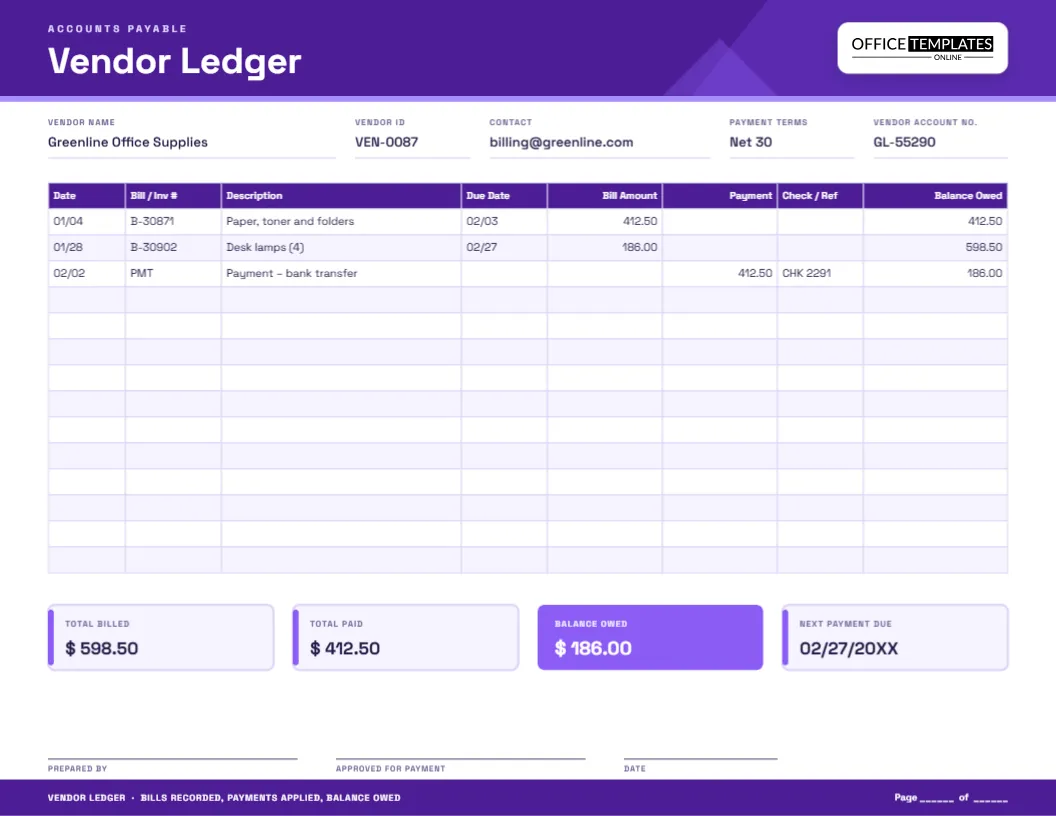
Those two promises sit behind every accounts payable process. Pay twice and you lose cash; pay late and you risk fees, strained supplier relationships and a lost early-payment discount. A vendor ledger is the simplest tool for keeping both promises. It is a running account for one supplier: what they billed you, what you paid, and what you still owe. This violet landscape template gives you that account on a single page, with a summary strip that shows the totals at a glance.
Bills in, payments out
Think of a vendor account as a mirror image of a customer account. When a supplier sends a bill, the amount you owe goes up. When you pay, it goes down. Recording both in the same table, in date order, gives you a balance owed that can be checked against the supplier’s own statement. Any difference shows up straight away, and you can settle it before it turns into an argument.
The header fields
- Vendor name as it appears on the supplier’s bills.
- Vendor ID, a short code you use in your books.
- Contact, the billing email or phone number for queries.
- Payment terms, for instance Net 30 or Net 45.
- Vendor account no., the number the supplier has assigned to you, which they will ask for on every call.
Eight columns, each with a purpose
The table has more columns than most ledgers because payables work involves more paperwork.
- Date the bill arrived or the payment was made.
- Bill / Inv #, the supplier’s invoice number.
- Description of what was bought.
- Due Date from the invoice terms.
- Bill Amount adds to the balance owed.
- Payment reduces the balance.
- Check / Ref holds the check number, transfer reference or card authorisation for each payment.
- Balance Owed is the running total.
In the sample, two bills of 412.50 and 186.00 bring the balance to 598.50. A payment of 412.50 by check number 2291 brings it down to 186.00, the amount still open.
The summary strip at the bottom
Four tiles finish the page: Total billed, Total paid, Balance owed and Next payment due. The third is filled in a brighter violet because it is the number you will look at most. The fourth tile is a small but valuable habit. Writing down the next due date means you can schedule cash for it, and it helps you avoid the late fees that quietly eat into margins.
Getting value from early-payment discounts
Some suppliers offer a discount for fast payment, often written as 2/10 Net 30. On a bill of 1,000.00 that is 20.00 saved for paying 20 days early, which works out to a very high annual return compared with almost any other use of the cash. Record the discount as a separate line, so the balance still reaches zero and the books stay clean. Keep an eye on the Due Date column and pay the bills with discounts first.
Matching before you pay
- Compare the supplier’s bill with the purchase order to check quantities and prices.
- Check that the goods or services were actually received.
- Write the bill on the vendor ledger with its invoice number and due date.
- Have the payment approved by the person who signs, and note the approval on the page.
- Record the payment with its check or transfer reference the day it is sent.
- Compare your balance owed with the supplier’s statement once a month.
Who should keep vendor ledgers
- Small businesses without an accounting package
- Restaurants and shops with regular suppliers
- Contractors with material accounts at builders’ merchants
- Non-profits and clubs with recurring bills
- Bookkeepers who prepare payables for clients
- Landlords with utility and maintenance vendors
Filling in the template
- Type the vendor’s name, ID, contact, terms and account number.
- Replace the sample rows with your own bills and payments.
- Update the summary tiles at month end.
- Add the name of whoever approved payment in the signature box.
- Change the violet colours if you prefer a different look.
- Download as PDF, PNG or JPG.
Filing the vendor pages
The sheet is US Letter landscape, 11 by 8.5 inches. Print it at 100 percent, punch it on the short edge and file it behind a tab for each supplier, or keep the digital copy in a folder named for the vendor. If you make part payments, write a line for each so the check numbers stay traceable. For year-end, keep the ledger together with the bills and bank statements it refers to.
Payables questions people ask
Where should I record a supplier credit note?
Use the Payment column and write “Credit note” with its number in the description, because it reduces the balance owed in the same way.
Can this replace accounting software?
For a few suppliers, yes. For many, the ledger is a useful reference or a backup, but software will save time.
What if the supplier’s statement is different from mine?
Compare line by line. The usual causes are a bill not yet received, a payment in transit or a bill recorded on a different date.
Should I keep one page for each supplier?
Yes. It makes statements easy to reconcile and keeps each supplier’s history in one place.
Reading the ledger as an early-warning system
A vendor ledger is more than a record; it shows patterns. If the balance owed to one supplier keeps growing, you may be relying on their credit to fund your business, and that deserves a conversation. If the same supplier’s bills jump in a particular month, you may need to renegotiate or compare prices. If two bills carry the same amount and dates a few days apart, you may have received a duplicate. A quick look down the Bill Amount column each month takes two minutes and can save real money.
A tidy vendor ledger keeps your suppliers happy and your cash under control. Open the template, add your first supplier and start tracking what you owe.