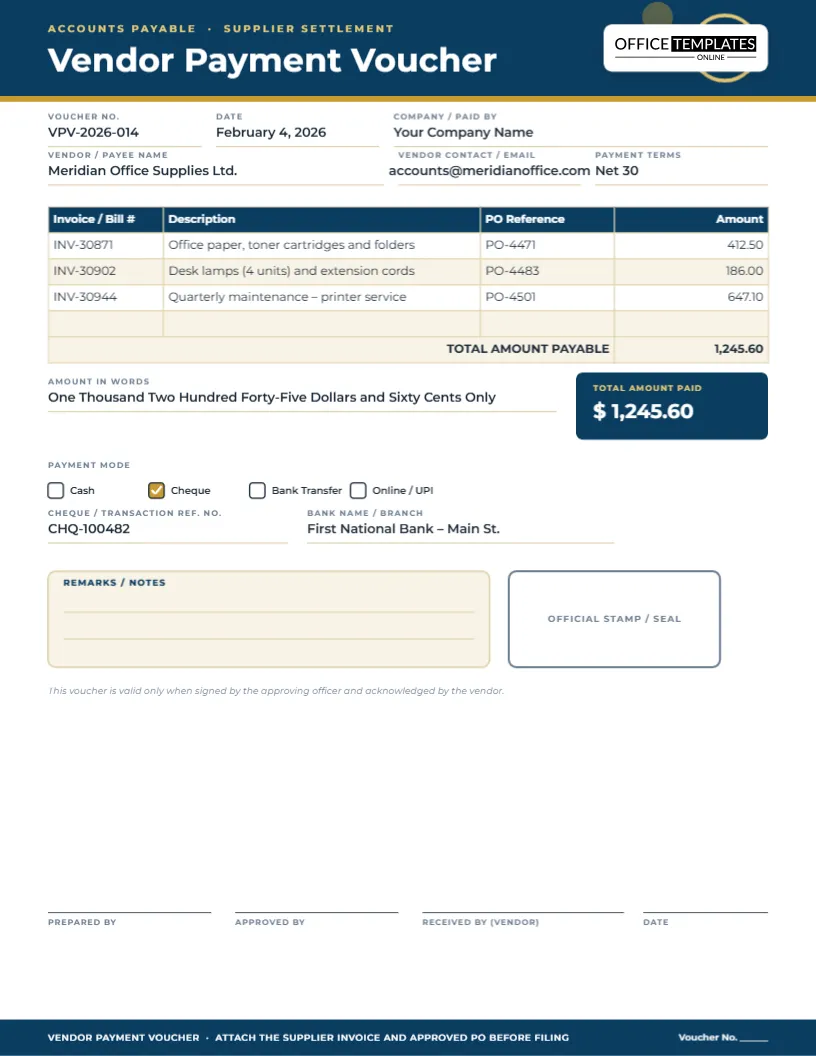
Every business that buys from suppliers eventually has to answer the same question: what, exactly, did we pay this vendor, when, and for which invoices? A vendor payment voucher is the document that answers it. It sits between the supplier’s invoice and your bank statement, recording the vendor, the bills being settled, the amount, the payment method and who approved it. This vendor payment voucher template is built to be filled in on screen, so a bookkeeper or accounts payable clerk can produce a clean, consistent record for every payment run without opening a spreadsheet.
It is designed for the everyday reality of accounts payable: a handful of invoices from one supplier, sometimes tied to a purchase order, paid together by cheque or bank transfer. The layout keeps that information in one glance – vendor details at the top, a line-item table of exactly which invoices are being paid, a clear total, and a place to record how the payment was made.
What the voucher captures
- A voucher number and date, so the payment can be filed and referenced later
- The paying company and the vendor’s name, contact and payment terms
- A line-item table for invoice or bill numbers, a short description, the purchase order reference and the amount
- A running total, plus the amount spelled out in words
- Payment mode checkboxes (cash, cheque, bank transfer, online) with reference and bank fields
- A remarks box, an official stamp/seal area and four signature lines
Layout and design details
The template is a single US Letter page, 8.5 by 11 inches, portrait orientation. A navy header carries the voucher title and two subtle gold rings with a checkmark, a quiet nod to approval, and the logo sits on its own light plate at the top right. Amber-gold accents pick out the total tile and payment-mode checkboxes so the two numbers that matter most – the total and the payment method – are impossible to miss. The invoice table uses the editor’s real table object, so rows and columns can be added, removed or resized freely.
Why use a dedicated vendor voucher instead of a general one
A generic payment voucher usually has one blank “paid to” line and one amount. That is fine for a single cash payment, but vendor payments are rarely that simple: you are often settling two or three invoices in one run, sometimes against a purchase order, sometimes with a partial payment. Splitting that into an itemized table – invoice number, description, PO reference, amount – means anyone reviewing the voucher later can match it straight back to the supplier’s own statement without guessing.
Who relies on a vendor voucher
- Small business owners who pay suppliers directly and want a paper trail
- Bookkeepers and accounts payable clerks processing a weekly or monthly payment run
- Office managers authorizing purchases from recurring vendors
- Freelance accountants preparing records for a client review
- Retail and hospitality businesses settling supplier invoices for stock or services
- Nonprofits and schools that need a signed record before releasing funds
- Anyone who currently pays vendors from a chequebook stub and wants something more professional
Ideas for the payment terms and remarks fields
- Note whether the payment clears a full balance or is a partial/installment payment
- Reference a discount taken for early payment, such as “2/10 net 30 – discount applied”
- Flag a disputed line item that was excluded from this payment
- Record a purchase order number if the invoice does not carry one
Customizing the voucher, step by step
- Click the voucher number and date fields and enter your own.
- Replace the company and vendor fields with your business and supplier details.
- Click into the invoice table and edit each row, or use the table tools to add or delete rows for more or fewer invoices.
- Update the total, the amount in words, and the payment-mode checkbox for how this bill was actually settled.
- Fill in the cheque, transfer reference and bank fields, and use the remarks box for anything unusual about the payment.
- Change the navy and gold color scheme from the toolbar if you want the voucher to match your brand.
- Download the finished voucher as a PDF, PNG or JPG, or print it directly.
Tips for a clean accounts payable trail
- Number vouchers sequentially so gaps are easy to spot during an audit
- Always attach the original invoice and, where relevant, the approved purchase order
- Get a second signature for any payment over your company’s approval threshold
- Keep the vendor’s banking details consistent across vouchers to catch fraudulent changes quickly
- File vouchers by vendor and month so a full year’s payments to one supplier are easy to pull together
- Reconcile the voucher total against the bank statement line before closing the month
Printing a vendor voucher for filing
The page is US Letter, 8.5 x 11 inches, and prints at 100 percent with no scaling needed on a standard home or office printer. Download it as a PDF for emailing to a manager for approval, or as a PNG or JPG if you only need a quick image copy for a chat message or shared drive. Because everything is editable text and a real table, there is no need to re-type the layout for a different vendor – just open it again and swap the details.
Sharing and approval workflow
Many small teams approve payments over email or chat before releasing funds. Fill in the voucher, export it as a PDF, and send it to the approving manager; once it comes back signed (physically or with a note in the remarks box), file the PDF alongside the invoice. If your business uses a shared drive, keep a consistent file name such as VPV-2026-014-meridian-office.pdf so vouchers stay searchable.
Vendor voucher questions, answered
Is this the same as a purchase order?
No. A purchase order authorizes a purchase before it happens; this voucher records the payment after an invoice has been approved for settlement.
Can I attach more than three invoices?
Yes. Click into the table and add rows for as many invoices as this payment covers; the total field will still need to be updated by hand.
Do I need a purchase order reference for every line?
No, leave it blank if the invoice was not tied to a PO. Many recurring service invoices, like utilities or subscriptions, never have one.
What if the vendor is paid part now and part later?
Use the remarks box to note the partial amount and the balance remaining, and issue a second voucher when the rest is paid.
Can I use this for a one-time supplier as well as a regular vendor?
Yes, the fields work equally well for a one-off purchase or a supplier you order from every month.
Does the voucher calculate the total automatically?
No, it is a fillable form rather than a spreadsheet, so you type the total after adding your invoice lines. That keeps it simple and works the same on any printer.
Open the vendor payment voucher template, fill in your supplier’s details and invoice lines, and download a clean, professional record for your accounts payable file.


