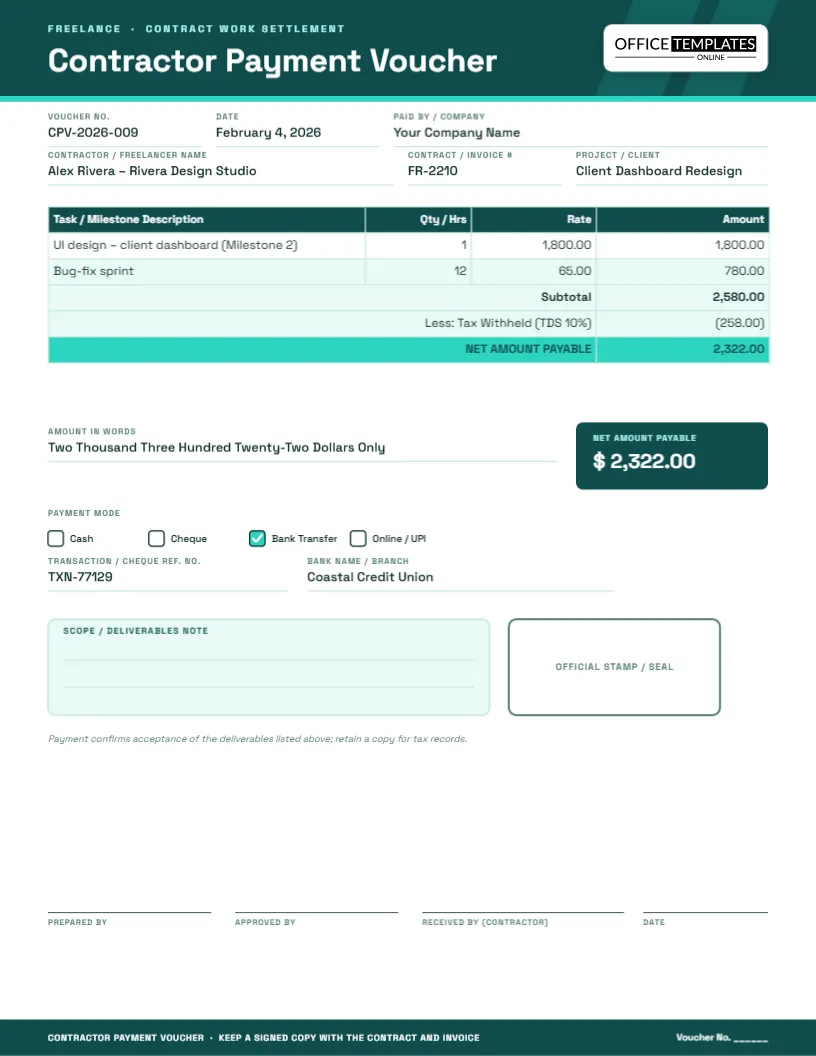
Paying a contractor or freelancer is rarely a single flat number. There is usually a rate, a quantity – hours worked or a milestone delivered – and sometimes tax withheld before the net amount goes out. A standard invoice template does not always leave room to record all of that cleanly on your side of the transaction, which is exactly what this contractor and freelancer payment voucher is for. It is the internal record you keep every time you settle an invoice from someone who is not on payroll: what they billed, what was withheld, and what actually landed in their account.
The layout is built around a simple idea: show the work, show the money, show the math. A task or milestone table lists what was delivered and at what rate, a subtotal and deduction line sits underneath, and a highlighted net-payable row makes the final figure unmistakable, even at a glance.
What’s on the page
- Voucher number, date and the paying company’s name
- Contractor or freelancer name, contract or invoice number, and the project or client it relates to
- A task/milestone table with quantity or hours, rate and amount
- Subtotal, a tax-withheld deduction row and a highlighted net amount payable
- Payment mode, transaction reference and bank fields
- A scope/deliverables note box, an official stamp area and four signature lines
Design details
Portrait US Letter, 8.5 x 11 inches, one page. The header is a deep teal with two soft diagonal bands for texture and the logo on a light plate at top right. Space Grotesk gives the headline a slightly technical, modern feel that suits freelance and contract work, while the body copy stays in a clean, highly legible weight for the fields and table. The net-payable row is filled in bright teal so it reads instantly as the number that matters.
Why a separate voucher for contract work
Employees are paid through payroll, with tax handled automatically. Contractors and freelancers are not, so the person approving the payment needs to see, on one page, what was billed, what was withheld and what is actually being transferred – and keep that record for tax season. This voucher makes that deduction visible instead of leaving it buried in a spreadsheet only the bookkeeper can see.
Who this is for
- Agencies and studios that regularly hire freelance designers, writers or developers
- Small businesses settling a one-off invoice from a contractor
- Startups managing a mix of employees and 1099/self-employed contributors
- Property managers paying independent tradespeople for repair work
- Nonprofits compensating guest speakers, trainers or consultants
- Freelancers themselves, who can issue this as a payment confirmation back to a client
- Anyone who needs a signed record before releasing a milestone payment
Notes and scope-box ideas
- List exactly which deliverable or milestone this payment closes out
- Note whether this is a full and final payment or one of several installments
- Record a purchase order or statement-of-work reference if one exists
- Flag any revisions still owed before the contract is considered complete
How to customize the voucher
- Update the voucher number, date and your company name in the top fields.
- Enter the contractor’s name, the contract or invoice number, and the project.
- Edit the task rows in the table, or add and delete rows to match the actual invoice.
- Adjust the subtotal, the tax-withheld line (or delete it if none applies) and the net amount payable.
- Check the payment-mode box that matches how the contractor was actually paid, and fill in the reference and bank fields.
- Use the scope/deliverables box to note what this payment covers.
- Download as a PDF for your records, or as PNG/JPG for a quick share.
Tips for working with contractors
- Keep a signed voucher for every payment; it is often the only proof of payment terms if a dispute arises
- Withhold tax only where your local rules require it, and confirm the rate with an accountant rather than guessing
- Match every voucher to the contractor’s own invoice number so both sides’ records agree
- Ask new contractors for a completed tax form before the first payment, not after
- Keep a running file per contractor so year-end totals are easy to pull for 1099s or equivalent forms
Printing a contractor voucher
The page prints cleanly on US Letter at 100 percent scale. Export a PDF for the contractor’s own records or for your accountant, and keep a copy filed with the original invoice and any statement of work. If you manage several contractors, a consistent naming pattern such as CPV-2026-009-rivera-design.pdf keeps a busy folder searchable.
Sharing with a remote contractor
Because freelancers are often not in the same office, this voucher works well as an email attachment confirming a payment has been sent, especially for wire transfers that can take a day or two to arrive. Attaching the PDF with the transaction reference filled in reassures the contractor the payment is on its way and gives them something to match against their own bank statement.
Contractor payment questions, answered
Do I always need to withhold tax from a contractor payment?
It depends on your country and the contractor’s status; many jurisdictions do not require withholding for independent contractors. Leave the deduction row blank or delete it if it does not apply to you.
Can I use this for an hourly freelancer instead of a milestone-based one?
Yes, just use the quantity column for hours and the rate column for the hourly rate; the amount column calculates the same way either way.
Is this voucher a replacement for a contract or statement of work?
No, it is a payment record, not a legal agreement. Keep it alongside your signed contract, not instead of one.
Can the contractor sign this themselves?
Yes, the “Received by (Contractor)” signature line is there for exactly that, whether printed and signed or acknowledged by email.
What if I am paying in a different currency?
Edit the currency symbol in the amount fields and note the currency in the remarks or scope box so there is no ambiguity later.
Can I reuse this template for every payment to the same contractor?
Yes, keep the file and just update the voucher number, date, table rows and totals for each new payment.
Open the contractor payment voucher, fill in the work and the numbers, and download a clear, professional record of every freelance payment you make.


