Every business that sells anything eventually has to refund something. A refund payment voucher is the record that turns “we gave the customer their money back” into a documented transaction: which order it relates to, why it was refunded, how much, and who approved and processed it. Without a voucher like this, refunds tend to live only in a payment processor’s dashboard, disconnected from the reason the refund happened in the first place.
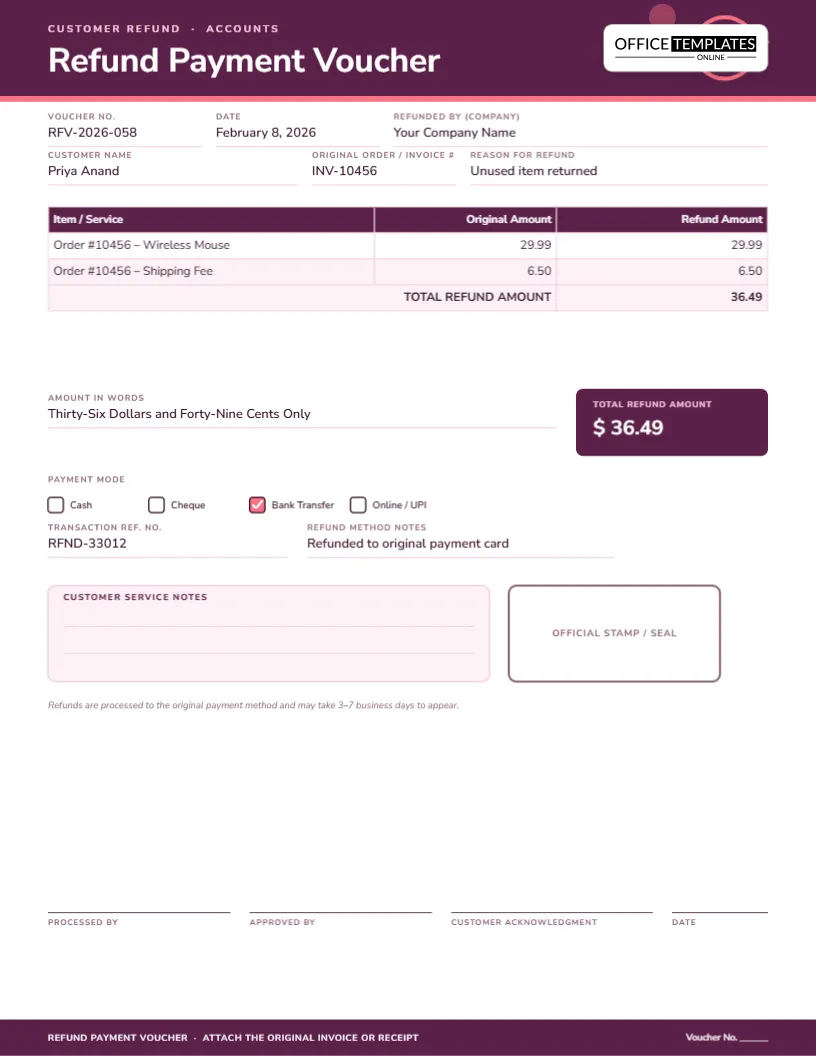
The layout ties each refund line back to the original order, so a partial refund – say, a returned item but not its shipping fee, or vice versa – is easy to document precisely rather than as one vague total.
What goes on the voucher
- Voucher number, date and the company issuing the refund
- The customer’s name, the original order or invoice number, and the reason for the refund
- An item-by-item table comparing the original amount to the refund amount
- A total refund amount, the figure in words, and the refund method used
- Customer service notes, an official stamp area and signature lines for processing and approval
The design, at a glance
One page, US Letter portrait, 8.5 x 11 inches, in a plum and coral palette with a thin circular arrow motif in the header, a quiet visual echo of money moving back. Nunito Sans keeps the tone warm and approachable rather than clinical, which suits a document a customer may occasionally see themselves. The item table lists the original amount next to the refund amount, so a partial refund is obvious at a glance rather than requiring a footnote.
Why a refund needs its own paper trail
A chargeback or a customer dispute almost always asks the same three questions: was this refunded, how much, and why. A payment processor’s dashboard can usually answer the first two, but rarely the third in a way that is easy to search later. Keeping a short, consistent voucher for every refund means a support team can answer a “did we refund this?” question from a customer, or a finance team can answer it from an auditor, in seconds rather than by digging through a transaction log.
Who benefits from this template
- E-commerce and retail businesses processing returns and refunds
- Customer service teams who need a record separate from the payment processor
- Small service businesses refunding a cancelled booking or unused session
- Finance teams reconciling refunds against sales for the month
- Marketplace sellers who need their own record independent of the platform
- Subscription businesses processing a partial-month or pro-rated refund
- Anyone who wants a signed, documented reason before money goes back out
Common reasons to record
- Item returned unused and in original condition
- Product arrived damaged or defective
- Service cancelled before it was delivered
- Billing error or duplicate charge
- Goodwill refund for a service issue, even without a return
Steps to customize it
- Update the voucher number, date and your company name.
- Fill in the customer’s name, the original order or invoice number and the reason for the refund.
- Edit the item table with the original amount and the refund amount for each line.
- Update the total refund amount, the amount in words, and check the refund method used.
- Fill in the transaction reference and any refund method notes.
- Use the customer service notes box for internal context that should not go to the customer.
- Download as a PDF for internal filing, or PNG/JPG for a quick reference.
Tips for handling refunds
- Always refund to the original payment method unless there is a specific reason not to
- Record a reason for every refund, even a small one; patterns in reasons often reveal a bigger product or service issue
- Get a second approval for refunds above a set amount to prevent errors or misuse
- File refund vouchers by month alongside sales records so totals reconcile cleanly
- Set expectations with the customer on how long the refund will take to appear, and note that timeframe on the voucher
- Review refund reasons quarterly as a group; a cluster of refunds for the same reason usually points to a fixable problem upstream
Printing and exporting
The page is US Letter, 8.5 x 11 inches, and prints at full size with no scaling. Export a PDF for internal accounting records, or send a PNG or JPG to a customer as informal confirmation alongside the automated email their payment processor sends.
Sharing with a customer
Some businesses like to send a simplified confirmation to the customer directly; if you do, consider removing the internal customer service notes box before sharing, since that field is meant for your team rather than the person receiving the refund.
Refund voucher questions, answered
Can I use this for a partial refund only?
Yes, that is exactly what the item table is for – list the original amount and a smaller refund amount side by side for the item involved.
Does this voucher process the actual refund?
No, it is a record of a refund processed through your payment provider or bank; fill it in alongside that transaction, not instead of it.
What if a refund covers several orders at once?
Add a row per order in the item table so each original order is still traceable individually.
Can I use this for a goodwill refund with no return involved?
Yes, just note “goodwill credit” or similar as the reason, and leave the “original amount” column matching the refund amount if nothing was actually returned.
Who should sign the customer acknowledgment line?
It is optional and most useful for in-person or high-value refunds where you want the customer’s written confirmation; for routine online refunds it can be left blank.
How long should I keep refund vouchers on file?
Keep them at least as long as your local tax and accounting rules require for sales records, typically several years.
Can I track refunds by product as well as by customer?
Yes, keep the item description specific in the table so refund patterns by product are easy to spot when you review the vouchers together.
Open the refund payment voucher template, document exactly what was refunded and why, and keep a clean record every time money goes back to a customer.