Orange Cobwebs and a Hanging Spider for a Halloween Certificate
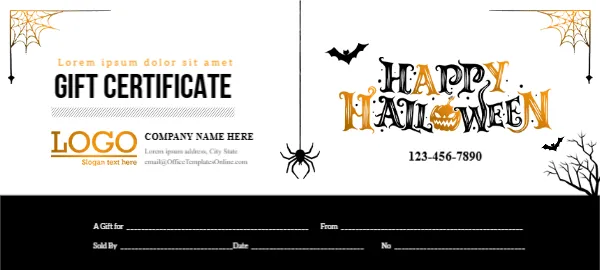
Orange cobwebs hang in the top corners of this white certificate, a black spider dangles on a thread in the middle, and small black bats and a bare tree sit on the right. HAPPY HALLOWEEN runs in a spooky black and orange font with a pumpkin replacing an O. On the left, an orange placeholder line sits above GIFT CERTIFICATE in bold black, with an orange LOGO and company details. A black band at the foot holds lines for A Gift for, From, Sold By, Date and No.
A Fun Seasonal Voucher
The certificate is 5.28 x 2.38 inches. The black band at the foot keeps the writing lines separate from the playful artwork.
Placeholder Line and Company Details
The orange line reads Lorem ipsum dolor sit amet, so replace it with a short greeting. Replace COMPANY NAME HERE, the Lorem address and the template site’s email. The certificate shows a phone but no value, so add the amount near the title.
Preparing the Halloween Certificate
- Replace the Lorem line.
- Add a value.
- Type company details.
- Fill the voucher lines.
- Print.
Halloween Promotions in October
Costume shops, sweet shops, haunted attractions, pumpkin farms and cafes can sell Halloween gift certificates through October. The playful spider and bats keep the design fun rather than frightening.
Writing on the Black Band
The voucher lines sit on a black band, so use a white or silver gel pen, or type the details in white in the editor before printing.
Printing Orange and Black Boldly
Orange and black print boldly on white card. Check that the thin cobweb lines stay crisp.
Adding the Missing Value
The certificate shows no amount. Add the value in bold orange near the title, such as Value $50.
Setting an Expiry Date
Halloween promotions are short, so many businesses set an expiry date in November. Write it clearly on the certificate.
Black or Orange Envelopes
Black or orange envelopes with a bat sticker complete the Halloween look.
Using the Halloween Certificate
Promote it through October.
Step by Step Editing of the Halloween Orange Webs Spider Design
- On the halloween orange webs spider design, click the main headline and type your own words, keeping a similar length.
- Retype every name, date and contact line on the halloween orange webs spider design, checking each against a trusted source.
- Search the halloween orange webs spider design for the words Lorem and Company so that no placeholder remains.
- Click any logo or photo on the halloween orange webs spider design, choose Replace Image and resize the new picture to fit.
- Zoom the halloween orange webs spider design to full size and read each line aloud before you save it.
- Keep a clean master of the halloween orange webs spider design without private details, so later versions start tidy.
Similar designs include the Halloween sale voucher. Compare it with the Easter certificate. You may also like the birthday gift card. The rest of the series around the halloween orange webs spider design is in gift certificate and voucher templates.