For Shops That Live on a Screen
An online store has no counter where a gift card can sit. Gift certificates are sold through a checkout page, delivered by email and redeemed with a code. So the design has to look right on a phone and in an inbox, as well as on paper. This purple certificate is built for that: bold colour, a clear subject, big readable lettering.
What You See on the Card
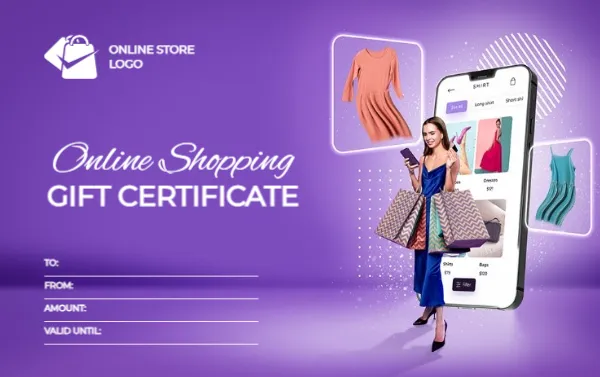
The certificate is 3.375 x 2.125 inches in landscape, the size of a credit card. The background is a gradient of violet with a glowing floor, as if lit in a studio. On the right stands a smiling woman in a blue dress with a handful of paper shopping bags, in front of a large smartphone showing a fashion app. Two dresses float in frames near the phone, one in peach and one in teal, to suggest products leaping off the screen.
At the top left a white shopping bag icon sits beside the words ONLINE STORE LOGO. In the middle left, Online Shopping is written in a white script, with GIFT CERTIFICATE under it in bold white capitals. Four lines at the bottom read TO, FROM, AMOUNT and VALID UNTIL.
Email or Print?
Download as PNG or JPG to attach to an email or paste into a message, where the purple stands out on screens. Use PDF to print a version for events, pop-up stalls or tucking into a parcel. The same file works for both, so you do not need two designs.
Codes and Security
The card has no code line, so add one yourself. Retype a line such as VALID UNTIL into a combined field, or type a code in a text box. Make codes long and unique, and record which are used. Never reuse a code.
Personalising the Design
- Replace ONLINE STORE LOGO with your brand mark.
- Change the word Online Shopping to your niche, such as Fashion, Pet Supplies or Home Goods.
- Click the photograph and choose Replace Image to show your own products.
- Add a line about free shipping, if it applies, in the space near the bottom.
Print Quality Tips
Purple gradients can band on cheap printers. Print a trial on glossy or silk card stock around 250 to 300 gsm, and compare with the screen. If banding appears, lower the print quality setting to a standard mode or use a print shop.
Matching the Card to Your Website
If your website uses purple or violet, this certificate will look like part of the same brand. If it does not, consider placing your own logo prominently and keep the rest of the card as a flexible template. Customers who receive the gift by email will click through to your shop, so keep the web address visible near the bottom. A clean, simple sentence such as “Redeem at yourshop.com” gives them the next step.
For a store with a physical location, see the retail store gift certificate. For electronics sellers, there is the Black Friday electronics certificate. More are in gift certificates and vouchers.