Get Ready Before the Rush
Black Friday and the weeks around it are when electronics shops sell the most and customers hunt hardest for a deal. A gift certificate is a good tool for that moment: it brings in money early, it can carry a bonus, and it gives hesitant buyers a way to give a present without picking a model. This certificate is dressed for it, in black, blue and the red percent signs of a sale.
On the Card
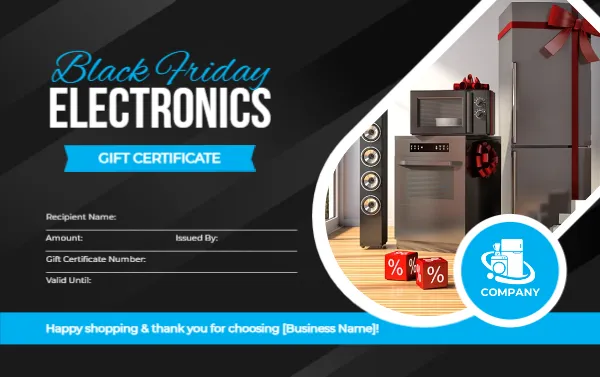
The certificate is 3.375 x 2.125 inches in landscape, the size of a credit card. The background is black with subtle diagonal bands. In the upper left, Black Friday is written in a blue script above ELECTRONICS in large white capitals, with a blue ribbon below reading GIFT CERTIFICATE. On the right, a curved photograph, outlined in white, shows household appliances in a bright room: a steel fridge with a red bow, a microwave, a speaker, and two red dice marked with percent signs. A round blue badge with an appliance icon and the word COMPANY sits at the corner of the photograph.
At the bottom, a bright blue bar carries the message “Happy shopping & thank you for choosing [Business Name]!” Above it are five lines: Recipient Name, Amount, Issued By, Gift Certificate Number and Valid Until.
Black Friday Ideas for the Amount Line
- A bonus offer such as “Buy $100, Get $120.”
- A specific product category, such as Small Kitchen Appliances.
- A fixed value with a limited redemption window in January.
- A doorbuster voucher for the first shoppers on the day.
Replace and Rename
Edit the footer bar to include your shop’s name. Replace the COMPANY badge with your own logo. If you do not sell appliances, change ELECTRONICS to Computers, Phones, Audio or Smart Home, then click the photograph and choose Replace Image to show your own products. The sale colours still suit any retail category.
Control the Redemption
Because Black Friday shoppers act on impulse, set clear terms. Say whether the certificate can be used on sale items, whether it can be combined with other promotions, and when it expires. Put short terms on the back by duplicating the page. Record each Gift Certificate Number as you issue it.
Printing the Black Friday Version
A black background with a bright photo works best on silk or matte card stock, 250 to 300 gsm. Run a test copy to check the blue ribbon and bar. If you hand out many, a print shop can cut a stack quickly.
Targeting Different Electronics Categories
If you specialise, say so on the card: Computers, Phones, TV and Audio, or Smart Home. The more specific the voucher, the easier it is for the buyer to picture the gift. A small kitchen appliance shop might use the same photograph, while a phone shop will want to replace it with a picture of handsets and accessories.
For other retail certificates, see the retail store gift certificate and the online shopping gift certificate. The wider collection is in gift certificates and vouchers.


