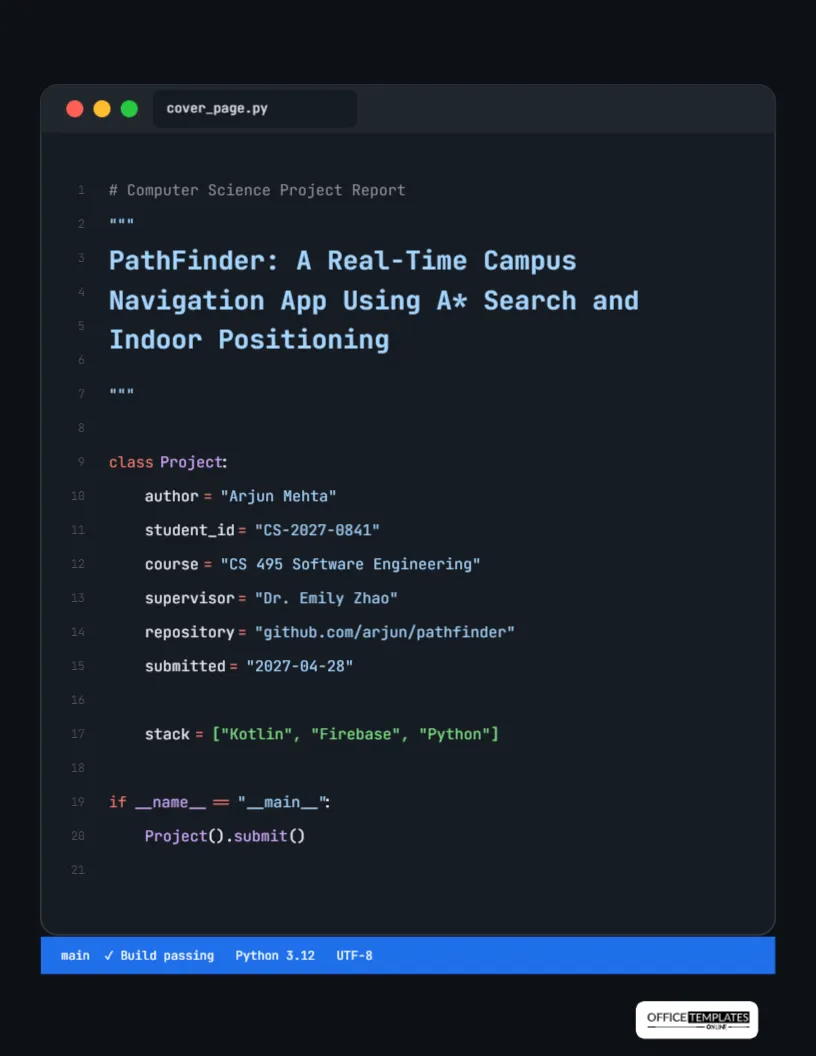
Programmers recognise a code editor instantly: the dark background, the coloured syntax, the line numbers down the left, and the little red, yellow, and green window buttons. This cover turns that familiar screen into a title page. Your project title sits inside a Python docstring, and your name, student ID, course, supervisor, and repository are written as attributes of a Project class. It is a cover only a computer science student would make, which is the point: it shows personality and fluency in one glance.
The Editor Window, Line by Line
The page background is near-black. A dark grey window with rounded corners fills most of the page, with a title bar at the top showing the three traffic-light buttons and a tab named cover_page.py. Faint line numbers from 1 to 21 run down the left gutter. The content, set in JetBrains Mono, reads like a short Python file:
- A grey comment:
# Computer Science Project Report - A docstring in light blue containing the title, PathFinder: A Real-Time Campus Navigation App Using A* Search and Indoor Positioning
class Project:with the keyword in coral and the class name in lavender- Six attributes: author, student_id, course, supervisor, repository, and submitted, each with a value in quotes
- A
stacklist in green: Kotlin, Firebase, Python - A main guard that calls
Project().submit()
A blue status bar along the bottom of the window reads main? Build passing Python 3.12 UTF-8, and the logo sits on a light plate below.
Editing the Code Without Breaking the Look
Each line of code is a text box. Click a value inside the quotes, such as Arjun Mehta, and type your own. Keep the quotes and the spacing so the code still looks valid. The colours follow a common dark theme: coral for keywords and operators, lavender for names, light blue for strings, green for lists, and grey for comments. If you add a line, copy an existing attribute line so the colours and indentation match, and move it into place. Python programmers will notice if the indentation is off, so keep attributes four spaces in class.
Your Details as Class Attributes
| Attribute | Sample value | What to write |
|---|---|---|
| author | Arjun Mehta | Your name, or team names separated by commas |
| student_id | CS-2027-0841 | Your student number |
| course | CS 495 Software Engineering | Course code and name |
| supervisor | Dr. Emily Zhao | Instructor or project supervisor |
| repository | github.com/arjun/pathfinder | Your public or course repository URL |
| submitted | 2027-04-28 | Date in ISO format, as programmers write it |
Prefer Java, JavaScript, or C++?
The sample uses Python because it is the most widely taught language, but you can rewrite the cover in your project’s language. A Java version would use public class Project { with String author = "..."; fields. A JavaScript version might be a const project = { object. Rename the tab at the top to match, such as CoverPage.java or cover.js. Keep the structure short; the joke works best when the code is simple enough to read at a glance.
Writing a Software Project Title
Software project titles often have two parts: a product name and a description. PathFinder: A Real-Time Campus Navigation App Using A* Search and Indoor Positioning gives the name, what it is, and the main technical ideas. Readers immediately know what you built and how. Avoid titles that list every technology; the stack line handles that. The docstring fits about four lines of text at the size shown.
The Stack Line and the Repository
The stack list names the main technologies. Keep it to three to five items: a language, a framework, and a database or service is usually enough. Including the repository URL is a good idea for any project that will be graded on its code. Make sure the repository is accessible to your instructor, and that it contains a README explaining how to build and run the project. If your code is private, write available on request in the value instead.
Changing the Theme Colours
The editor uses a dark theme similar to popular ones in code editors. To switch to a light theme, change the page background to light grey, the window to white, and the text colours to darker versions: navy for names, dark red for keywords, and dark green for strings. The status bar can take your university colour. Keep line numbers faint so they do not compete with the code.
Suitable Projects and Courses
The cover suits software engineering projects, senior capstones, data science notebooks written up as reports, machine learning projects, hackathon write-ups, operating systems or networking assignments, and internship technical reports. For a data science report, change the stack to libraries like pandas, scikit-learn, and Matplotlib, and the tab name to analysis.ipynb. For a web project, use HTML, CSS, and JavaScript.
Matching the Cover to Your README and Demo
A software project usually lives in three places: the written report, the repository, and a live demo. It helps when all three look related. Use the same project name and one-line description in the docstring, in the first line of your README and on your demo’s landing screen. If your app has an icon or logo, add it in the space at the right of the class block, kept small. Examiners who open the repository after reading the report will recognise it immediately, and so will recruiters if you later link the project from your CV or portfolio.
Printing a Dark-Mode Cover
The page is US Letter, 8.5 x 11 inches, with a near-black background. It looks best on screen, as a PDF, or as the first slide of a demo presentation. If you need a printed copy, use a laser printer or consider switching to the light theme described above to save toner. Download as a PDF for submission, or download a PNG for a slide.
Computer Science Cover FAQ
Will a joke-style cover be taken seriously?
Most CS instructors enjoy it, and the information is all there. For formal documents such as a thesis, use a conventional cover instead.
Can I include a QR code to the repository?
Yes. Generate a QR code image and add it near the status bar, small enough not to cover the code.
Does the code actually run?
The Project class is valid Python syntax, but submit() is not defined, so running it would raise an error. It is decoration, not a program.