A Missing Pet Poster That People Notice and Remember
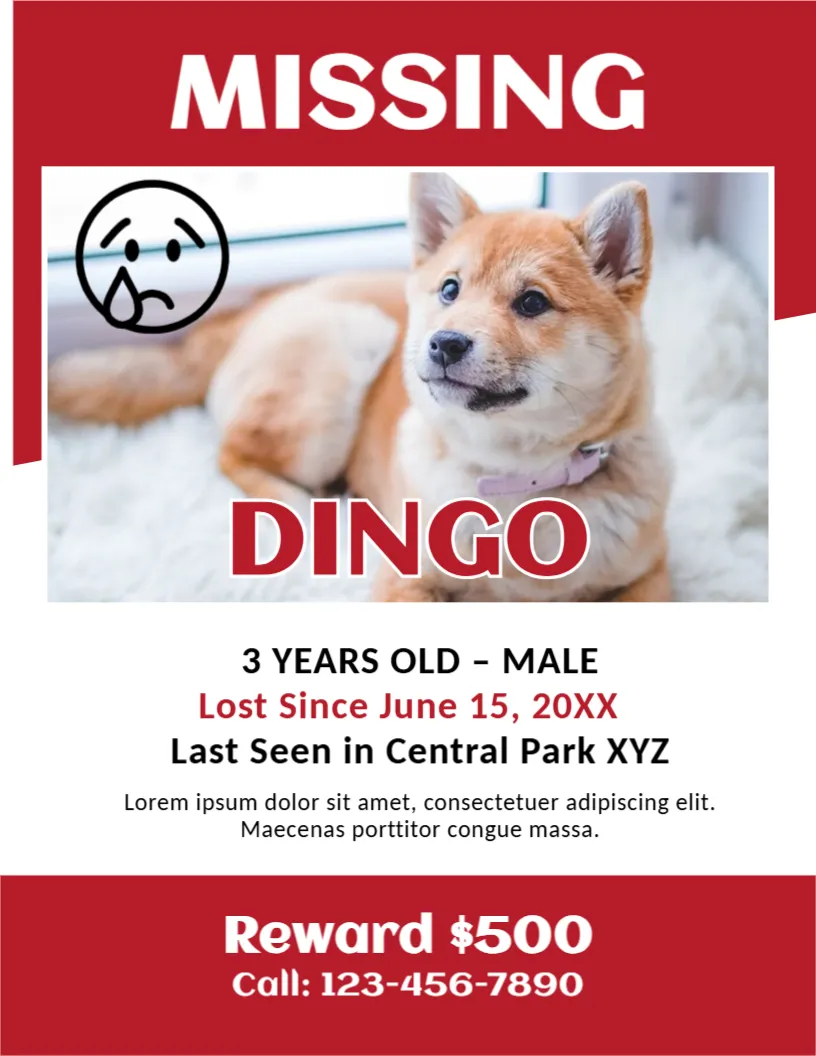
When a pet goes missing, speed matters, and a clear poster helps neighbours spot the animal. This template uses a red header with MISSING in huge white capitals, a large photo of a puppy, the name DINGO in red and the key facts underneath, with a reward banner at the foot. It suits dogs, cats and other pets, and it can be posted online or printed in quantity.
Red Header, Big Photo and Reward Banner
The page is 8.5 x 11 inches, portrait, one page. A red band at the top holds MISSING. The photo fills the middle with a sad face icon at its upper left and the pet’s name over its lower edge. A white area lists details, and a red band at the foot carries the reward and the phone number. The fonts are Aclonica and Carlito.
Facts That Help Finders
The sample reads 3 YEARS OLD to MALE, Lost Since June 15, 20XX, Last Seen in Central Park XYZ, a placeholder paragraph, Reward $500 and Call: 1234567890. Replace each with real facts, and add the breed, colour, size, collar and any microchip information. Be specific about the place and time, and give a number that you will answer day and night.
Information to Add for a Lost Animal
- Breed, colour and distinguishing marks.
- Collar, tag or microchip details.
- Where and when it was last seen.
- Whether it is friendly or shy.
- A phone number and a second contact.
Choosing the Best Photo
Use a clear, recent photo that shows the animal’s face and markings. Crop out people and other animals. If your pet has an unusual marking, add a second small photo that shows it.
Where to Post and Who to Tell
Put posters on lampposts, vet clinics, shops and noticeboards near where the pet was lost. Tell local shelters, vets and neighbourhood groups online. Check shelters often, and update the poster when the pet is found.
Printing the Missing Pet Poster
Print in colour on bright paper, and protect posters from rain in a plastic sleeve. Make a PDF for quick sharing by message. Remove the posters when your pet is home.
Step by Step Editing of the Missing Pet Design
- On the missing pet design, click the main headline and type your own words, keeping a similar length.
- Retype every name, date and contact line on the missing pet design, checking each against a trusted source.
- Search the missing pet design for the words Lorem and Company so that no placeholder remains.
- Click any logo or photo on the missing pet design, choose Replace Image and resize the new picture to fit.
- Zoom the missing pet design to full size and read each line aloud before you save it.
- Keep a clean master of the missing pet design without private details, so later versions start tidy.
You may also like the funeral announcement card. For comparison, open the birth announcement template. Consider the job vacancy announcement. Find more designs next to the missing pet design in announcements.