Shift swaps are a fact of working life. A child gets sick, a bus is late, a friend is getting married. Employees trade shifts to cope, and most managers allow it, but only if it is done properly. Without a record, the schedule says one thing and reality another, payroll questions arise, and nobody is quite sure who agreed to what. This form turns a casual favour into a clear, signed request that a manager can approve in a minute.
Blue Header With a Swap Arrow
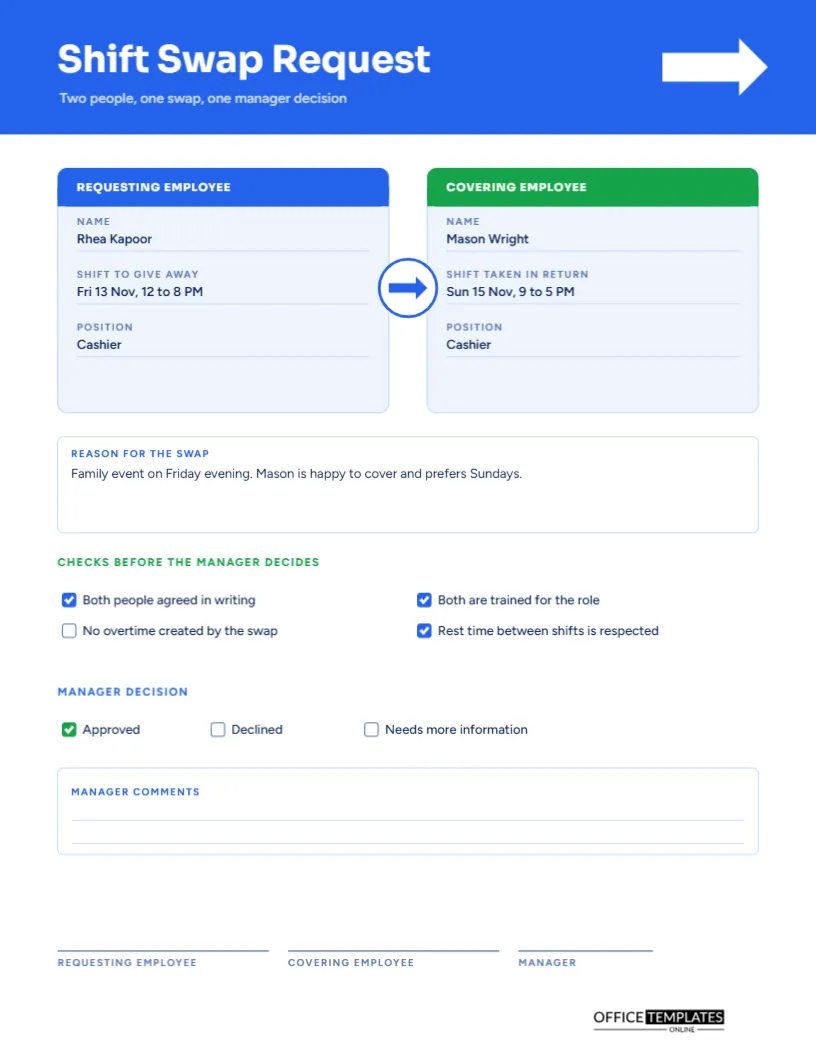
The page opens with a bright blue band, with a white double-headed arrow near the right edge to show an exchange. The title Shift Swap Request is set in Sora, a modern geometric sans, with the line two people, one swap, one manager decision beneath. Figtree sets the rest of the text. The look is clean and approachable, in keeping with an informal favour that needs a formal record.
Two Panels Side by Side
Below the header are two rounded panels. The left one, in blue, is headed REQUESTING EMPLOYEE, and the right, in green, COVERING EMPLOYEE. Each holds the name, the shift involved, and the position. A white circle with an arrow between them reinforces that the shifts move in both directions. The layout makes the swap easy to understand at a glance.
The Sample Swap
| Person | Gives away | Takes in return |
|---|---|---|
| Rhea Kapoor, Cashier | Friday 13 November, 12 to 8 PM | Sunday 15 November, 9 to 5 PM |
| Mason Wright, Cashier | Sunday 15 November, 9 to 5 PM | Friday 13 November, 12 to 8 PM |
Both people hold the same position, which makes the swap simple for a manager to approve.
Reason for the Swap
A box under the panels asks for the reason. The sample reads: family event on Friday evening, and Mason is happy to cover and prefers Sundays. A short, honest reason helps the manager decide, and noting that the other person benefits shows the swap is fair. If the reason is private, a general phrase such as personal commitment is enough.
Checks Before the Manager Decides
Four tick boxes list things to confirm before approval: both people agreed in writing, both are trained for the role, the swap creates no overtime, and rest time between shifts is respected. In the sample, the first, second, and fourth are ticked, and the overtime box is left open for the manager to check. These prompts are the real value of the form, because they catch problems early.
Why Overtime and Rest Time Matter
A swap can quietly push someone over forty hours or leave them with a short break between a late and an early shift. The employee may not notice, but payroll and safety rules will. By asking the question on paper, the form prompts both the employee and the manager to look. If overtime is created, the manager decides whether to approve it.
The Manager Decision
Three boxes allow the manager to mark Approved, Declined, or Needs more information. In the sample, Approved is ticked in green. A line for comments follows. Declined swaps should have a reason, which can be as simple as would create overtime. Giving feedback in writing keeps staff informed and teaches them what to check next time.
Completing the Form in Order
- The requesting employee fills in their name, shift, and position.
- The covering employee fills in their details and the shift they take.
- Both write the reason and sign.
- The checks are ticked, or noted if not met.
- The manager decides, writes comments, and signs.
- The schedule is updated, and the form is filed.
Why a Swap Needs Both Employees and the Manager to Sign
The requesting employee, the covering employee, and the manager sign at the foot. Two employee signatures show that both agreed. The manager’s signature shows the decision was theirs. Without all three, the swap is not final, which protects everyone if a shift is missed.
Notice Periods and Deadlines
Many workplaces require swap requests 48 hours before the shift, or by a set day each week. State your rule on the form or in a note beside it. Late requests are harder to approve, and a clear rule prevents resentment when a manager must say no.
Keeping Swap Forms With the Schedule
Clip each approved form to the schedule for the week it affects. If payroll asks why someone worked a different shift from the one printed, the form is the answer. Over a quarter, a stack of these also shows how often swaps happen, and whether the base schedule needs improving.
Using the Form for Voluntary Cover and Giveaways
Sometimes an employee wants to drop a shift without taking another. Use the same form, write none in the return shift box, and let the manager decide whether to approve. A giveaway is a different request from a swap, and treating it separately avoids confusion about who is responsible for filling the gap.
Editing the Swap Panels and Checks
All labels can be edited, and the tick boxes can be changed by selecting and recolouring. Add more checks if your workplace has extra rules, such as an approved list of roles. Print it on one side of a US Letter sheet, in colour or in black and white.
Preventing Swap Disputes Before They Start
Most swap arguments come from a missing detail: the wrong date, the wrong start time, or a misunderstanding about who covers a late finish. Write the full date and time of both shifts, read them back to each other, and then sign. Two minutes of care at the start prevents hours of confusion later.
Sharing the Approved Swap With the Rest of the Team
Once approved, tell the team through the usual channel so that supervisors and colleagues know who is working which shift.
Shift Swap Questions
Can the two shifts be on different days?
Yes, as in the sample. Write the dates clearly for both people.
Do I need a form for a small team?
A quick form still prevents misunderstandings. Keep it simple and consistent.
Who updates the schedule?
The manager or schedule owner, after the decision is made.