Retail hours are irregular. A shop might open at ten, close at nine, run a sale on Friday, and need extra hands for a stocktake on Saturday. Staff move between the floor, the register and the stockroom, take unpaid breaks of different lengths and swap shifts with colleagues. This US Letter timesheet captures that variety in one weekly page, with a price tag in the corner and a column for where each person was assigned.
A Swing Tag Reading SALE HRS
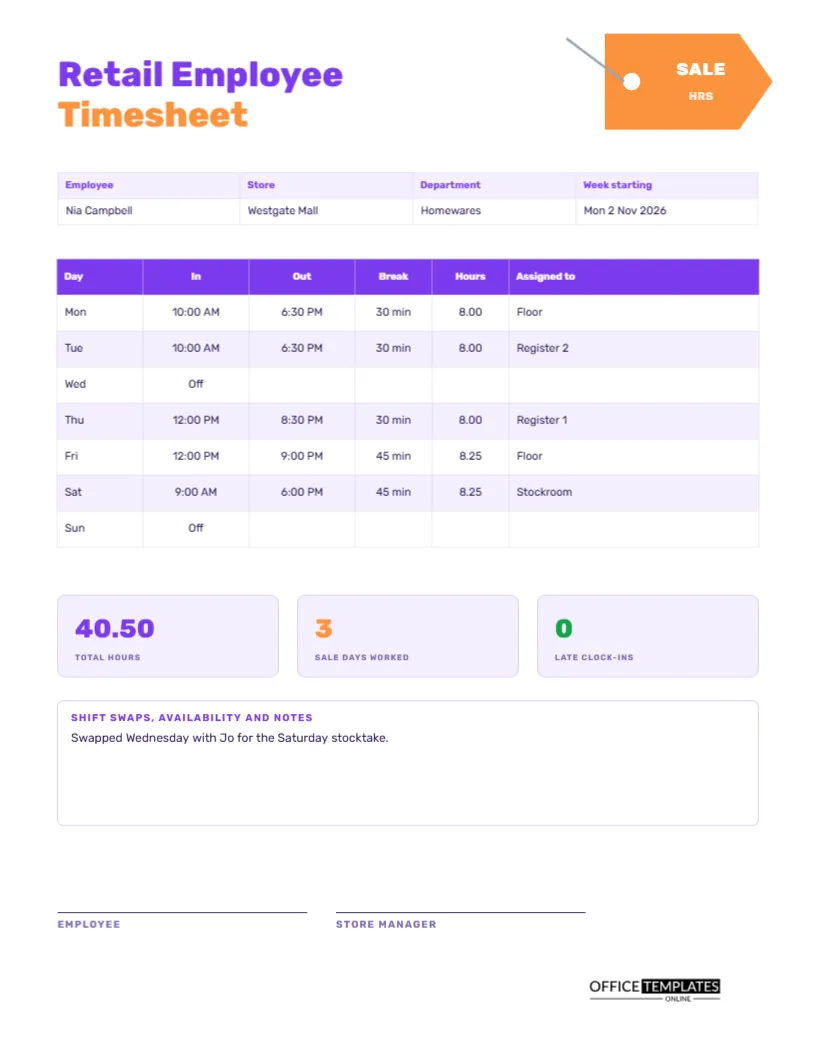
An orange price tag hangs at the top right, with a small hole, a thin string and the words SALE and HRS in white capitals. Its shape and its tongue-in-cheek label tell you instantly that this is for shops. The title Retail Employee is set in violet and the word Timesheet in orange, both in heavy Rubik, a friendly modern typeface.
Employee, Store, Department and Week
The strip beneath lists the employee, the store, the department and the week starting. The sample is Nia Campbell at Westgate Mall in Homewares, for the week starting Monday 2 November 2026. A department matters because large stores calculate labour budgets by department, and managers need to know where hours were spent.
The Weekly Shift Table
| Day | In | Out | Break | Hours | Assigned to |
|---|---|---|---|---|---|
| Monday | 10:00 AM | 6:30 PM | 30 min | 8.00 | Floor |
| Tuesday | 10:00 AM | 6:30 PM | 30 min | 8.00 | Register 2 |
| Thursday | 12:00 PM | 8:30 PM | 30 min | 8.00 | Register 1 |
| Friday | 12:00 PM | 9:00 PM | 45 min | 8.25 | Floor |
| Saturday | 9:00 AM | 6:00 PM | 45 min | 8.25 | Stockroom |
Wednesday and Sunday are off in the sample, and the weekly total is 40.50 hours.
Why Record the Assignment
The Assigned to column answers questions that a bare time record cannot: who was on the register when the till came up short, who was in the stockroom during a delivery, who covered the fitting rooms. It also helps managers see whether their staff are spread across tasks or stuck in one place. For employees, it is a record of the experience they have gained.
Total Hours, Sale Days and Late Clock-ins
Under the table, three tiles show total hours (40.50 in violet), sale days worked (3 in orange) and late clock-ins (0 in green). The second tile helps stores that pay a premium on promotional days, and the third rewards punctuality at a glance. Replace them with whatever your store watches most closely, such as upsells or returns handled.
Shift Swaps, Availability and Notes
A notes box at the bottom records swaps. The sample reads swapped Wednesday with Jo for the Saturday stocktake. Swaps are a major source of confusion in retail because the schedule says one thing and the sheet another. A note, initialled by both people, saves time when payroll asks why the hours differ from the roster.
Filling the Sheet Each Shift
- Write the date and your in time when you arrive.
- Record the length of your unpaid break.
- Write your out time and work out the hours.
- Note where you were assigned.
- At the end of the week, add the tiles and sign.
Peak Seasons and Extra Hours
During holiday seasons and sales, staff work extra shifts and longer days. Record everyone on this sheet, including short shifts, and write the reason in the notes. When overtime or premium pay applies, the sheet gives payroll the dates and times to check, instead of leaving it to memory.
Breaks, Meal Periods and Local Rules
Breaks differ by place and employer. In the sample, a shift of eight hours or more has a thirty-minute break, and a longer shift has forty-five minutes. Replace these with your own rules. Recording the break each day also gives evidence if a manager needs to show that staff were given the rest periods required by law.
Using the Sheet in Small Independent Shops
A family shop with three employees does not need a clocking system, and a paper page on the wall by the till may be all that is required. Staff fill in their own times, the owner signs on Sunday, and the totals go to the accountant. It is simple, cheap and easily understood.
Managers Reviewing Weekly Sheets
A manager reading the sheet should check that the totals match the roster, that breaks are recorded and that the notes explain every change. A pattern of late clock-ins, early finishes, or unexplained overtime is easier to spot on paper over several weeks than in a memory of single days.
Editing Assignments, Tiles and Colours
All text is editable. Replace the assignment names with your own departments, retype the tile labels and recolour the tag to match your brand. The table is a real Table object, so you can add a column for tills or sales. Delete the tag if you prefer a plainer look.
Printing and Filing Retail Sheets by Week
US Letter portrait. Print one sheet per employee per week, or use a single master that staff copies from. File by week and keep for the period required by your payroll rules.
Recording Sale Days, Stocktakes and Inventory Nights
Retail has predictable spikes: the first day of a sale, the holiday run-up, and the night of the annual stocktake. Mark these shifts in the notes with a short label. When you plan next year, the sheets show how many hours each event really needed, which is far better than a rough memory of how busy it felt.
Fair Rostering Using the Weekly Records
Managers can use a month of sheets to check that weekend shifts, late closes, and early opens are shared fairly. If one person always carries the Saturday close, the pattern is obvious on paper. Fixing it early keeps morale high and reduces the chance of staff leaving.
Retail Timesheet Questions
Can it be used for part-time staff?
Yes. Leave unused days as Off, and add the weekly maximum in the notes if one applies.
Where do I record sales targets?
Retype one of the tiles, or use the notes box. The sheet focuses on hours.
Does it count overtime?
Not automatically. Use the regular and overtime sheet if you need a daily split.